


Building a website without a clear strategy often leads to wasted time, missed goals, and disappointing results. I’ve seen businesses pour effort into redesigns or content updates, only to find their sites still underperforming.
If you’re frustrated by low conversions, unclear direction, or a site that feels more like a digital brochure than a business driver, you’re not alone. Many teams struggle to connect daily website decisions to real business outcomes.
In this guide, I’ll break down what a website strategy really means, why it matters, and how each element—goals, audience, content, design, tech, and analytics—fits together. You’ll get step-by-step instructions for audits, goal-setting, persona mapping, and optimisation, plus practical templates and checklists you can use right away.
By the end, you’ll know exactly how to build a strategy that turns your website into a measurable growth engine—not just another online placeholder.
What is a Website Strategy?
Website Strategy: Foundations and Definition
Website strategy might sound like jargon, but it's really about having a coherent plan for your site’s entire life.
At its core, it’s a structured approach connecting every detail—goals, audience, design, content, tech, and analytics—so each decision supports genuine business results.
This isn’t about fixing a slow page or tweaking a headline in isolation.
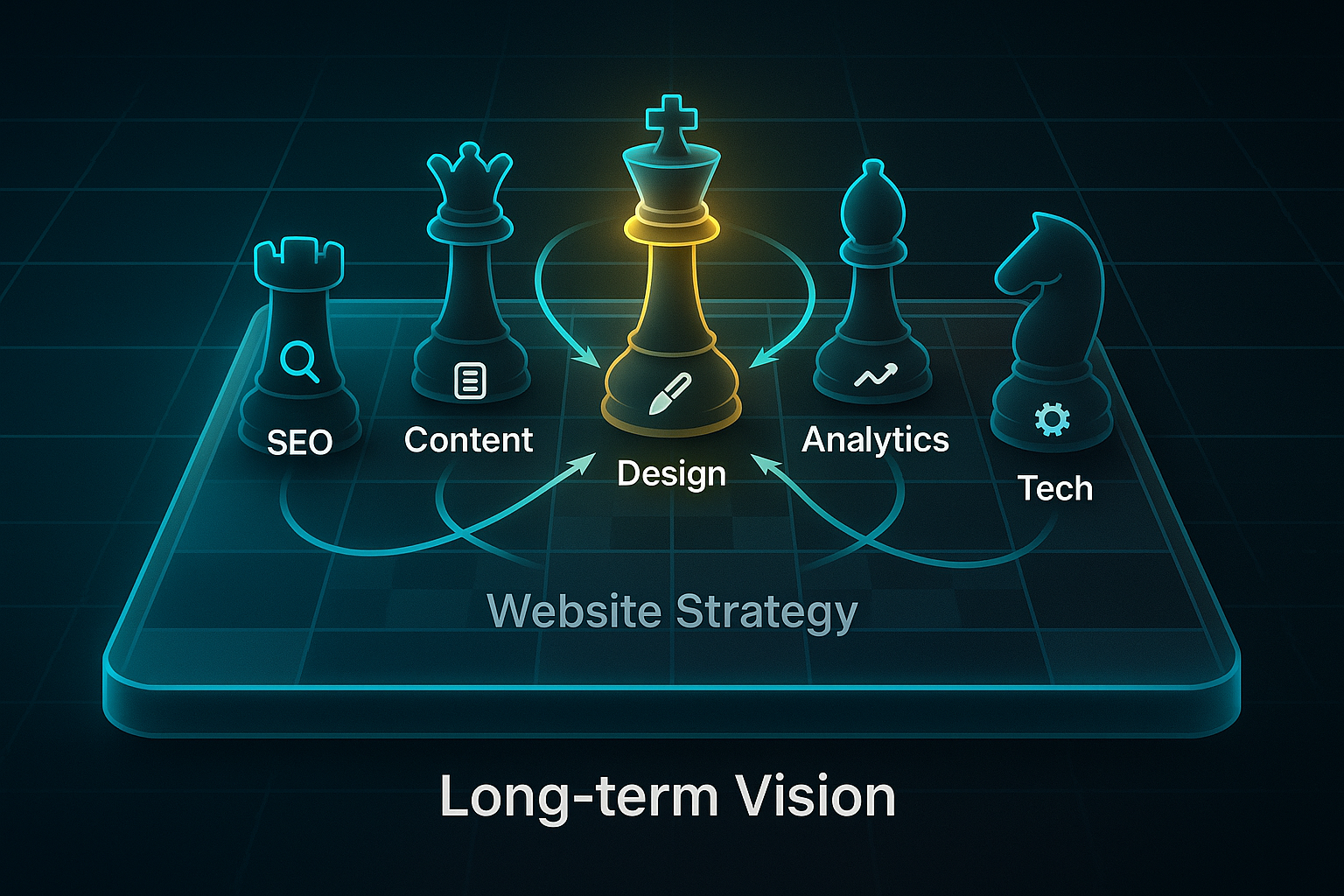
Strategy links every move to a bigger, long-term vision.
Strategy and tactics are often confused.
Tactics might be a quick SEO update or a design refresh.
But strategy is the chessboard, not the individual moves.
Tactics solve short-term issues, but strategy binds them together for lasting impact.
The Business Purpose of Website Strategy
Why does this matter so much?
Modern organisations operate in digital landscapes where expectations never stop rising.
If a website rolls along blindly, it risks becoming a passive brochure with minimal engagement or return.
A well-defined strategy turns a static website into a business engine, deliberately tying every upgrade or piece of content to objectives that count—like leads, sales, or growing authority.
A case study of a B2B consulting firm that was struggling to generate business despite high social media engagement found that implementing a foundational content strategy drove a 150% increase in qualified leads.
Teams instantly gain direction.
There’s less guesswork and more effort spent where it matters.
With this clarity, it's important to examine the specific pillars underpinning an effective strategy.
Essential Elements of a Website Strategy
A robust strategy stands on several foundational pillars.
Each plays a vital role in transforming a website into a valuable asset.
Here’s how those elements break down:
- Goal Alignment
Basing all decisions on measurable results, such as sales or leads—not just chasing “more traffic.” - Audience Understanding
Developing personas and conducting research to keep the website relevant for real users. - Content Planning
Shaping themes and publishing times to steer users and support business priorities. - User Experience (UX) Design
Ensuring the site is easy, fast, and mobile-friendly so people trust and enjoy using it. - Technical Foundations
Building stable architecture, SEO, and security for reliability and wider reach. - Measurement and Analytics
Tracking progress with KPIs for ongoing learning and improvement.
When these elements work in tandem, they reinforce each other.
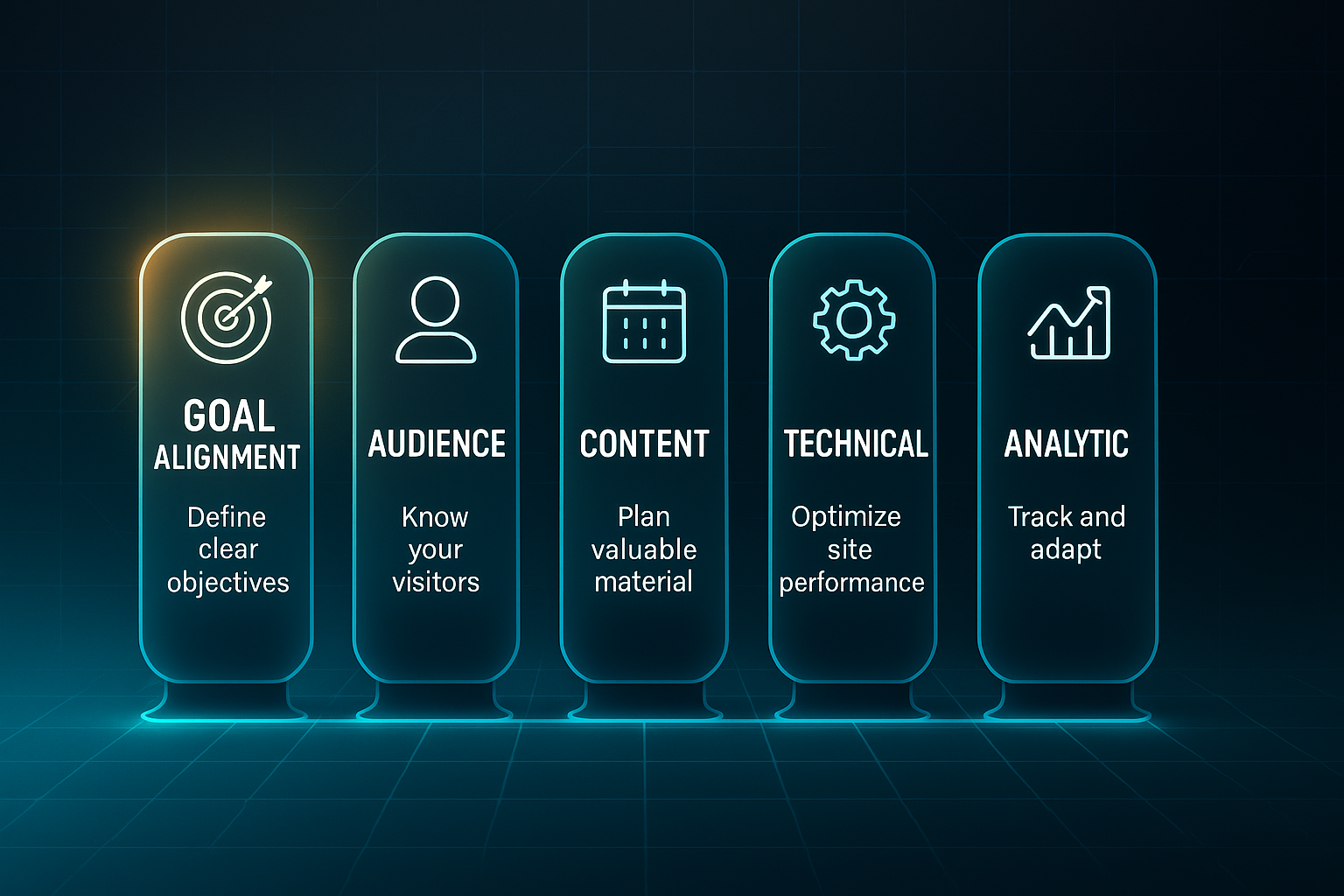
For example, technical enhancements boost user experience, which can lift conversions.
Conceptual Framework: The Strategic Alignment Cycle
Strategy isn’t one-and-done.
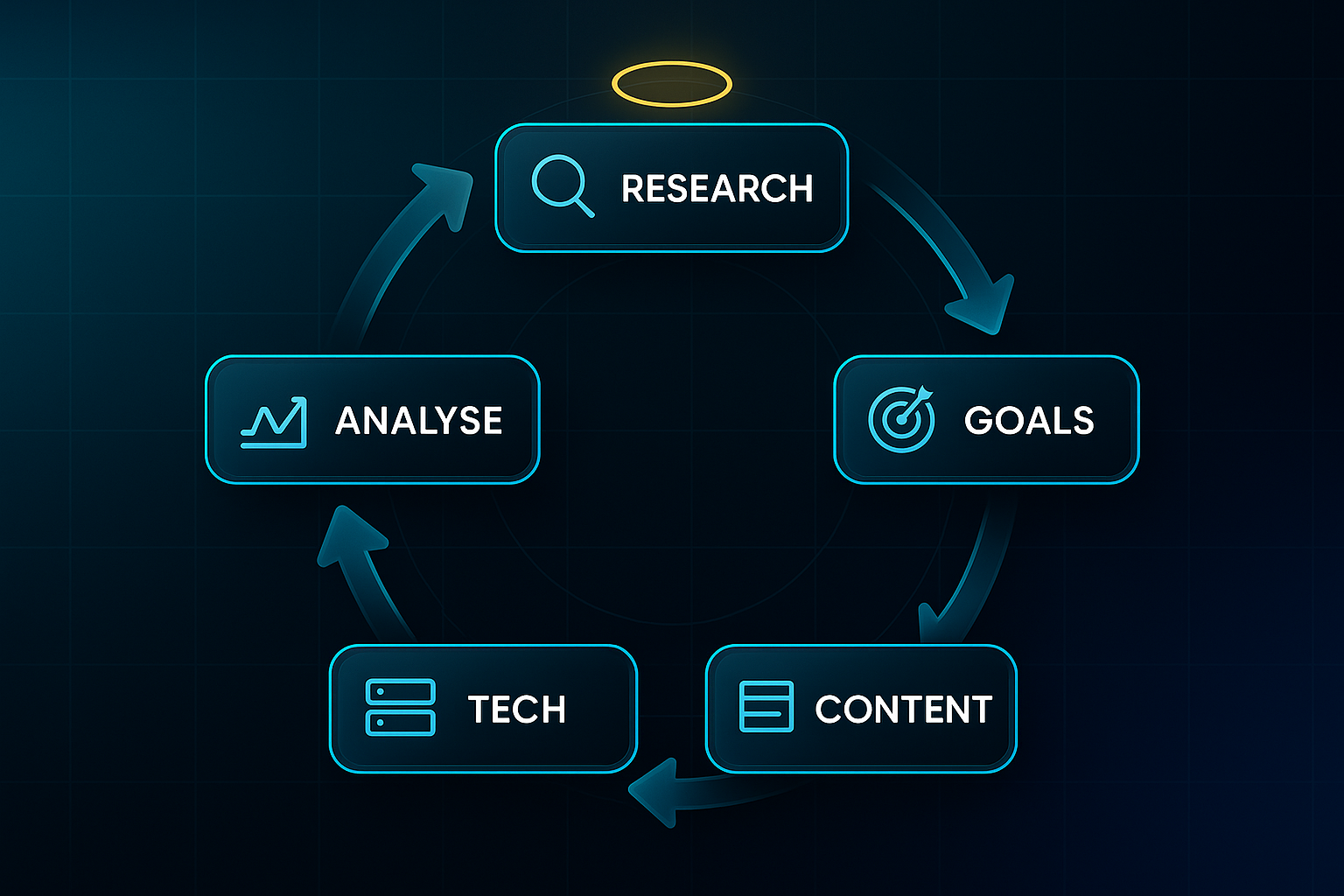
The Strategic Alignment Cycle shows how website strategy is a continually evolving process.
There are five stages: research and discovery, defining goals and users, planning content and experience, setting up technology, and continuously analysing data.
Each phase builds on the previous one.
This cycle ensures the website can adapt as needs or technology shift.
Common Misconceptions About Website Strategy
It’s easy to mistake strategy for a catchy design, a chunk of content, or a single technical fix.
But strategy is broader.
It integrates every facet—design, development, content, analytics—into a clear, purposeful process.
Ignoring analytics or treating technical tweaks as “strategy” are common errors.
Real strategy keeps everything working together for the bigger goal.
Having continuous alignment means efforts don’t get wasted on isolated fixes.
Real-World Context: Strategy vs. Ad-Hoc Choices
Websites without a strategy often look piecemeal, struggle on mobile, and fail to convert.
But when every element serves a strategic plan, growth and ROI follow.
That’s why a local bakery saw a 40% jump in online orders.
Law firms with a proper strategy reported up to 50% more qualified leads.
A solid understanding of website strategy’s foundations turns theory into tangible results.
This sets the stage for exploring why strategy is the secret to real business advantage—which is exactly where we’re headed next.
The Importance of a Website Strategy for Business Success
Why Strategic Alignment Converts Website Effort Into Real Business Value
Just putting in the hours on your website isn’t enough. The truly successful sites have one thing in common: every tweak, new blog, or bit of code change ties straight back to real business targets, not just wishful thinking.
You might refresh your homepage design and see no difference in leads. Why? Without clear KPI (Key Performance Indicator) links—such as lead enquiries or actual sales—these efforts rarely move the needle. When your activities are driven by a plan like the Strategic Alignment Cycle, every choice supports results that can be tracked and measured. That means less guesswork and more value for the business.
To effectively prove marketing's value and make data-driven decisions, it's essential to not only identify the right key performance indicators (KPIs) but also to have a clear process for measuring them against business objectives.
Mapping Website Objectives to Company Goals and KPIs: Metrics, Tools, and Tactical Approaches
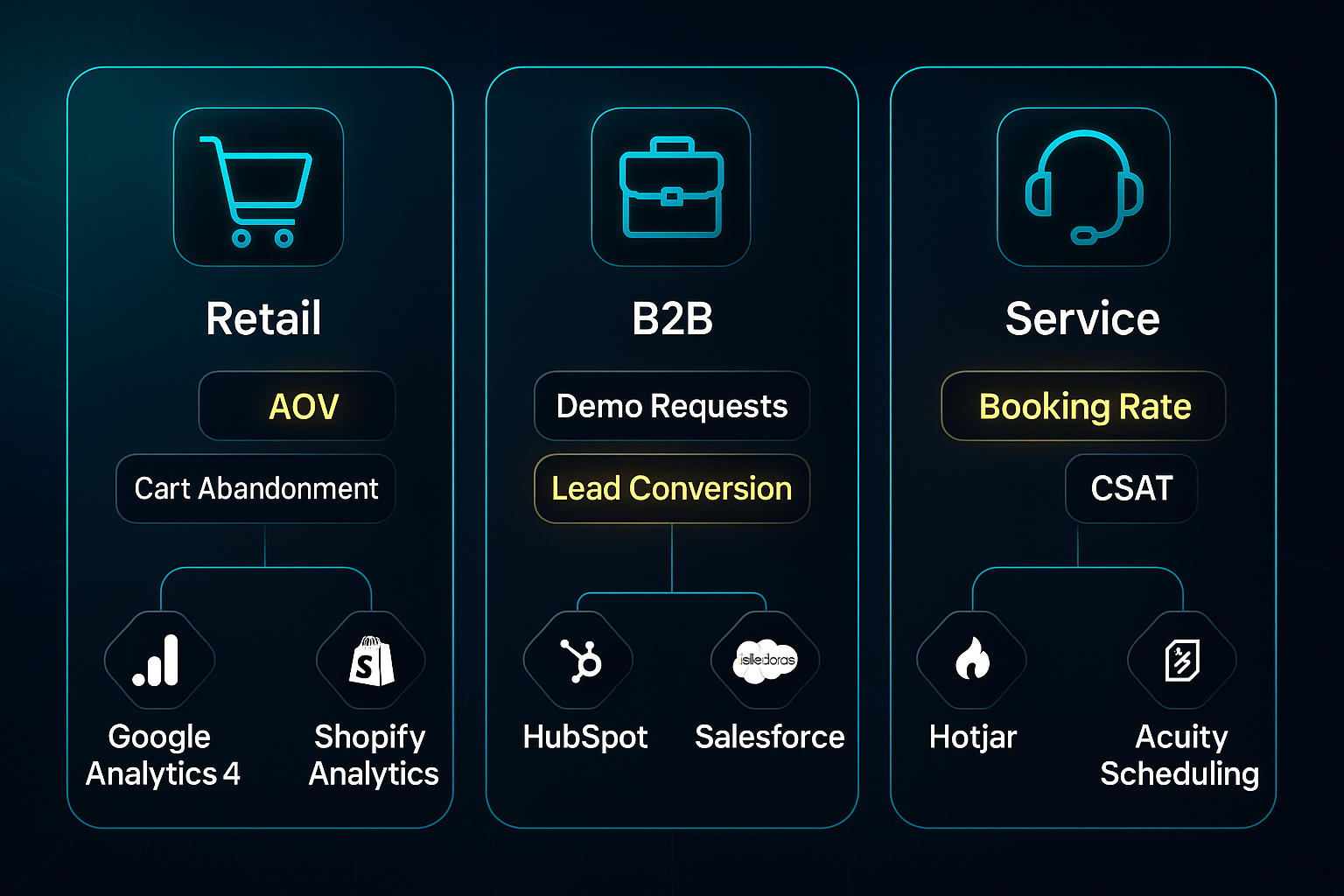
Turning objectives into outcomes starts with clear metrics and using the right tools, which differ depending on your field. For example, in retail, Google Analytics 4 helps set up funnel tracking, while Shopify Analytics monitors AOV (average order value, ideally £60–£120) and cart abandonment (keep under 55%). UTM codes from Google Campaign URL Builder clarify which channels drive sales.
Likewise, in B2B contexts, tools like HubSpot and Salesforce track demo requests, downloads, and lead conversion rates (aim for 5–10%), while also keeping an eye on cost per acquisition (targeting £150–£400).
For service-based companies, Google Analytics 4 and Hotjar measure booking rates, CSAT (aim for >85%), and NPS (targeting over 40). Acuity Scheduling makes booking impact quantifiable.
Beyond tracking, conversion rate optimisation (CRO) tools such as VWO and Microsoft Clarity enable A/B testing and review heatmaps to boost action rates—target a 20%+ improvement after some focused testing.
The Concrete Risks of Lacking a Website Strategy: Benchmarks and Tools for Avoidance
Here’s why you need to pay serious attention: neglecting strategy doesn’t just mean missed potential—it leads to real, painful business losses. Each of these risks can be identified, measured, and prevented with the right approach.
- Loss of credibility
Mobile sites with over 2.5s LCP (Largest Contentful Paint; test using PageSpeed Insights) lose visitors quickly. - Low leads/conversions
A bounce rate above 55% frequently points to slow sites or poor mobile usability. - Technical pitfalls
Hero images larger than 120KB slow load times, while missed schema markup (check with TinyPNG and Google Rich Results Test) undercut visibility. - Missed personalisation
Failing to implement chatbots or recommendation tools—like Intercom or Shopify—means you’re losing out on easy engagement wins.
With 97% of people vetting brands online before making a purchase, and 93% of traffic coming from search engines, making website strategy an afterthought is simply not an option.
Armed with these insights, you’re ready for what comes next: hands-on steps for content audits, SMART goal setting, mapping personas, and crafting user-focused wireframes to make your digital presence genuinely work for your business.
How to Create a Website Strategy: Step-by-Step Process
Conducting a Tactical Content Audit: Workflow, Tools, and Action Criteria
Let’s start at the foundation: a proper content audit. This isn’t just a box-ticking exercise—it’s how you finally stop guessing what works and let the data drive every website update. The aim is simple: find out which pages are helping your business, and which ones are dragging you down.
Set yourself up with a spreadsheet and map out these fields: URL, Page Title, Primary Keyword, Conversion Target (that’s your main call-to-action for each page), Last Modified, Traffic as recorded in Google Analytics 4 (GA4), SEO Score (pulled from SEMrush, scored from 0–100), Engagement Rate (such as form fills or average time spent), and an Action Category (Keep, Update, Remove/Redirect). This structure ensures every page decision supports your larger website strategy—not just what “feels right” on the day.
Now, you’ll need a few essential tools to get it done:
- Screaming Frog SEO Spider
Site-wide crawling for errors, duplicate content, status codes, and sluggish pages—£149/year. - SEMrush
Runs a “Site Audit” for SEO (search engine optimisation) scoring and lets you see where you stand versus the competition with “Keyword Gap”—from £115/month for Pro. - ContentKing
Great for ongoing, real-time SEO alerts and auditing, especially if you’re managing big or often-updated sites (pricing varies per month).
When should you take action? Here’s your shortcut: if a page gets fewer than 50 organic visits per month, sees conversion rates under 1%, or offers content more than 90 days old, mark it for removal or redirection right away.
This can be transformative.
One SaaS company redirected 15% of its deadweight pages and saw a 67% boost in organic sessions and an 18% lift in conversions within just six months.
Once finished, you’ll want Screaming Frog to report fewer errors, SEMrush to confirm higher site scores, and Google Search Console to reflect fewer indexation issues.
These are your signals that the audit worked.
Setting SMART, Business-Linked Website Goals: KPI Mapping and Review
With your audit in hand, it’s time to set SMART goals—those which are Specific, Measurable, Achievable, Relevant, and Time-bound. And crucially, these goals should scream business impact. How do you pick the right KPIs for your type of business? Here’s how the pros do it:
- Lead Generation
Want a conversion rate above 6% and your cost per lead below £350? Track this in HubSpot Starter (£41/month). - Ecommerce
Aim for cart abandonment below 55% and average order value (AOV) above £85. Shopify Basic offers this for around £32/month. - Publishing
Go for over 50% returning visitors and a 25%+ boost in subscribers each quarter, monitored via Mailchimp Essentials (from £11/month for 500 contacts).
Next, don’t set and forget—plan to review progress quarterly.
Set minimum growth targets (like a 20% increase year-over-year) and commit to tracking them on dashboards in GA4, SEMrush, or HubSpot.
For example, an e-commerce site targeting a 25% jump in organic conversions stuck to monthly reviews and ultimately banked a 31% conversion increase plus sessions lasting 40% longer.
The real measure of success? Consistently improving those KPIs and seeing green-light metrics across your analytics platforms.
Persona Building and Customer Journey Mapping: Data-Driven Action Steps
Building meaningful personas isn’t just marketing fluff—it’s how you keep your strategy rooted in reality.
Each persona should feature a name, photo, role, age, location, motivations, frustrations, an actual user quote, what devices they use (split from GA4 data), and their favourite content channels.
Collect at least 12 survey responses per persona (via SurveyMonkey, around £20/month) and conduct six user interviews of 30–45 minutes for each segment that matters.
With personas defined, map out journeys for your top three personas.
Hotjar (from £34/month) tracks user paths and behaviour—watch at least 25 sessions per persona journey.
Watch for red flags: if over 20% drop off at any step or if 30%+ complain about navigation in interviews, log an urgent UI issue.
The results can be powerful.
One financial services team saw form completions rise 52% and support requests drop by 28% after persona-driven fixes.
What are you looking for after changes?
Consistently stronger persona-specific conversions and clear drops in abandonments in GA4 or Hotjar reports.
Editorial Calendar and UX/UI Planning: Structured Execution
Bringing it all together, you’ll need an editorial calendar and clear UX/UI wireframes before launching any campaigns.
List the following in your calendar: title/keyword, content type, owner, publish date, CTA, connected persona, channel, topic priority, and monthly search volume (from SEMrush).
Focus effort on content matched to search volumes above 1,000 (per month) with obvious persona fit.
Re-check priorities every quarter and don’t be afraid to cut what isn’t working.
Next, for UX and UI, build and test your main page wireframes using Figma Professional (about £10/month) or Adobe XD (£10.99/month).
Check accessibility using the AXE or WAVE plugins—stick to WCAG 2.2 AA standards for compliance.
Make sure all CTAs are at least 50×50 pixels.
When you get this right, you’ll usually see bounce rates fall under 40% and conversions surge by anything from 20–50%—especially when driven by persona research and user journeys.
Following this process, every website improvement is tied directly to measurable results.
Every new page, tweak, or campaign is a lever for business growth—never just a shot in the dark.
And isn’t that what strategy is really about?
Website Optimisation: Achieving Measurable Gains and Continuous Improvement
Website optimisation in 2025 is no longer a one-off job.
It’s an ongoing cycle built around accessibility, usability, technical SEO, content quality, and hosting.
Every change you make should be measurable and purposeful.
That’s where dashboards powered by industry-leading tools come in, keeping every update visible and focused on real business gains.
Guesswork? There’s simply no place for it anymore.
Accessibility & Usability: A Modern Audit Workflow
Accessibility and usability shape that crucial first impression.
Start by mapping out your main user journeys in Figma—like sign-up or checkout flows.
Then, run these journeys through Hotjar or UXtweak to see exactly where users click.
The aim? No journey should take more than three clicks from start to finish.
Each month, run automated page scans using WAVE or Accessibility Checker Pro.
Strive for WCAG 2.2 AA compliance.
A 4.5:1 colour contrast ratio or better, alt text on every image, and clear heading hierarchy.
Log every accessibility issue in Notion or Excel.
Each quarter, go further—use NVDA or VoiceOver and make sure at least 95% of your pages are navigable without a mouse.
Want proof your navigation is getting easier?
A/B test new menus with Hotjar until you see at least a 10% bounce rate reduction.
Technical SEO: Monthly Audit and Fast Fix Routine
Technical SEO is the engine room behind your site’s performance.
Consistency is key here—and the payoff can be huge.
Begin with a monthly crawl in Screaming Frog (ensure JS rendering is switched on).
Your target is a crawl error rate below 1%.
Batch test in PageSpeed Insights and keep LCP less than 2.5s, CLS under 0.1, and INP below 200ms.
Check Google Search Console each week.
Jump on soft 404s or sitemap issues fast.
Get them fixed within 72 hours.
Turn on TinyPNG’s API to automatically compress hero images so nothing tops 120KB.
Every quarter, run your schema through Google Structured Data Testing Tool to hit a 100% pass.
Record every audit and action on a team dashboard in Notion or Google Sheets.
By keeping this running log, your technical health becomes transparent and easy to track, sprint after sprint.
Reliable workflows depend on checklists you can trust.
Here’s a table with the essential technical audits—a template for regular reviews, smooth handovers, and spotting bottlenecks before they cause problems:
| Audit Area | Tool | Target | Frequency | Resource/Cost |
|---|---|---|---|---|
| Crawl Error Rate | Screaming Frog | less than 1% | Monthly | 3hr/100 pages (analyst) |
| LCP Speed | PageSpeed Insights | less than 2.5s | Monthly | ~1hr/batch |
| Schema Validity | Structured Data Tool | 100% pass | Quarterly | 1hr/quarter (QA) |
| Accessibility | WAVE/Siteimprove | AA/90+ score | Monthly/Quarterly | less than 30min/page (auto), 2hr manual |
Keep this table handy during every audit and handover.
It’s your “at-a-glance” for knowing where things stand and what should happen next.
Content Optimisation: Making Every Page Work Harder
Strong content is never a fluke—it’s the reward for regular reviews and adaptations.
Tidy up heading structure, from H1–H3.
Update titles and meta descriptions each quarter.
Check for progress in Google Search Console CTR.
Make internal linking a habit.
Use Yoast SEO to map your links.
Audit anchors twice a year for both relevance and schema markup accuracy.
Don’t forget CTAs.
Test them quarterly with VWO or Microsoft Clarity—aim for a 15% boost in clicks.
Compress and check images every month using TinyPNG; verify alt text on each visual for accessibility and UX.
After each round of changes, jump into Google Analytics 4, SEMrush, or Hotjar to see the direct results.
Always log these updates in a shared dashboard.
Build an ongoing learning resource with every tweak.
Hosting and Platform: Choosing, Testing, and Monitoring
Great hosting is foundational—ignore it, and everything else suffers.
If your site is small or lead-gen focused, Hostinger delivers around 100% uptime for £2/month.
Migrations? Typically done in under 30 minutes.
For WordPress sites, SiteGround and Bluehost offer plugin compatibility and reliable support.
Monitor uptime with UptimeRobot (5-minute intervals), verify SSL and DDoS, and log every significant outage or migration.
Don’t overlook hosts with integrated accessibility tools and easy dashboards—they make life simpler for your team.
Automation & Agency Platforms: Seeing ROI With SEOSwarm
If you’re publishing at scale or short on technical time, automation is your advantage.
Publishing more than 20 pages monthly?
Platforms suddenly matter a lot more.
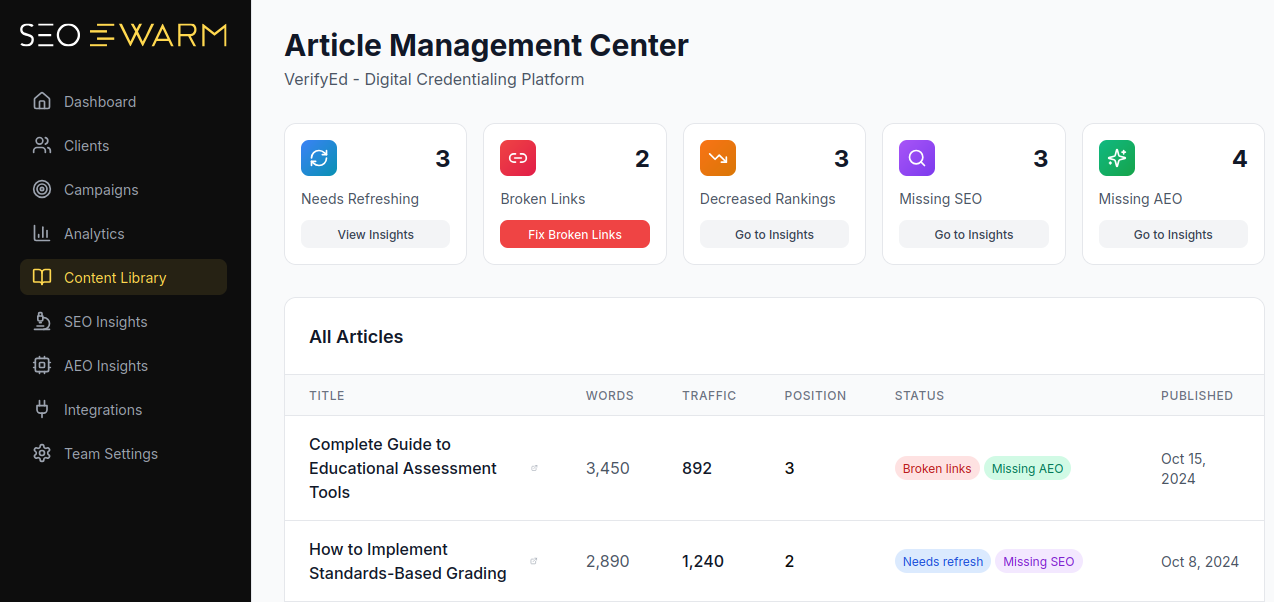
SEOSwarm (our platform) automates research, SEO writing, formatting, publishing, and offers agent-powered technical audits plus auto schema fixes.

AI-Powered
SEO Content Strategy
See the AI platform that's replacing entire content teams
(with better results).

What used to require 2–4 hours per post now needs less than five minutes.
Keep error rates under 1% and view organic growth with monthly analytics.
For sensitive or compliance-critical content, always double-check with a manual review before publishing.
Closing the Optimisation Loop: Review, Improve, Repeat
Website optimisation never ends—it’s about momentum.
Schedule monthly or quarterly improvement sprints for review and action.
Gather insights from every dashboard—WAVE, Screaming Frog, SEMrush, UptimeRobot, SEOSwarm—and compare against KPI targets.
Talk regularly as a team.
Step up what works and ditch what doesn’t.
By treating optimisation as an ongoing cycle, your website stays fresh, fast, and impactful.
That’s how you’re ready for the next phase: measuring real business impact using precise KPIs and relentless, data-driven improvement.
Monitoring and Measuring Website Strategy Success
Building a successful website strategy hinges on measuring the right things—and acting fast when your data signals a shift. In 2025, even lean teams can deliver major gains by focussing on key metrics, clear reporting, and automation that doesn’t waste time.
Let’s cut through the confusion and see exactly how you translate numbers into real business progress.
Step 1 – Choose KPIs That Link Directly to Goals
Get started by picking Key Performance Indicators (KPIs) that genuinely support your main business objectives. It’s all about clarity—chasing random stats only distracts from what really matters. Most sites will track the conversion rate, average order value (AOV), bounce rate, return visits, and session duration.
For ecommerce, try for a 2–4% conversion rate and AOV between £65–£120.
If you rely on lead generation, target 8–16% conversions and keep the cost per lead between £295–£620.
Content-focussed sites should be aiming for over 35% returning visits, 3.5–7 minute sessions, and newsletter sign-ups at 3–6%. And here’s something most teams miss: three KPIs per goal is usually all you need for focus.
Step 2 – Set Up Analytics and Event Tracking
Your analytics platform makes the invisible visible. Choose what fits best for your organisation:
- GA4 (Google Analytics 4)
Free, feature-rich event tracking and reporting with Looker Studio integration. - Matomo
Privacy-first, hosted at £19/month; great for compliance-heavy sectors. - HubSpot
CRM plus analytics from £46/month. - Usermaven
User-friendly dashboards, £21/month. - Shopify Analytics
Included in Shopify Plus (£45/month); perfect for ecommerce.
Implement Google Tag Manager or your chosen tool to capture the meaningful stuff—form submissions, purchases, or lead generation events. Give your links UTM parameters so every campaign gets credit. Setting clear conversion events is critical for tracking real outcomes.
Step 3 – Build Clear Dashboards and Automate Alerts
The best dashboards are uncluttered. Highlight priority metrics using Looker Studio, Matomo widgets, or whatever your platform provides. Place your most important traffic sources, user journeys, and conversions front and centre.
Set up automated notifications so you’re alerted if, for example, your bounce rate jumps or conversions dip. It’s easy to get flooded with noise, so tune alerts to the shifts that actually matter for your business.
Step 4 – Regular Reviews and Action Logs
This is where things get lively. Hold a monthly check-in (even if it’s just you) to focus on dashboard warnings, sudden changes, and trends in key metrics. Always log your discoveries: date, which KPI flagged, likely cause, and what you did.
If you’re working solo, keep your review tight—stick to your three most important dashboards. Every quarter, dig deeper into traffic patterns and user engagement shifts; sometimes those trends are hiding in plain sight.
Step 5 – Troubleshoot and Adapt
Ever had a metric suddenly drop for no clear reason? That’s when this workflow really proves its worth. Start by reviewing your analytics configuration and checking filter settings. GA4 DebugView or platform-specific debugging tools help you spot gaps fast.
Stumble on issues like missing tags or dodgy data? Adjust your tagging setup right away to keep future numbers reliable.
Step 6 – Automate Monitoring and Maintenance
Automation takes you from scrambling to prepared. Platforms such as SEOSwarm deliver scheduled SEO audits, content refresh reminders and performance alerts straight to your inbox.
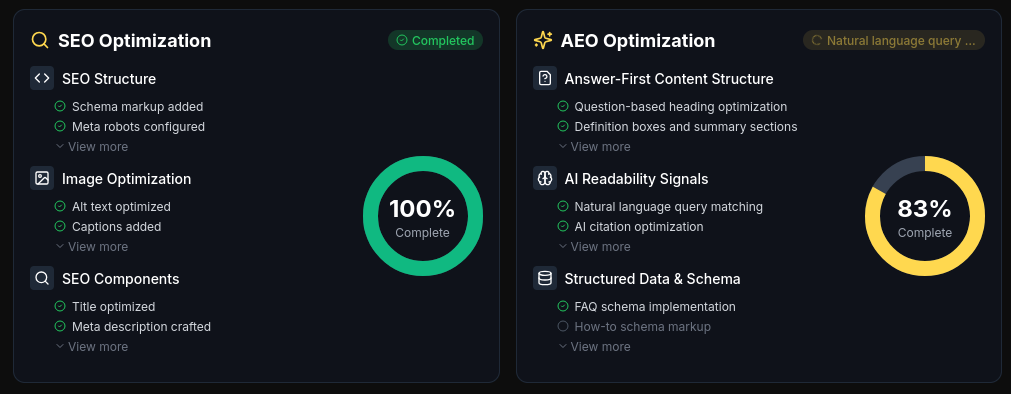
Even just switching on automatic KPI notifications or receiving a monthly summary via email can save hours. That extra efficiency means more time to optimise, less time firefighting.
Layering these habits—KPIs with real purpose, frequent reviews, and smart automation—turns your website measurement into a source of compounding business improvement.
Manual vs. Automated Approaches to Executing Website Strategy
Choosing the Right Execution Model
This is where things get interesting—deciding between manual, automated, or hybrid execution is a genuine turning point for your website strategy.
Your pain points from earlier audits, bottlenecks, and growth spurts? The model you choose can tackle, or amplify, those very challenges.
Whether you’re running a boutique agency or wrestling with fast-scaling ecommerce, fitting your approach to your site’s size, complexity, and compliance needs is absolutely vital.
Manual Strategies: Customisation and Operational Limits
Manual means every content, QA, SEO, and analytics task happens within your team—no automation shortcuts.
This suits websites with under 30 pages per month and teams of 1–3 people who want full control.
But manual comes with hidden limits.
If audits stretch beyond five hours weekly or publishing drops below ten posts, expect bottlenecks and a serious risk of burnout.
Let’s break down the reality, so you know if this approach fits your goals:
- Manual Pros
Total brand control and deep customisation, ideal for specialists using familiar tools on niche projects. - Manual Cons
Time-intensive, bottlenecks emerge fast, tough to scale, burnout risk climbs as demand builds.
Small agencies love that control—until a surge in work turns deadlines into daily stress.
Automated & Agency Platforms: Efficient Scale
Automated platforms like SEOSwarm and ContentKing lighten the load, handling SEO, content, and audits at speed.
Blog-in-one-minute
Add a fully SEO-optimised blog to your website with just 2 lines of code.
Learn more
These platforms thrive with >50 monthly pages or teams >10, delivering capital time savings and reliable compliance.
The move to automation can bring relief, but also comes with its own trade-offs.
Consider how much efficiency you need—and whether you’re happy letting go of some hands-on oversight.
Here’s the essence of automation’s pros and cons, to help you weigh the shift:
- Automation Pros
Scalability, built-in reporting, rapid compliance, fewer manual chores, and serious ROI surges. - Automation Cons
Control trade-off, learning curve, upfront cost, needs detailed setup and monitoring.
Retail and media sites usually see error rates tumble and output climb once automation takes centre stage.
Hybrid Strategies: Balanced Workflow
Hybrid models offer the best of both worlds—personal attention for premium content and brand, automation for SEO and analytics repetition.
It’s ideal for 4–10 staff and 20–50 pages monthly, especially when compliance gaps or high growth make pure manual or automated too risky.
If your business needs high-level control and efficiency, hybrids let you keep strategy sharp and avoid running your team ragged.
Look at these key factors for balanced hybrid success—and possible points to watch:
- Hybrid Pros
Strategic control, manages growth spikes, less burnout, and supports stricter compliance. - Hybrid Cons
Needs disciplined handoffs, can be tricky to integrate, workflow errors can slip past unnoticed.
Comparison Table
Here’s your quick reference—spot which model matches your needs fast:
| Model | Page Volume | Team Size | Skills Needed | Best Fit | Main Risks | Time/Cost | Benchmarks |
|---|---|---|---|---|---|---|---|
| Manual | <30/mo | 1–3 | QA, oversight | Specialist, boutique | Burnout, bottlenecks | High/time | QA scores, deadlines |
| Automated | >50/mo | >10 | Tech, QA setup | Retail/media, large sites | Control loss, setup | Low/unit, upfront | Error reduction, velocity |
| Hybrid | 20–50/mo | 4–10 | Strategy, integration | Agency/SaaS, compliance | Handoff errors | Balanced | Brand KPIs, compliance |
Manual suits detail-heavy projects.
Automation delivers scale and speed.
Hybrid balances control with efficiency.
Transition Checklist and Exclusive Planning Tool
When should you switch models? These signals are your red flags—each demands a reassessment, and our exclusive transition calculator helps map your workflow to the best-fit approach:
Before you move forward, watch for:
- Audit backlog
Persistent? Hybrid or automated options can clear the logjam. - Burnout symptoms
Rising fatigue is a clear signal to adapt. - Compliance gaps
Hybrid solutions plug those risks. - High error rates
Automation catches issues before they escalate. - Rapid growth
Automated scaling keeps chaos at bay.
Lock in your ideal model, and get ready—the next section is packed with actionable checklists and templates to put your strategy to work.
Templates and Checklists to Build and Refine Your Website Strategy
Templates are more than simple paperwork—they are what turns strategy into progress you can actually see.
In 2025, it’s not enough to talk about best practice.
You need frameworks that are actionable, simple to update, and able to tie daily tasks back to real business results.
The following templates and checklists transform planning into data-driven growth.
Each one has clear fields, key metrics, tool recommendations, and practical review triggers.
This means you don’t just fill them out—you drive measurable improvement.
Content Audit Spreadsheet Template
A content audit is all about pinpointing which site pages help your business and which hurt it.
Start by running a full site crawl with Screaming Frog (£149/year) to get every URL, its status code, and core metrics.
You’ll want to export:
- URLs, status codes, traffic (GA4),
conversion rate (HubSpot/GA4), SEO score (SEMrush, 0–100), last updated date, and accessibility score (WAVE/AXE, 0–100).
Rank pages fast using this formula:
- SEO Score = (Keyword Rank + Backlink Quality + Internal Linking + PageSpeed)/4
For a quick filter:
- Flag
any pages with under 50 visits per month or a score below 60 for update or removal. - Airtable or Notion (£8/user/month)
can automate these checks and visual cues. Pages above 80 get added to your quarterly review board for ongoing improvement.
With your content health assessed, next turn to user persona mapping to keep every decision user-focused.
User Persona & Journey Map Template
Strong website strategy rests on accurate, rich personas built from real data.
For each persona, gather:
- Survey data
SurveyMonkey (£20/month) and device/location stats (GA4) - Fields
psychographics, pain points, accessibility needs, preferred channels, and a real user quote
For their journey, map the following:
- Stages
Discovery, Explore, Purchase, Post-Sale - Mapping tools
Miro (£10/user/month) or Notion
Layer heatmaps to catch blockers, such as a slow checkout or high bounce point.
Whenever traffic shifts by 20 percent or after a redesign, update those personas to keep them accurate.
Now that you have user journeys mapped, prioritise your content planning with an editorial calendar.
Editorial Calendar Template
Editorial calendars connect your content ideas to actual strategy.
- Notion AI or CoSchedule
£25/month for content brainstorms and keyword gaps from SEMrush - Fields
date, topic, owner, persona, keyword, CTA, channel, target KPI - Colour-coded status
for at-a-glance clarity - Zapier (£19/month)
to automate reminders and status updates
Monthly reviews show who’s behind or what’s underperforming.
Then, every quarter, plan for bigger pivots that steer your content in a profitable direction.
With content and user strategy outlined, ensure technical health stays strong with a straightforward audit checklist.
Technical SEO Audit Checklist
Use this list each month as a preventive routine for keeping technical health on track and AI-ready.
This checklist is designed to catch errors, monitor speed, and guarantee compliance, all with key tools you’re already using.
- Monthly crawl
in Screaming Frog; fix errors above 1 percent within 3 days - Core Web Vitals (PageSpeed Insights)
LCP less than 2.5 seconds, INP less than 200 milliseconds, CLS less than 0.1 - Quarterly schema check
with Google Rich Results Tool—aim for a 100 percent pass - Accessibility audits
WAVE or Siteimprove for WCAG 2.2 AA; schedule scans to track improvement - Logging
After any redesign or content push, record findings in Notion or Airtable
All your templates should live in a shared Google Drive or Notion folder so your team can access and update them easily.
Automate reminders for regular review and keep every template aligned with your latest website update or annual refresh.
What makes these frameworks genuinely useful?
You get built-in automation, formula-based scoring, ownership cues, and tool cost transparency, offering a level of clarity typical guides skip.
Thanks to step-by-step workflows and easy review triggers, these templates let you take proactive control and measure results in ways competitors envy.
Get these systems running, and you’ll be ready for the next phase—avoiding the most common mistakes that trip up even smart strategies.
Common Website Strategy Mistakes: Fast Diagnostics and Prevention in 2025
When teams try to grow their websites in 2025, it’s not only about having great ideas. The hidden threat? Those familiar blunders that creep in—quietly eroding performance before you know it.
The good news is, rapid diagnostics now allow even small teams to catch mistakes before they spiral. You just need to know what to look for.
Top Strategy Mistakes and How to Catch Them Early
Most stumbling blocks show up again and again. Fortunately, you can use simple checks to spot them fast.
Here are the common culprits and exactly how to catch them:
- Analytics Setup Failures
GA4 tag errors or missing conversions. If conversion data and sales figures differ by over 5%, you need to investigate quickly. - Mobile Responsiveness Gaps
Core Web Vitals failures (LCP >2s, CLS >0.1) harm ranking. Monthly testing keeps mobile speed and layout compliant. - Slow Page Speed
Large images or unoptimised code slow pages down. Use audits, compress and minify as needed, and watch for instant improvement. - Duplicate or Thin Content
Too many copycat or brief pages lower search scores. Audit, merge, and update content with unique information. - Broken Internal Links and Indexation
Orphan pages and poor navigation hurt visitors. Link reviews and sitemap updates prevent unseen losses. - Unoptimised Metadata & Accessibility
Alt text gaps, long titles, or missing ARIA labels can kill usability. Automated scans keep metadata and structure sharp.
Want to make sure you really catch these issues before they grow?
That’s where a tight monthly workflow comes in.
Stepwise Diagnostic and Quick-Fix Workflow
Set yourself up for prevention by following this practical routine every month:
- Spot analytics failures
Debug GA4 events, cross-check sales records, switch up who reviews so errors don’t go unnoticed. - Run technical health checks
Screaming Frog and PageSpeed Insights make under 1% crawl errors and LCP below 2s your monthly goal. - Assess mobile and UX experience
Test main page templates on real devices, patch up slow or broken layouts by quarter’s end. - Audit content and links
Any page under 50 visits monthly? Review and either improve or consolidate it; strengthen connections between all crucial pages. - Review accessibility and metadata
Axe or WAVE highlight missing alt text or ARIA labels. Refresh headings and enhance clarity for all users.
After completing your monthly workflow, a quick-access table can help address the most urgent errors fast.
Quick Fix Table: 2025’s Most Costly but Missed Errors
This table brings the key checks and fixes together, serving as a quick reference when things go wrong:
| Mistake | Test/Diagnostic | Fast Fix |
|---|---|---|
| GA4 Tracking Errors | DebugView/CRM (>5% mismatch) | Review event tags, remove duplicates, retest |
| Broken Schema/Metadata | Rich Results Tool or axe/WAVE | Fix schema and alt text, update headings |
| Mobile Speed Drop | PageSpeed LCP >2s on mobile | Compress images, enable lazy load, minify files |
The real secret to prevention in 2025 is building monthly diagnostics into your calendar—and acting straight away when anything drifts.
Consistent health checks, ruthless consolidation of thin content, and sharp reviews after big changes will keep your site performing and your business protected.
With common pitfalls under control, you’re ready to move onto advanced templates and frameworks for even stronger growth.
My Final Thoughts on Website Strategy
Most websites fail not because of a lack of effort, but because their actions aren’t tied to a bigger plan. I’ve seen teams pour hours into tweaks and content, only to wonder why results stall. The difference? Strategy connects every move to real business outcomes—measured, reviewed, and improved.
If you want your website to drive growth, here’s what I recommend: - Audit your content and technical health monthly—don’t let issues linger. - Set SMART goals linked to business KPIs, and review them quarterly. - Build real user personas and map their journeys, then adapt your UX and content accordingly. - Use automation where it saves time, but keep a human eye on quality and compliance.
Strategy isn’t a one-time project; it’s a living process. The websites that win are those that treat every update as a step toward measurable, long-term impact. Your website should work as hard for your business as you do—make every improvement count.
- Wil