

Running out of fresh content ideas can stall even the most creative teams. I’ve seen how quickly repetitive posts and creative fatigue set in when inspiration dries up.
If you’re struggling to keep your content pipeline flowing, you’re not alone. The challenge isn’t just coming up with ideas—it’s finding concepts that actually fit your audience and work across every platform you use.
In this guide, I’ll break down what makes a content idea truly valuable, share proven frameworks for brainstorming and validation, and compare the top ideation and automation tools for every budget and team size. You’ll get step-by-step workflows, practical troubleshooting tips, and strategies for building an evergreen idea archive that keeps your campaigns moving.
Whether you’re a solo creator or part of a large agency, you’ll walk away with actionable systems to generate, adapt, and sustain high-impact ideas—so you never run out of content, no matter where you publish.
What Are Content Ideas and Why Do They Matter?
Let’s break down content ideas—they aren’t just random thoughts or flashes of inspiration. Instead, they’re focused concepts ready to guide the making of digital materials, whether that’s a blog post, podcast, video, newsletter, or social media update.
Unlike general brainstorming where anything goes, content ideas are specific enough to translate straight into a finished post. Think about an idea like “10 Reasons Time Tracking Transforms Freelance Businesses”. With just a little shaping, that one concept could become a detailed blog article, an Instagram carousel, or a LinkedIn post, showing the adaptability and purpose that set true content ideas apart.
Their role in the world of content strategy is actually pretty central. The digital landscape is busy and noisy—brands, agencies, and even solo creators are constantly after fresh, targeted content ideas to grab attention, connect with people, and push campaigns forward.
Stale or repetitive ideas just don’t cut it. That’s why a steady pipeline of relevant concepts is crucial. If this pipeline dries up, teams can end up facing creative blocks or send out lacklustre posts.
Intentional creativity builds momentum that lasts beyond brief flashes of inspiration.
Here’s a stat to bring it home: 72% of content teams driving real business results say their success comes from clear planning and frequent ideation.
Generating ideas is only part of the challenge. The real test is coming up with concepts that echo what audiences care about, push campaign goals, and work flexibly across all sorts of platforms.
A blog post you wrote might turn its insights into an infographic, a Twitter thread, or a TikTok video—each time reaching new audiences in new ways.
If teams rely on improvisation alone, repetitive ideas and uninspired content become inevitable, which can quickly sap their reach and relevance.
To overcome these challenges, conceptual models can help. The Triple-A Framework—Audience, Adaptation, and Analytics—offers a neat way to think it through.
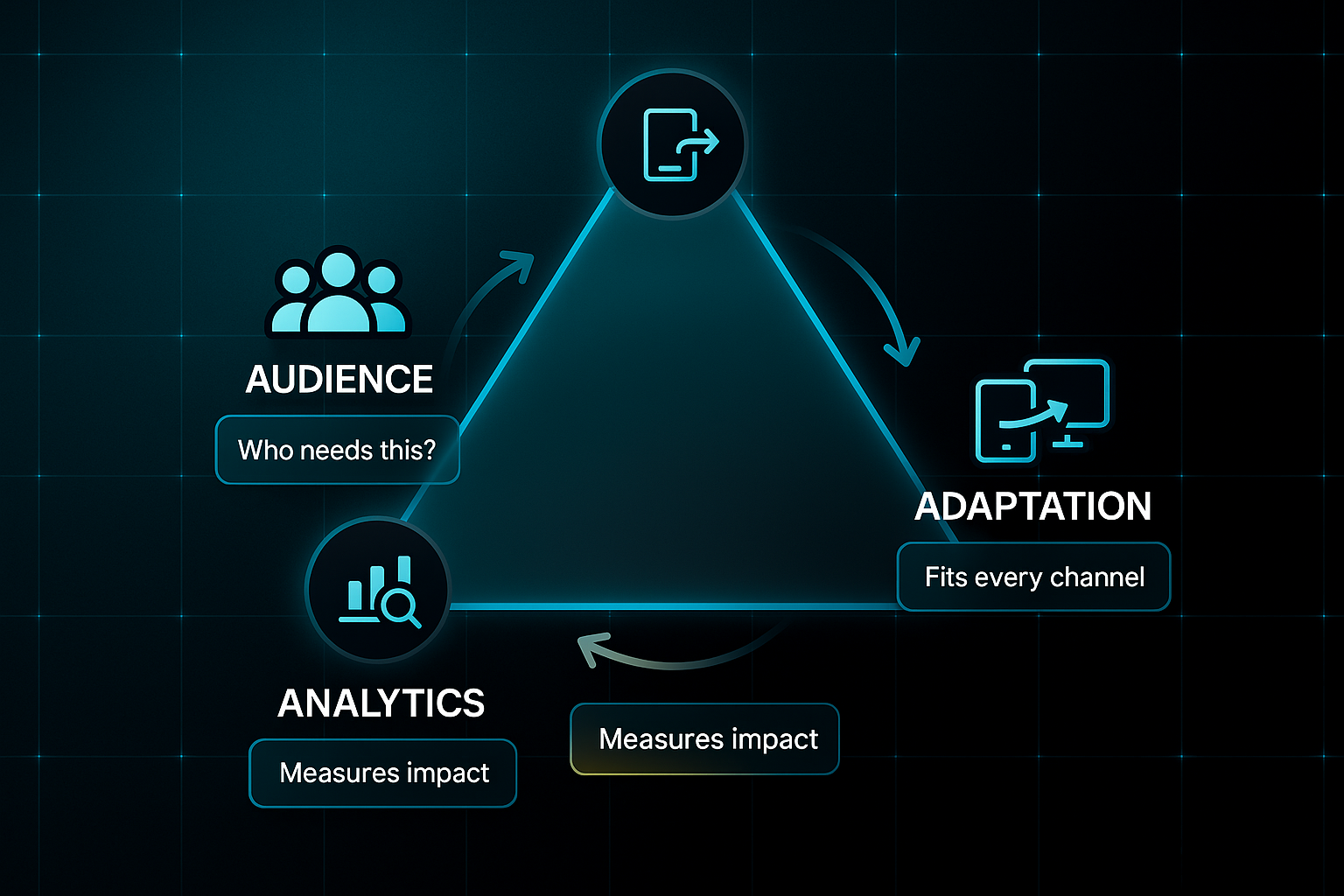
Start with Audience: Who’s going to see or read this, and does it address their genuine needs? Adaptation makes sure every idea can flex for different channels without losing its punch.
Analytics ties everything back to measures like engagement or conversion, granting a way to truly gauge impact. Using a framework like this, teams gain a simple way to check if an idea is sturdy and valuable before diving in.
In the end, content ideation is about balancing creative spark with analytical grounding. It’s the reliable engine powering strong campaigns and brand growth.
A truly effective content strategy is not a choice between creativity and analytics, but a fusion of both. Data should inform creative direction, while creativity brings life to the insights that data provides, ensuring a balanced and impactful approach.
Understanding the building blocks of good content ideas sets the scene before jumping into strategy and multi-platform tactics later on.
Comparing Content Ideation and Automation Tools: Decision Frameworks, Features, Pricing, and Implementation Fit
Finding the right content ideation or automation tool in 2025 involves more than choosing a big name.
Your ideal choice depends on team size, workflow complexity, and budget.
For solo freelancers, agencies, or in-house teams, the tool you pick will either streamline content creation or drown you in manual work.
The wrong platform saps creativity and slows your pipeline.
Let’s get hands-on.
Below is a comparison designed to help you balance flexibility, automation, and cost.
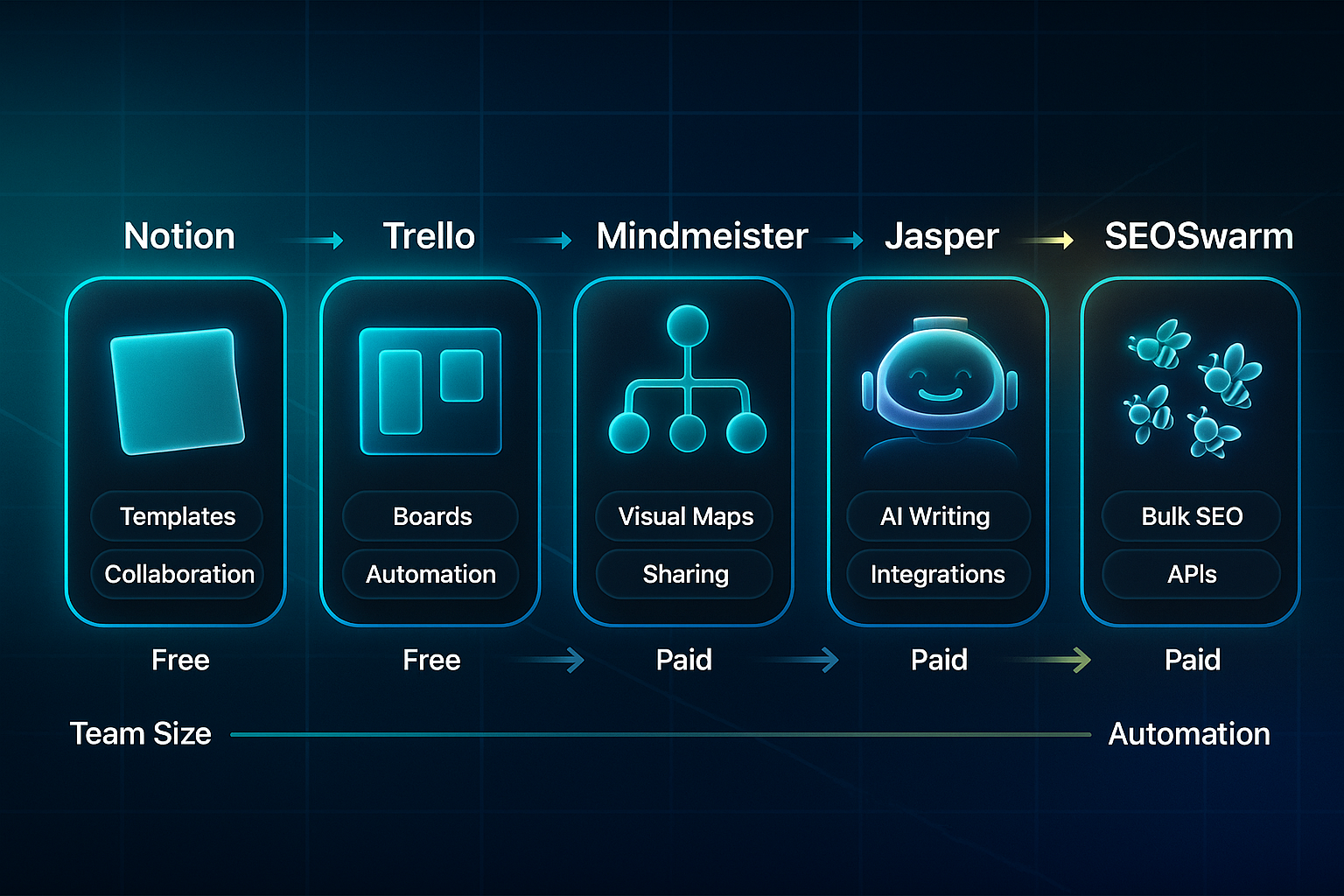
Along the way, keep an eye out for first-use explanations of terms like SEO (search engine optimisation), API (application programming interface), QC (quality control), and indexing (Google’s process for adding pages to its search results).
Platform-by-Platform Overview
It’s a crowded marketplace.
Want a quick sense of what’s out there? Here’s a summary of some of the most widely used content ideation and automation platforms in 2025.
Each platform below brings unique strengths and common limitations, so you can scan and shortlist those that match your strategy.
- Notion
Capture, tag, and collaborate; free for basics, $10–$24/user/month for upgrades. - Trello
Visual boards, easy setup, some automation; free for small teams, paid tiers from $5/user/month. - MindMeister
Mind-mapping and export; free for three maps, paid $6.50–$15.50/user/month. - ChatGPT
AI-based batch ideation; free (GPT-3.5), $20/month (GPT-4). - Jasper
AI templates and team workflow; $39–$149+/month, training needed to hit brand tone. - Copy.ai/Writesonic/HyperWrite
Fast trend-driven ideas; $19–$49/month. - StoryChief/Byword/Hootsuite
Editorial calendars, scheduling; $40–$739/month.
Every tool here stands out for one reason or another—maybe you need fast idea capture, or perhaps robust workflow automation. One of these can unlock the next level for your process.
Agency and Enterprise Automation Platforms Context
If you’re publishing more than 30 posts a month, you’ll likely run into limits with basic tools.
For agency or enterprise teams, SEOSwarm is engineered for volume.
It covers SEO automation, technical audits, API publishing, and provides analytics—all in a single system.
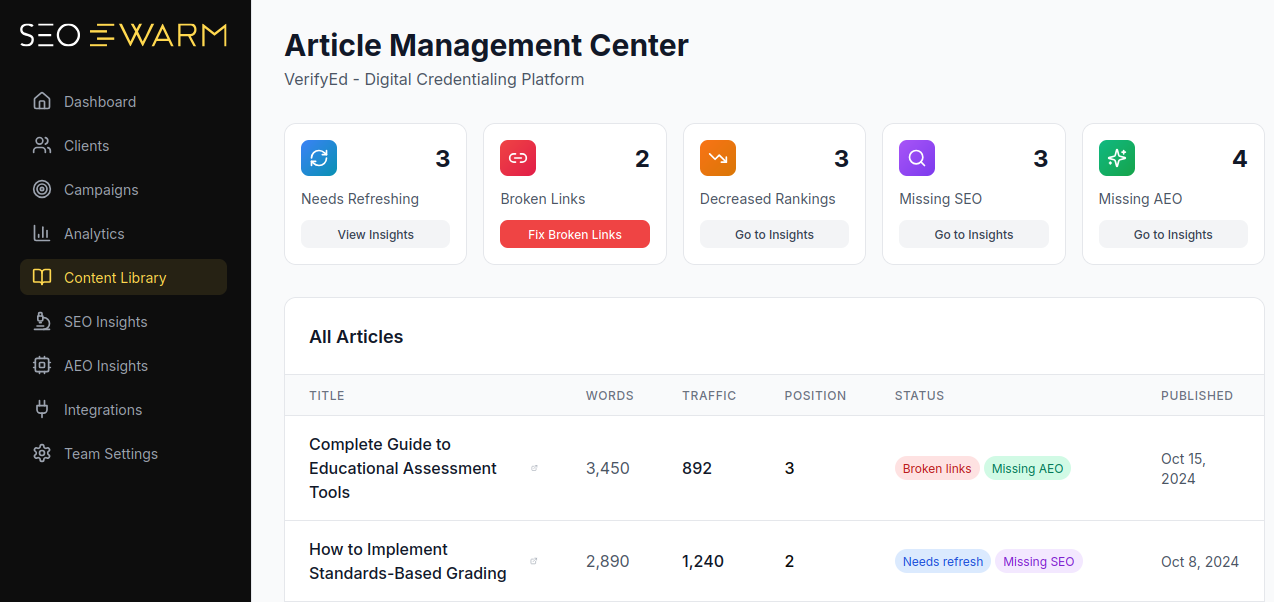
Getting started is straightforward: onboarding takes 1–3 days.
Pricing lands at $800–$4,000/month.
The highlight? Over 95% indexing within 48 hours on published content.
That said, it’s built for businesses running frequent, high-volume campaigns, not one-off content bursts.

AI-Powered
SEO Content Strategy
See the AI platform that's replacing entire content teams
(with better results).

Decision Framework for Platform Selection
Here’s a step-by-step approach for matching your team’s needs to a platform.
- Check average monthly post volume and current workflow hours.
- If you’re solo or publishing less than 8 posts/month
Go with Notion or Trello plus ChatGPT. Spend: $0–$25/month. - For mid-size teams (10–30 posts/month)
Jasper, MindMeister, or Trello Premium are best—budget $100–$400/month. - For agencies or large teams (30+ posts/month)
Go for advanced automation, analytics, and direct scheduling—SEOSwarm is a fit, at $1,000–$5,000+/month. - Upgrade your system when manual work hits five hours per team member each week, or plugins can’t keep up with SEO integration.
The golden rule? Match your platform’s capacity to your real-world demands, not just to buzz.
Validation Milestones for Tool Adoption
Rolling out a new platform? Don’t hit the gas until you’ve checked its impact at these milestones.
- Integration test
Allot 15–120 minutes to set up and sync systems. - Batch idea trial
Generate 50+ ideas and look for at least 90% alignment with campaign goals. - Publishing/indexing
Automate at least 90% of output within 48 hours. - Analytics review
Aim for a 10–20% gain in either workflow speed or engagement at the 30-day review. - User adoption
Target 80%+ team satisfaction and visible drops in manual effort.
These stages let you spot issues (or wins) early—protecting your investment.
Features and Pricing Comparison Table (2025)
Sorting through these platforms is easier with a direct comparison. This table lets you see how platforms differ in price, features, onboarding, and practical constraints.
| Tool/Platform | Cost Range | Key Features | Onboarding | Output/Time Savings | Constraints |
|---|---|---|---|---|---|
| Notion | Free–$24/user/mo | Tag, archive, collaborate | 30–60 min | 300 ideas/month | No automation |
| Trello | Free–$10/user/mo | Boards, automation | 15–30 min | 30–40% faster workflow | Poor for archiving |
| MindMeister | Free–$15.50/user/mo | Mind-map, export | 10–20 min | 100 ideas/session | No campaign mgmt |
| ChatGPT | Free–$20/mo | AI batch ideation | 5 min | Up to 200 ideas/hour | No collab/archive |
| Jasper | $39–$149+/mo | Templates, automation | 1–3 days | 100–1,000 ideas/month | Needs training |
| Copy.ai/Writesonic/HyperWrite | $19–$49/mo | Social batch ideas | 10–30 min | +10% engagement | Shallow output |
| SEOSwarm | $800–$4,000/mo | End-to-end automation | 1–3 days | 2–2.5x organic growth | High-volume only |
| StoryChief/Byword/Hootsuite | $40–$739/mo | Calendar/scheduling | 2–6 hours | 30–50% time saved | Manual QC/SEO limits |
So, what actually stands out? If you’re starting solo, Notion and ChatGPT help you capture ideas and stay organised while spending almost nothing.
Larger, collaborative teams will notice the benefits when they upgrade to Jasper and MindMeister—you get better automation, plus stronger teamwork.
If you’re running campaigns across multiple channels each month, SEOSwarm’s end-to-end automation, analytics, and publishing speed are hard to rival. That’s where time-savings and consistent indexing matter most.
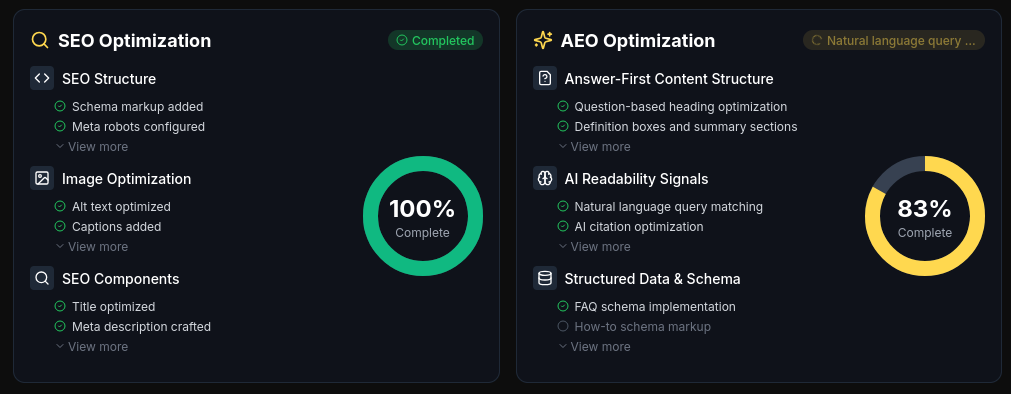
No matter what you select, validation milestones protect you.
Look for quick setup, relevant output, reliable automation, and genuine team buy-in.
That way, your content process never falls behind as you scale.
All right—ready to put these tools to work? Next up, we’ll show how to take those winning ideas and convert them into cross-platform, high-impact campaigns.
Step-by-Step Processes for Brainstorming, Capturing, and Validating Content Ideas
Building Reliable Ideation Workflows With Proven Frameworks
Let’s start with a truth: if your creative process feels random every session, you’ll keep getting unpredictable results.
A repeatable ideation workflow is how you guarantee dependable output, whether you’re flying solo or part of a small team.
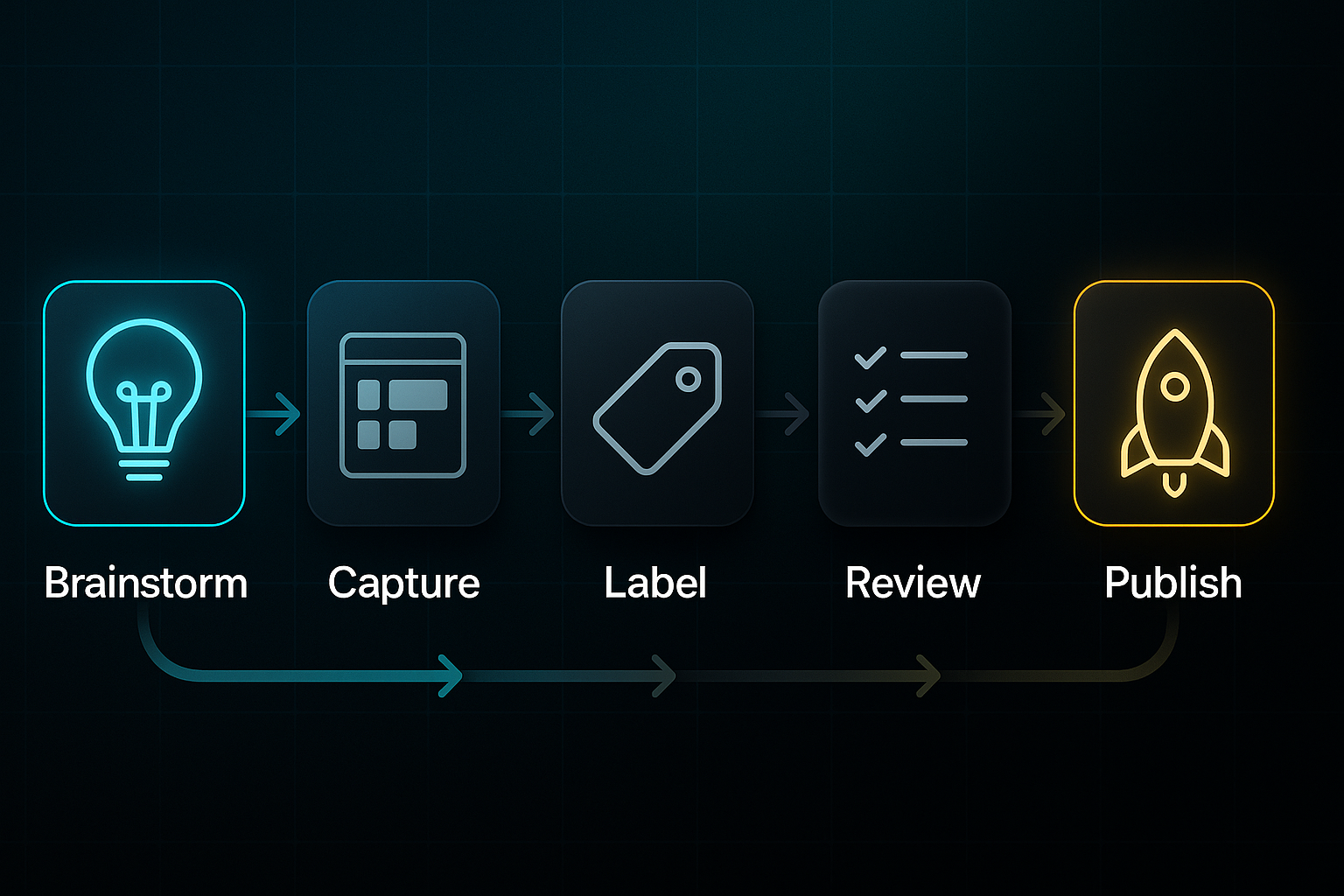
Most of the high-performing teams I know lean on frameworks designed for systematic idea generation.
- SCAMPER
Substitute, Combine, Adapt, Modify, Put to another use, Eliminate, Rearrange. - 5 Whys method
Use consecutive questions to reach root insights.
Give yourself 30–60 minutes per brainstorming session and gather 1–3 collaborators—though you can just as easily do this alone.
All ideas should be recorded in Trello or Notion boards. Make sure to label each one with topic, channel, and date.
Here’s a golden rule: every idea gets reviewed within 48 hours, either with a voting system for teams or a personal checklist if working solo.
You want to generate 20–30 new ideas each week, and at least 20 percent should work on two or more platforms.
Up to 10 boards or users get by with free plans, but once your volume or team size grows, consider upgrades at $10–$20 per user monthly.
If you’re wondering what kind of results to expect, shoot for 20–30 ideas every session, with about 20–30 percent making it through to publish-ready status.
Over 80 percent team feedback in that 48-hour window keeps everyone on track.
Integrating AI and Automation Into Idea Generation
AI platforms like ChatGPT and Jasper have genuinely changed how teams brainstorm and refine their concepts.
Sessions now revolve around prompts that specify the brand voice and audience needs.
For example, you might ask ChatGPT: Generate 25 topics for a B2B SaaS blog on customer retention.
Each round with AI should be kept short—5–15 minutes maximum.
Immediately scan the output for any repeated or generic suggestions.
Sometimes you’ll need to run another round to get fresh options.
- Shortlist the top 5–10 ideas
Use Trello or Notion voting. - Trial those ideas on a single platform
Look for click-through rates above 3 percent and social engagement crossing 5 percent. - Complete the workflow
From prompts to final testing, usually finished within 30–45 minutes.
On a good day, you’ll get 20–50 usable ideas, with 70 percent being unique or directly usable.
Peer review and feedback cycles also wrap inside 48 hours.
If you’re tracking costs, ChatGPT has a free tier and a $20 per month Pro option, while Jasper supports teams at $39–$99 per month after a free trial.
Collaborative Team Capture and Validation Protocols
Great processes are built around clear roles and quick feedback loops.
- Initiator
Collects fresh ideas. - Validator
Reviews ideas within 48 hours. - Editor
Does the final polish before publication.
To keep things orderly, split your idea board into columns:
- New
For newly added ideas. - Under Review
Ideas being validated. - Ready
Validated ideas ready for use. - Archived
Old or unused ideas stored for reference.
A session with 2–10 collaborators (30–45 minutes) brings in 15–20 ideas, each getting 3–6 votes. More than 80 percent are reviewed in under two days.
If less than 60 percent of ideas get reviewed, add peer reviewers or tweak your process.
Free plans work for small teams, then step up to $20 per user per month for more advanced needs.
If your operation runs smoothly, expect 20–40 percent of those ideas entering production. Engagement is tracked by vote counts and completion rates.
Visual Mind Mapping and Batch Review Integration
Some teams swear by visual mapping. MindMeister and XMind create clusters of ideas you might never connect with ordinary lists.
In a short 15–30 minute session, you can create 1–3 mapped branches and up to 30–50 new ideas.
At least 20 percent will fit across multiple platforms. Setup is a breeze—just two minutes.
Spend about 10 minutes clustering ideas per branch, then export those clusters to Trello or Notion for final review, usually inside 24–48 hours.
Start with free plans. Premium features at £4.99–£10 per month boost export power and advanced team integration.
When you add it up, you’ll capture 30 or more ideas per session, have 6–10 ready for publication, and get clear digital feedback pipelines.
Building and Maintaining an Idea Bank and Archive
An organised idea archive is your secret advantage for avoiding creativity burnout and keeping your content relevant.
Use Notion or Trello plus cloud storage.
- Weekly
Set aside half an hour each week to rotate active ideas. - Quarterly
Run a deeper review of 50–100 concepts and trim at least 15 percent of dormant items.
Naming conventions like Platform–Topic–Status–Date, along with tagging by creator or campaign, make retrieval fast.
Archive ideas after 12 months or if analytics (Airtable, Looker Studio) show less than 1 percent engagement.
With a business upgrade (£20 per month per user), you’ll see your archive grow by 100 or more ideas per quarter. Each search should take less than five minutes.
Troubleshooting and Continuous Output Improvement
Even the best systems need tweaking.
- Weekly
Block out 15 minutes for board health checks. - Monthly
Do backups and tag reviews.
If you notice 30 percent or more redundant ideas, rotate responsibilities or try a new framework.
When more than 100 ideas go unreviewed for two weeks, it’s time for urgent maintenance. Allocate 30 to 45 minutes per 100 ideas.
- 3-2-1 backup rule
Three copies, two media types, one cloud or offsite.
Monthly test restores are important.
Keep digital dashboards live to track engagement, and try for a 10–20 percent drop in low-value ideas with every audit.
With all important data backed up and issues fixed during scheduled maintenance, you can count on a strong, continuous content pipeline—even when the ideas start piling up.
Now that your step-by-step ideation and review system is in place, the next question is... how do you turn these validated concepts into impactful campaigns across multiple platforms?
Overcoming Creative Blocks and Sustaining Effective Idea Flow
Recognising and Counteracting Ideological Fatigue: Metrics and Reset Routines
Ever notice your brainstorming sessions sounding almost identical week after week?
That’s creative fatigue creeping in—a warning that your idea pool is drying up.
The classic signs? Click-through rates dropping below one percent, feedback rates dipping under ten percent per idea, and an endless parade of recycled concepts.
Catching fatigue before it stalls your process makes a difference.
Keep tracking idea outcomes in Notion or Trello, and regularly analyse those trends with Google Analytics (web analytics platform) or Sprinklr (social analytics tool).
These tools will highlight plateaus or repetitive patterns so you know when intervention is needed.
How do you reset?
For solo creators, a 30-minute idea sprint followed by a change of scene—perhaps a walk or simply working somewhere new—can provide a jolt of inspiration.
Review your fresh ideas and see if the approach sparks anything different.
Teams benefit from introducing pace and variety.
Rotating creative roles or running Crazy Eights (eight ideas in eight minutes) injects new thinking into sessions.
Asynchronous Loom (video) pitches and Trello voting keep wider input and momentum.
Aim to surface ten new ideas per session, chase a 25–30% uplift in idea diversity, and nudge click-throughs above three percent in a fortnight.
When feedback lags, solo operators should benchmark progress against personal targets.
Remote teams can use Loom and shared docs to ensure participation and keep ideas flowing—the key is momentum.
Community-Driven Inspiration and Prompt Mining
Running low on approaches to generate new ideas?
Turning to your wider community is a proven shortcut to fresh inspiration and relevance.
Prompt mining lets you surface audience pain points, trending discussions and untapped themes—giving you the fuel to keep your pipeline full.
To make this efficient and effective, get into the habit of systematically capturing and archiving discoveries.
This avoids losing valuable prompts in busy feeds and makes future content planning much easier.
Here’s how you can tap into reliable streams for ongoing inspiration and stay a step ahead:
- Twitter/LinkedIn polls and surveys
Gather first-hand pain points, archiving findings in Notion or Google Sheets for later review. - Reddit threads
Spot hot debates or emerging challenges in your niche and log the best for campaign planning. - Quora questions
Identify exactly what your target audience is seeking, creating a rolling bank of prompt ideas. - BuzzSumo & AnswerThePublic
These tools highlight topics producing over seven percent engagement or 1.5x your average reach—aim to archive ten promising prompts each week.
Once you have a pool of community-sourced prompts, pilot your top selections as short-form content—striving for at least one high-engagement post weekly.
If engagement falls, explore new circles or recycle winning ideas from your archive.
Troubleshooting, Recovery, and Sustaining Feedback Loops
Even robust workflows stall.
The main culprits? Lack of peer feedback, stale formats, and weak ideas cluttering the database.
Proactive checks and a clear system for regular improvement keep your output sharp.
Think of troubleshooting as your ongoing health check for creativity.
By making these checks a habit, you quickly spot and clear bottlenecks before they drag down your whole process.
Here are practical steps for keeping your idea flow healthy and reliable:
- Weekly audit
Use Google Analytics or Sprinklr to catch repeated formats or underperforming content before they build up. - Team voting and review
Ensure every idea is scored in Notion or Trello within 48 hours so nothing stagnates. - Prune underperformers
Retire or revise any idea missing a one percent click-through rate after two rounds. - Monthly mind-mapping
MindMeister or XMind help generate at least two new content formats each month to break formulaic habits. - Distributed team rituals
Rolling deadlines, Loom walkthroughs and shared documents keep accountability high, no matter where your team works.
By sticking to these routines, expect a thirty percent increase in unique ideas per session and click-through rates exceeding three percent within two weeks.
Community prompt mining should contribute at least one high-engagement post weekly, and routine troubleshooting can cut repetition by fifteen percent, ensuring an adaptable and robust archive.
Put these systems in place and you’re set for truly sustainable idea flow—ready to adapt and scale your top concepts across platforms, without running out of creative momentum.
Adapting and Repurposing Content Ideas for Multi-Platform Strategy
How much more could a single idea deliver if you didn’t let it stop at just one platform? A smart multi-platform strategy multiplies campaign reach and impact—your audience sees your message wherever they are.
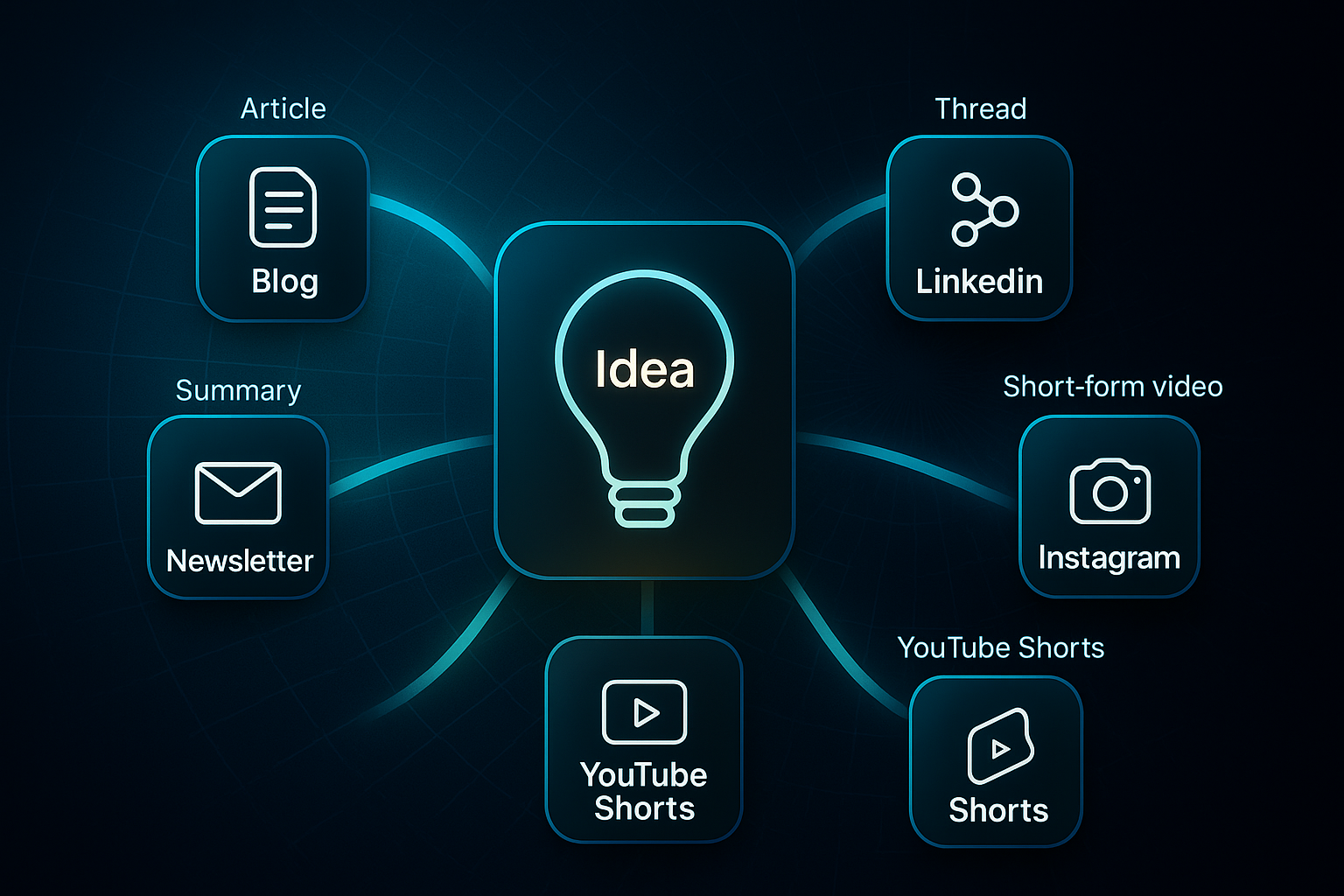
Adapting a strong concept for your blog, LinkedIn, Instagram, YouTube Shorts, and newsletter isn’t a marathon. With a polished draft, basic creative skills, platform logins, and a clear workflow, the repurposing process takes one to three hours even solo.
Basic tools get the job done for free. For premium features, tools like Canva Pro, Buffer Essentials, and Descript Pro total about £75 per month.
It helps to follow a step-by-step framework. This keeps your output organised, benchmarks progress, and makes results repeatable for every major channel.
- Blog Post Publication
Use WordPress or SEOSwarm to publish, applying automated SEO and metadata. Target at least 1,200 words. Monitor for: - Over 1,500 pageviews. - Average read time over two minutes. - Bounce rate under 50 percent. - Internal click-through rate above five percent. Example: SEOSwarm helped a hybrid work blog hit 1,950 views and a 6.4 percent click-through rate. - LinkedIn Carousel
Turn content into a 5–10 slide carousel in Canva Pro. Schedule with Buffer or Planable AI. Track: - Over five percent engagement. - 500+ impressions. - Click-through rate above one percent. Compress files if uploads fail. - Instagram Visuals
Remake as six to eight slides (1080x1080 px) via Canva Pro. Use Instagram Insights: - Over four percent engagement. - 700+ reach. - Swipe-through above 50 percent. Edit overlays if flagged. - YouTube Shorts
Create a vertical video under sixty seconds in Descript Pro, upload in YouTube Studio. Look for: - 10,000+ views. - Over 70 percent completion rate. - 50 or more new subscribers in seventy-two hours. Use copyright-safe music from Descript if needed. - Newsletter Campaign
Condense into a short intro and strong call to action in Mailchimp or Gmail. Preview before sending. Track: - Over 25 percent open rate. - At least three percent click rate. - Under 0.5 percent unsubscribe rate. Example: Adobe’s April 2025 newsletter hit a 36 percent open and 5.2 percent click rate.
After implementing these adaptations, scheduling in batches with Buffer or Hootsuite keeps you efficient. Review weekly analytics using Google Analytics, Instagram Insights, and YouTube Studio.
| Channel | Key Metric 1 | Value 1 | Key Metric 2 | Value 2 | Key Metric 3 | Value 3 |
|---|---|---|---|---|---|---|
| Blog | Pageviews | >1,500 | Read Time | >2 min | Bounce Rate | <50% |
| LinkedIn Carousel | Engagement | >5% | Impressions | >500 | Click Rate | >1% |
| Engagement | >4% | Reach | >700 | Swipe-Through | >50% | |
| YouTube Shorts | Views | >10,000 | Completion | >70% | New Subscribers | >50/72h |
| Newsletter | Open Rate | >25% | Click Rate | >3% | Unsubscribes | <0.5% |
If a channel delivers under one percent engagement after two campaigns, refresh or archive your concept—just as Moz did to revive their Shorts.
Troubleshooting is essential. Check how your content looks on multiple devices. Always follow each platform’s rules and use copyright-safe elements. Team review tools like Planable AI help catch formatting mistakes before launch.
By building these habits, your best ideas perform across all channels. With your multi-platform process established, the next step is measuring results and improving, so your content keeps working for you.
Blog-in-one-minute
Add a fully SEO-optimised blog to your website with just 2 lines of code.
Learn more
Building an Evergreen Content Idea Archive for Long-Term Productivity
A high-functioning content idea archive does more than store thoughts—it fuels your team’s creativity and keeps productivity high year-round.
With structured organisation, automation where possible, and regular tune-ups, you’re always geared up for your next campaign.
Organising Your Archive for Scalability and Speed
Structure is the secret to speed.
Use a three-level folder system—Year, Platform, Theme—for rapid navigation (e.g., /Ideas/2025/Social/Active).
Stick to the YYYYMMDD_Type_Description_v### filename format, so files like 20250405_Blog_RemoteWorkTips_v001 are always easy to locate.
Each idea needs three tags—channel, status, and theme—plus metadata including creator, workflow status, priority 1–5, and latest engagement.
In Notion or Coda, let automation archive ideas idle for 12+ months.
A README at the archive root, updated quarterly, gives everyone the lowdown on structure, tags, and troubleshooting.
Newcomers should get comfortable in 30 minutes.
Maintenance, Auditing, and Pruning—Protocols and Benchmarks
Archives thrive on active care.
Every quarter, gather three to five reviewers for a 30–45 minute audit of 100–200 ideas.
Keep redundancy below 10% and only let refreshed concepts remain active.
Once a month, spend 15–30 minutes sweeping for trend shifts and archiving ideas under 1% click-through or no views in six months.
Any idea doubling engagement or rising by 30% should be revived and re-evaluated within a week.
Dashboards in Data Studio or Airtable make it easy to track engagement, ages, status, and retrieval speeds.
Aim for any search to finish in five minutes or less.
Platform Choice, Migration Steps, and Loss Recovery
Choose your platform wisely.
With under 5,000 ideas, Notion or Nuclino work well.
For more users or GDPR (General Data Protection Regulation) compliance, opt for AppFlowy or Airtable.
Migrating? Export as CSV (comma-separated values) or Markdown, import, then validate every tag and metadata field.
Test searches—success means 100% of records and metadata intact and results in under five minutes.
In the event of data loss, restore from backup.
Expect a 99% data match and full access returned for everyone within ten minutes.
Performance and Productivity Metrics
Tracking these metrics guarantees your archive works for you—not against you:
- Redundancy
Keep under 10% after each quarterly audit, so clutter never builds. - Retrieval time
Locate any idea in under five minutes to keep campaigns moving. - Onboarding
Ensure new team members understand the system and can contribute in 30 minutes. - Idea revival
Each month, revive at least one archived idea and target a 20%+ boost in engagement when you publish it.
These habits transform your content archive into the engine behind adaptable, creative campaigns—keeping your team ahead as you grow and pivot.
Now, let’s see how robust archiving connects to tracking and improving your entire content workflow.
Expert Case Studies: Workflow Benchmarks, Troubleshooting, and Fit
Let’s get practical for a moment. Seeing how real teams in 2025 harness automation and hybrid workflows makes all those frameworks actually click.
What does this look like in everyday work? Here’s a rundown of six rapid-fire examples showing benchmarks, bottlenecks, and where a workflow does—or doesn’t—fit.
- BuzzFeed AI Quizzes
Doubled quiz output using AI and analytics. Hit two quizzes/week, 45% more shares. Not for low-volume or highly creative projects. - Canva Magic Write
Tripled draft speed after asset prep and onboarding. Typical: 20 minutes per draft. Struggles with technical or specialist content. - Jasper AI Automation
Agencies saw 80%+ handoff rate, up to 40% higher engagement. Requires brand review and human QA. Overkill for solo or bespoke work. - ClickUp + SurferSEO
SEO teams merged project management/optimisation, gaining 85% traffic and five ranked posts/week. Not a fit for non-SEO or visual-only teams. - Notion AI Migration
Startups halved project times and doubled output. Recovery relies on manual tagging if automation fails. Poor for legacy or media-heavy processes. - SEOSwarm Automation
Agencies publishing 30–500+ posts monthly automated workflows, reaching 2–2.5x traffic and >90% automation. Not cost-effective for small or very niche teams.
Across these examples, AI handles asset creation in just 5–30 minutes. Human QA typically wraps up in 30–120 minutes, with publishing often done within two hours.
However, in practice, if two cycles of automation still leave bottlenecks, a hands-on manual review is the best way forward.
The most successful teams? They continually adjust their system so it genuinely fits, letting automation become an engine—not a stumbling block.
Keeping Your Content Ideas Flowing
Most teams run out of ideas not because creativity dries up, but because their systems fail to capture and adapt inspiration consistently. I’ve seen that a reliable workflow—built on frameworks, automation, and regular feedback—keeps your pipeline full and your campaigns relevant.
Here’s my advice: Start by matching your platform to your real needs, not just the latest trends. Use Notion or Trello for solo work, Jasper or MindMeister for growing teams, and SEOSwarm when scale and speed matter. Validate every tool with quick setup, batch ideation, and analytics review before committing long-term.
Keep your archive organised, prune stale concepts, and mine your community for fresh prompts. The best content teams don’t chase endless inspiration—they build systems that make it inevitable. Sustainable creativity isn’t luck; it’s the result of habits you choose every week.
- Wil