Tracking images online has become a real challenge. Billions of visuals are uploaded daily, making manual monitoring nearly impossible for professionals and creators alike.
I've seen how AI-powered reverse image search tools can help solve this problem, especially when it comes to verifying authenticity, protecting copyright, and managing duplicates. Copyseeker stands out by offering batch search, edit detection, and automation features that save time and boost accuracy.
In this guide, I'll break down how Copyseeker works, what sets it apart from traditional tools, and how its AI-driven technology handles altered images across obscure sites. You'll get a clear look at its user interface, technical strengths, and real-world use cases for photographers, brands, legal teams, and newsrooms.
By the end, you'll know exactly which features matter most for your workflow and how Copyseeker compares to other leading platforms. If you're looking for actionable ways to protect your images and streamline your process, this article delivers practical insights you can use right away.
What is Copyseeker?
The rise of reverse image search
Searching for information online isn’t just about entering words anymore. Now you can upload an image and let reverse image search do the work for you. Driven by computer vision and AI, these tools analyse shapes, colours, patterns, and textures—scanning enormous web databases for matches or similar visuals.
And that’s important, because our digital world is absolutely overflowing with imagery. Social media, e-commerce, and news platforms generate billions of images every day. Trying to track or manage it all manually? Completely impossible. That’s why automated solutions are now essential for everyone from casual users to large organisations.

Verifying authenticity and origin
What’s fascinating is how reverse image search acts as a lifeline for verifying if an image is real and used correctly. With misinformation rampant, journalists, researchers, and fact-checkers depend on these tools to check when and where an image first appeared. This is how they catch misleading visuals before they spiral out of control.
Trusted outlets and verification teams—think AFP Fact Check—use these technologies to safeguard media credibility and reassure their audience.
By tracing the origin of an image, reporters can confirm if it has been accurately represented or manipulated, ensuring that news articles maintain credibility and do not inadvertently spread misinformation.
Copyright protection
Copyright infringement is a frequent headache for creators. Their work can surface elsewhere without permission. Reverse image search helps photographers, artists, and brands discover and address these unauthorised uses.
For example, in late 2023, major brands turned to these tools to spot and take down counterfeit product listings on marketplaces, streamlining enforcement and protecting their intellectual property.
Duplicate detection and management
Duplicate files are another major issue. Content teams and creative professionals use reverse image search to uncover near-identical images cluttering their libraries, making organisation far simpler and boosting campaign effectiveness.

Professional support across sectors
The benefits reach even further. Educators, legal experts, and content moderators rely on reverse image search for media verification, compliance checks, and brand monitoring. Having a dependable tool ensures accurate image usage and proper guideline adherence.
So, as digital visual content continues to explode, reverse image search isn’t just convenient—it’s essential. Robust image verification powers authenticity, copyright protection, better asset management, and real trust in today’s media.
How does Copyseeker work as an AI reverse image search tool?
User interface and search process
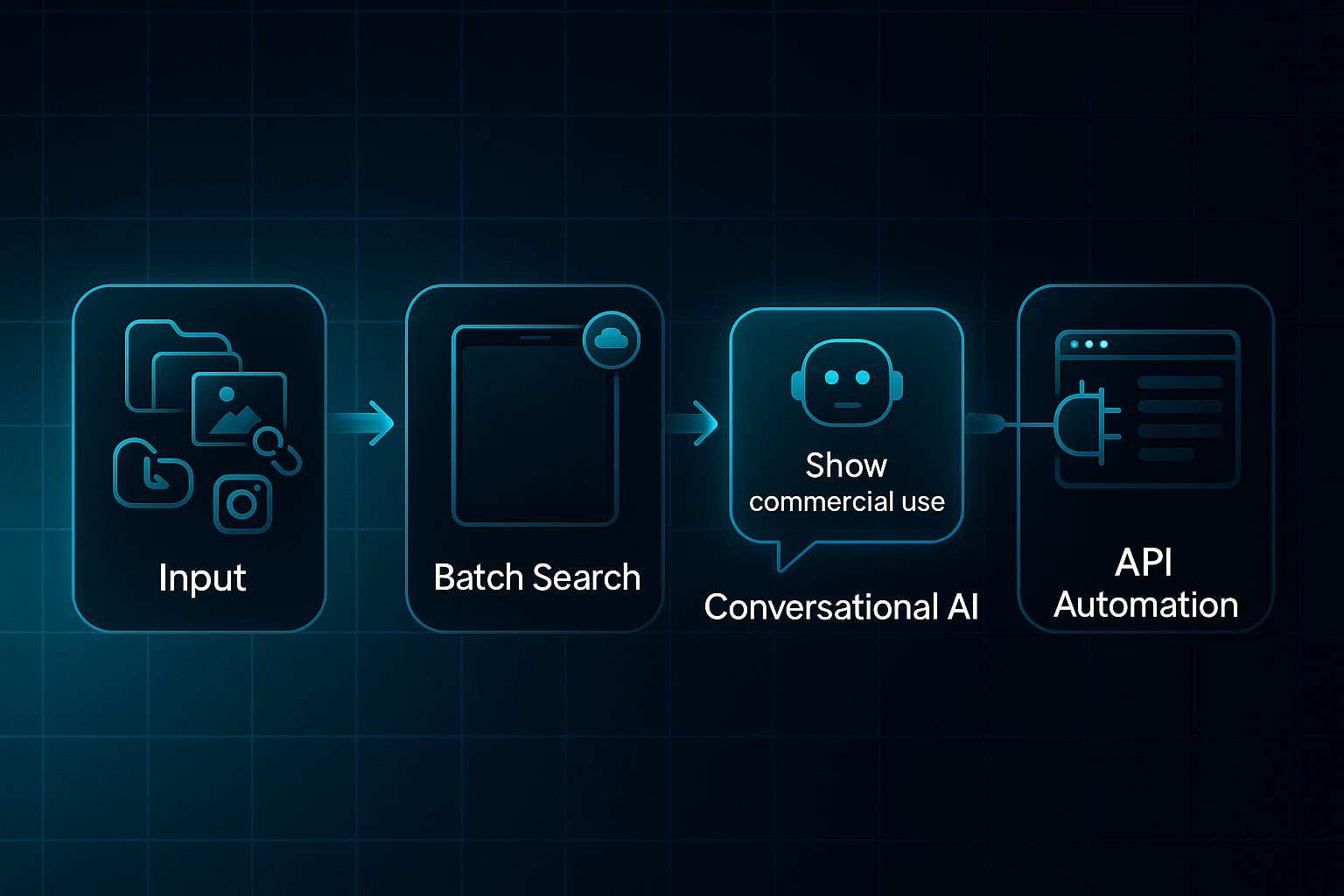
Getting started with Copyseeker is refreshingly easy. You can drag-and-drop, select a file, paste a URL, or even pull images straight from Instagram—giving users immediate access whether they’re a photographer or part of a busy agency.
If you’re handling a large number of images, batch searches on the Progressive Web App (PWA) make a real difference. The PWA works on any device and keeps going even offline, which is something browser extensions just can’t match.
Here’s where things get interesting: advanced users can talk to Copyseeker’s conversational AI as if they’re requesting a colleague’s help. Commands like, “Show me every commercial use this month,” turn bulk monitoring from a headache into a breeze. Want full automation? Connect Copyseeker’s API to your content management system and say goodbye to manual uploads.
Behind the scenes: AI-driven detection and technical challenges
But what’s happening under the hood? Copyseeker generates a “visual fingerprint” for each image using cutting-edge AI. This lets it spot your image even if someone crops, filters, watermarks, or compresses it—a huge step forward for brands trying to find campaign images that have been tweaked.
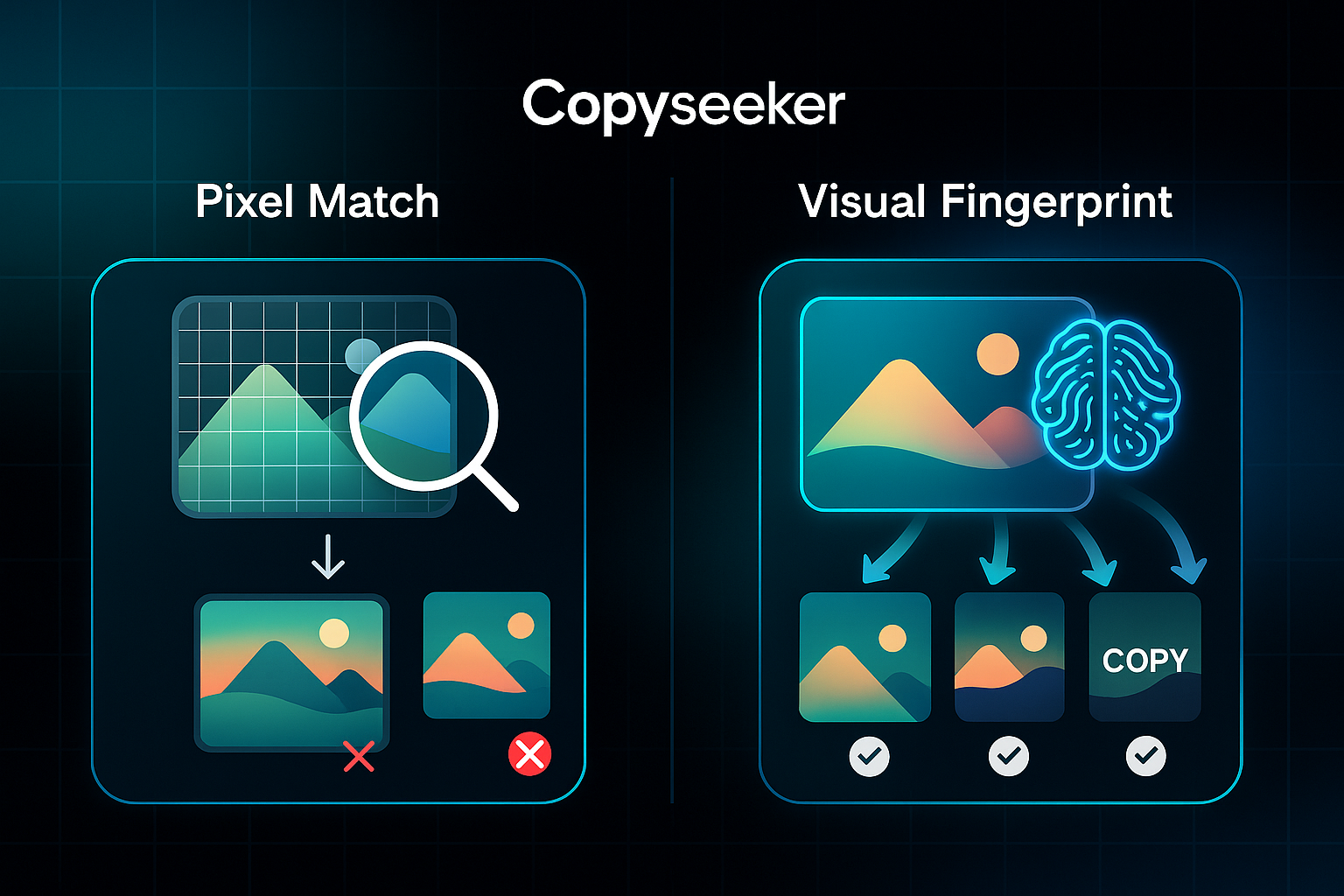
Traditional tools mostly rely on plain pixel matching and limited web indexes. Copyseeker scans obscure websites, niche forums and social media that standard tools just ignore. This is the big edge when it comes to coverage and accuracy.
Let’s get visual for a moment:
| Feature | Copyseeker | Traditional Tools |
|---|---|---|
| Exact match detection | Yes (AI and pixel) | Yes (pixel only) |
| Edited/cropped image finding | Yes (robust) | Rarely/No |
| Batch multi-image search | Yes (conversational/API) | Limited/none |
| Coverage of obscure/social sites | Broad AI-enabled scanning | Standard web index only |
Of course, no system catches everything. Highly manipulated collages or images parked on private sites can slip through, and the rare false positive is still possible. Copyseeker flags anything suspicious so users keep control over what matters most.
Result interpretation and actionable insights
Results appear as exact matches or edited versions, listed with thumbnails, sources, credibility tags, discovery dates, and confidence scores. This makes it simple to spot potential risks or confirm ownership in seconds.
Imagine a journalist uploading a news image. They can instantly review everywhere the photo has surfaced online or trigger a takedown process. Agencies get tools to export reports, launch protective actions or automate alerts—useful for both ad-hoc checks and ongoing monitoring.
In short, Copyseeker brings you instant, actionable intelligence—helping everyone from creative professionals to global businesses protect their images and reputation, right when they need it.
Core features of Copyseeker and the pain points they solve
Batch search capabilities
Ever tried managing hundreds of images for a campaign or editorial? That overwhelming feeling is exactly what Copyseeker’s batch search is designed to resolve.
You can select huge image sets in one go—drag-and-drop, upload from your device, paste URLs or pull directly from Instagram and cloud folders.
For agencies and newsrooms, typical batch sizes in 2024 go beyond a handful; we’re talking 100 to 500+ images each session. Enterprise teams process 1,200 images nightly through the API.
And here’s the clever bit: there’s no hard batch limit for enterprise users. That means global retailers, legal teams, and creative professionals scale up easily without bumping into artificial ceilings.
But Copyseeker isn’t just about throughput. Its batch functionality is a genuine time-saver. Agencies report 80% less time spent on manual copyright checks.
Newswire teams—like Reuters—scan editorial submissions in under two minutes per batch. Retailers now handle image infringement in hours, rather than letting cases drag on for days.
This matters, because manual searching on outdated tools is too slow and error-prone when facing a flood of assets.
Copyseeker adds advanced filtering, ranking matches with domain authority so quality sources appear first and spam stays out of sight.
Each match includes direct image links, timestamps, metadata and a confidence score. Need a real example? A Paris ad agency recently vetted over 300 influencer images—Copyseeker called out 17 unlicensed entries before publication.
These efficiencies skip across sectors. Content studios, newsrooms and retailers use batch scanning for brand protection and rapid catalogue checks.
One major e-commerce company now scans over 1,200 images nightly, removing 250+ unauthorised listings in a single week. Newsrooms experience workflows up to seven times faster for fact-checking, while agencies generate copyright reports straight from the results page.
So what’s the net effect? Batch search on Copyseeker empowers professionals to handle giant image libraries quickly, respond to credible matches, and automate copyright defence. You skip endless single-image uploads and incomplete results.
Instead, you get granular filtering, immediate insights and total scalability—a serious upgrade over old-school reverse image tools with limited results and minimal context.

AI-Powered
SEO Content Strategy
See the AI platform that's replacing entire content teams
(with better results).

Batch workflow improvements at a glance
- Agencies
80% faster checks for batches over 100; 17 unlicensed entries flagged at a Paris ad agency. - Newsrooms
7x speedier verification; Reuters debunked 3 viral fakes in a single April batch. - Retailers
Over 1,000 images swept nightly; 250+ stolen images removed in just one week.
How is Copyseeker used in real-world scenarios?
Photographers and artists: Tracking image theft
For photographers and artists, Copyseeker acts like a digital watchdog. Batch uploads let them scan entire portfolios—whether that’s ten pieces or hundreds—all at once.
And here’s where it gets smart: the AI goes beyond direct copies, catching versions that have been cropped, filtered, or watermarked, so altered image theft doesn’t go unnoticed. Source URLs, timestamps and credibility ratings make it clear if your work is being misused.
I’m in a group of storm chasers on Facebook that looks out for unauthorized use of content we produce. When I came across a post about [an image thief], I decided to look through his Instagram page and quickly found one of my images was mirrored and used as a key element in his 'artwork'.
Even after that first sweep, you’re covered. Ongoing alerts flag fresh infringements quickly. In one freelance case, Copyseeker uncovered over 50 unauthorised website uses at once, streamlining the DMCA takedown process with bundled evidence files.
Brands and businesses: Defending logos and product images
Businesses get real firepower here. Copyseeker allows brands to bulk-upload assets and monitor them automatically via dashboard or API.
Automated web crawls hunt down counterfeit listings and logo misuse across e-commerce, social media and marketplaces. Actionable reports, with links and timestamps, help teams react fast and enforce their rights.
Take one major European retailer: Copyseeker enabled them to monitor 1,200 product images nightly, removing 250+ unauthorised listings in just a week and significantly reducing counterfeiting.
Legal/IP teams and content creators: Gathering actionable evidence
Legal teams rely on Copyseeker for timestamped evidence bundles supporting takedowns or disputes. Custom workflows flag urgent cases and automate DMCA responses.
One publisher even integrated Copyseeker exports into legal documentation, speeding up disputes and strengthening copyright claims with concrete audit trails.
Newsrooms, educators, and investigation teams: Verification and research
Journalists and researchers upload images for quick verification—Copyseeker checks origins, edits, and first appearances. Batch search streamlines academic checks and newsrooms can debunk viral fakes in a single sweep, sharing robust reports instantly.
Workflow fit and automation advantages
So what’s the advantage? Seamless integration—Copyseeker fits into daily routines, with API, automation, and exportable reports.
Scheduled scans and ongoing tracking turn image protection into a calm routine. Users report up to 80% faster resolutions and hundreds of infringements solved monthly, making visual protection truly efficient.
How does Copyseeker compare to other reverse image search tools?
The major players: Google Images, TinEye, Lenso.ai, Bing Visual Search
Let’s run through the biggest names. Google Images and Lens, TinEye, Lenso.ai, and Bing Visual Search cover most needs—each with their own strengths.
Google Images is the default for simple online searches, now featuring AI to recognise objects and products. TinEye’s solid legacy and reputation make it ideal for batch duplicate checks, especially for asset managers. Lenso.ai is the speedster here, scanning faces and brand logos at scale, which agencies love for vetting influencer content.
Bing Visual Search focuses on straightforward, personal searches rather than deep professional auditing. What about Copyseeker? It’s engineered for teams dealing with big batches, providing edit detection, scalable audits, automation and powerful privacy.
Technology under the bonnet
Behind the scenes, Google’s catalogue is huge—over 120 billion images in 2024. That means broad matches, mainly pixel-perfect.
TinEye works with fifty-four billion images and supports legacy assets through a robust API. Lenso.ai, using deep learning, scans up to 10,000 images per hour, perfect for high-volume checks.
Bing plays it simple, designed for quick searches but not for scale. Copyseeker’s AI finds even cropped, filtered, or compressed versions across obscure sites and forums—handling 1,000+ images in a single enterprise batch.
Comparative feature analysis: Batch search, privacy, edit detection, monitoring
| Feature/Capability | Copyseeker | Google Images/Lens | TinEye | Lenso.ai | Bing Visual Search |
|---|---|---|---|---|---|
| Batch search | 50–500/session, unlimited enterprise | Main: single, Lens supports few | Up to 5,000 | 10,000+/API | Mainly single |
| Edit detection | Robust: crop, filter, watermark | Basic, limited | Basic | Strong for logos/faces | Pixel matching only |
| Privacy | No retention for guests; GDPR/CCPA compliant | Retained for training | Retained for improvement; API privacy | Custom for enterprise | Often retained, varies |
| Monitoring/alerts | Automated & instant alerts | Manual only | Basic (paid) | Automated/alerts | None |
| Professional API | Yes: workflow, browser, CMS | Limited | Yes, asset management | Yes, media/influencer | Limited |
| Cost: free vs paid | Free batch; paid automation | Free; limited API | Free small batch; paid API | Paid for volume | Free |
Copyseeker stands out for edit detection, automation, flexible batch size and robust privacy. TinEye fits long-haul asset libraries, Lenso.ai is ideal for influencer and brand sweeps, while Google and Bing offer straightforward single checks.
Use-case alignment: Who should choose which tool?
Which suits you best? Agencies, brands and legal teams running ongoing, bulk searches or fraud monitoring—Copyseeker brings the most control. Retailers automate nightly sweeps of 1,200 product images, while agencies use it to pre-flag unlicensed influencer images.
TinEye is suited for catalogue managers handling large archives. Lenso.ai makes quick work of influencer and brand logo scans. For rapid, individual checks, Google and Bing excel.
So, what’s the secret? If your work depends on ongoing monitoring, edit detection, and automation—Copyseeker is a leader. Archivists turn to TinEye. Those checking influencers and brands quickly pick Lenso.ai. And for quick, occasional lookups, it’s Google or Bing. Professional workflows needing privacy and deep reporting consistently favour Copyseeker as the reliable choice.
Recent updates and innovations in Copyseeker
Continuous monitoring and smarter alerts
Proactive, ongoing scanning
Copyseeker’s 2024 upgrade made continuous monitoring possible. Now, photographers can automate checks across their entire portfolios, and agencies keep tabs on thousands of images round-the-clock—so manual searching becomes a thing of the past.
Real-time alert system
Got a new match? Real-time alerts ping solo users straight away with evidence-ready email reports. Agencies and enterprise teams get dashboard notifications, making copyright and brand misuse quick to tackle.
Impactful enforcement use cases
Speed is crucial. Freelancers fire off takedown requests in minutes using alert-driven evidence. Global retailers automate enforcement on 2,000+ products weekly, cutting infringement timelines by 60%.
Algorithm, filtering, and user experience improvements
Smart filtering and high-confidence results
Sick of sifting through noise? Copyseeker’s smarter algorithm hides spam and weak matches, so users see only reliable, actionable results.
Redesigned interface and workflow upgrades
The new interface means drag-and-drop uploads, instant previews, easy prompts for beginners, plus batch tools and dashboards for seasoned users. Setting up scheduled scans is simple, too.
Accelerated batch processing
Batch scanning now runs up to 40% faster, with instant exports ready for legal or client use. Asset management integration keeps everything organised.
Advanced AI, reporting, and integrations
Complex match detection with custom AI
The updated AI now traces composite, watermarked, or edited images on obscure forums—far outpacing old-school tools.
Detailed reporting and automated exports
Reports pack in provenance timelines, EXIF data, and bulk export options—streamlining audits, DMCA filings, and records.
Browser extension and API
Whether you need browser-based checks or API automation, Copyseeker adapts seamlessly to any workflow.
Beyond image search: Complementary AI solutions for content creators
Today’s digital publishers and agencies have their work cut out—protecting images, keeping up with compliance, and making sure SEO boxes are always ticked.
That’s where automated asset protection steps in, building copyright checks straight into daily creative routines so nothing gets missed.
Where content creation and asset protection intersect
- Broader responsibilities of image-centric professionals
Photographers, marketers, and agencies handle copyright tracking, compliance, publishing, and SEO in one workflow. - Workflow synergy: Copyright verification meets content optimisation
Copyseeker ensures every published image is copyright-verified, driving compliant, optimised, and quick campaigns. - PixelForge Studio campaign example
Using Copyseeker, PixelForge halved compliance time and increased output 30%—only checked images made it through. - Efficiency from integrated automation
Automation cuts legal delays and eases manual workloads.
SEOSwarm and blog-in-one-minute: Value for digital publishers (not image search)
- Distinct role of SEOSwarm and blog-in-one-minute
They automate blog creation, SEO, and publishing—not reverse image search. - Workflow supplement to image verification
Copyseeker clears images; SEOSwarm then manages automation and SEO with verified assets. - Automation at scale for compliance
Features like bulk article creation and meta optimisation support high-volume, compliance-focused teams. - Maintaining end-to-end asset integrity
Blending Copyseeker and automation keeps images protected across the full publishing journey.
Pairing these AI tools doesn’t just speed up production—it safeguards your assets, ensures compliance, and makes scaling campaigns a breeze.
Blog-in-one-minute
Add a fully SEO-optimised blog to your website with just 2 lines of code.
Learn more
Why I Trust Copyseeker to Protect My Work
Most people underestimate just how quickly images can slip out of your control online. Copyseeker changes that equation, giving you real-time visibility and actionable intelligence—whether you’re a solo creator or managing thousands of assets for a global brand.
If you want to protect your work, verify authenticity, or streamline compliance, here’s what I recommend: - Start with a batch search to audit your current image library - Set up ongoing monitoring for your most valuable assets - Integrate Copyseeker’s API or browser extension to automate checks as your workflow grows
No tool is perfect, but Copyseeker’s blend of AI-driven detection, privacy, and automation puts you ahead of the curve. In a world where every image matters, the smartest move is to make image protection part of your daily routine—not an afterthought.
- Wil