Waiting days for Google to notice your new page or backlink can stall even the best SEO campaigns. I’ve seen firsthand how slow indexing holds back launches, product updates, and link-building efforts—especially when you’re working at scale or under tight deadlines.
That’s where rapid URL indexers come in. These tools are designed to get your content and links into search engine results much faster, giving you a real edge when timing matters. In this article, I’ll break down exactly how these indexers work, what features set them apart, and why speed is more than just a convenience for SEO professionals.
You’ll get a clear look at the technical side—bulk submissions, API connections, automated retries—and see how different workflows fit solo site owners, agencies, and high-volume publishers. I’ll also compare leading tools, outline their limits, and share practical troubleshooting steps so you can avoid common pitfalls.
By the end, you’ll know which rapid indexing solution matches your needs, how to set it up, and what results to expect. If you’re tired of waiting for visibility, this guide will help you move faster and smarter.
What is an SEO Software Rapid URL Indexer?
Understanding Rapid URL Indexers in SEO
A rapid URL indexer is a specialised piece of SEO software with a very particular job: making sure your web pages and backlinks are discovered and indexed by search engines like Google and Bing much faster than traditional methods allow.
When you hear the term indexing in SEO, think of it as the process where a search engine adds your webpage or backlink to its vast, searchable database. Only the content that’s indexed can appear in search results—so if it’s missing from the index, it may as well not exist online at all.
But, why does this matter so much? The blunt truth is that general SEO tools tend to focus on things like performance tracking or site auditing, rather than the nitty-gritty of rapid discovery. Rapid URL indexers are built for one primary purpose: to cut down the time between when you publish something and when it actually becomes findable. Anyone who’s ever uploaded a new product or launched a crucial landing page—only to watch it languish, unseen, while waiting for Google’s slow manual index submission—knows how aggravating this wait can be. Sometimes days go by before your new content finally shows up in results, leaving potential traffic on the table.
Search engines tend to favor websites that are frequently updated with fresh, relevant content. Rapid indexing ensures this new content is recognized quickly, signaling to search engines that the site is active and authoritative, which can lead to improved search rankings.
This becomes even more obvious if you’re handling multiple sites as an agency, rolling out new ecommerce products, or publishing lots of stories that need instant visibility. In these scenarios, speed isn’t just nice to have—it’s a real competitive advantage. These tools are also essential for link-builders who depend on seeing freshly-created backlinks recognised by search engines promptly.
The Conceptual Anatomy of Rapid Indexing Tools
So, what makes a rapid URL indexer tick? There are a few powerful technical features at play, each one instrumental in reducing the lag between publishing and visibility.
Let’s break down the four fundamental features that set rapid URL indexers apart:
- Bulk Submission
Send hundreds or thousands of URLs at once—no tedious manual entry, just efficient submission. - Automated Queueing
Spots and schedules new URLs for indexing, smartly staying within search engine quota limits. - API Connections
Direct links to Google Search Console or third-party APIs let you request indexing without relying on slow, organic crawling. - Status Reporting
Monitors which URLs are indexed and highlights any that are still pending, making troubleshooting much easier.
All these elements work together immediately after new pages or backlinks are published. Rather than sitting idle, a rapid indexer will quickly initiate submissions to search engines. This step comes before broader analytics or performance tracking and forms a critical bridge between content creation and ongoing SEO strategy.
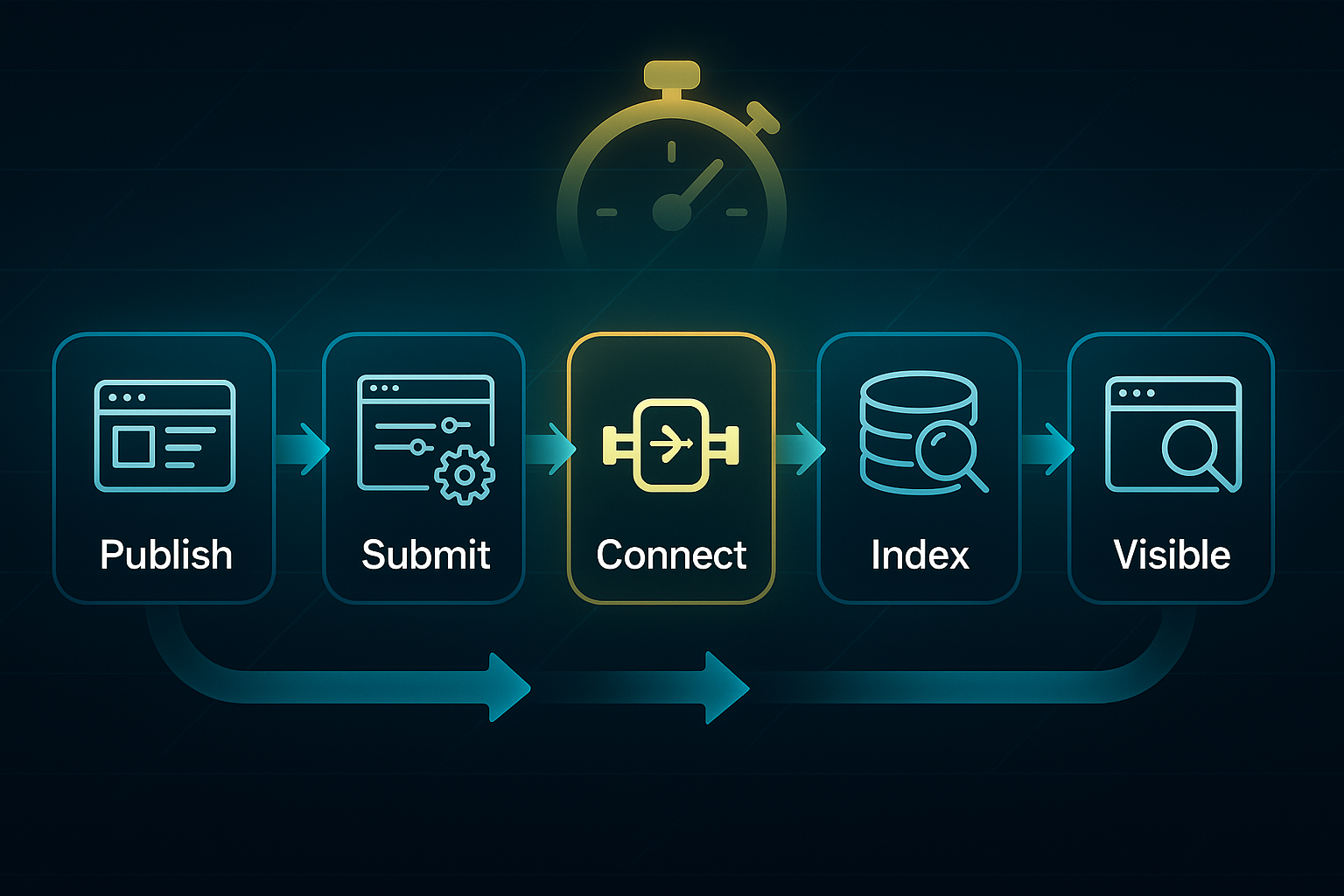
You might wonder, is this advantage real in practice or just theoretical? The answer is that speed and automation are genuinely decisive for SEO professionals who are striving for early wins in crowded markets. It’s no wonder these rapid indexers are becoming a staple for agencies and brands eager to maximise online exposure with minimal wait time.
In competitive industries, speed matters. If your competitors’ content gets indexed first, they may capture more clicks and audience attention.
Having covered the essential principles, it’s time to explore exactly how rapid URL indexers transform speed into tangible SEO benefits—and where they address the most stubborn indexing challenges.
Understanding and Overcoming Indexing Bottlenecks: How Different Users Run Into (and Solve) Limits
Slow, inconsistent indexing is a nightmare for any SEO manager, whether you're optimising a small blog or handling tens of thousands of URLs for a busy agency. The delays can block campaign momentum and chip away at your ROI (Return on Investment).
But here’s the thing: not every site or team faces these hurdles in the same way. The workflow you use, your website’s scale, and the SEO tool you rely on shape both the bottlenecks you'll hit—and how you get past them.
Hitting the Wall: Common Indexing Limits
Submitting by hand in Google Search Console (GSC)? There’s a tough daily cap—10 to 15 URLs per property. Overstep and you'll hit HTTP 429 (Too Many Requests)—shutting you out for 24 hours or more if the pattern repeats.
Automating through plugins like WP Instant Indexing or Rank Math helps by letting you push requests via Google’s Indexing API (Application Programming Interface). Free plans cover up to 500 URLs per day, and paid plans (from £59/year) increase the limits. Yet Google’s official quotas still apply: 200 publish requests per project each day, 100 per batch, and one request per second. Bust those limits, and you’ll see “rateLimitExceeded” or “quotaExceeded” errors in your logs.
If errors pop up, plugins pause, auto-retrying every 15–30 minutes for up to three cycles. If the problem doesn’t clear, you’ll get a prompt to review your API access or pause until quotas reset.
Scaling Up: SaaS Platforms and Bulk Indexing
If you're pushing thousands of URLs, SaaS (Software as a Service) tools such as IndexMeNow, RapidIndexer, and Omega Indexer are built for scale. They routinely support 10,000–50,000 URLs per month. For example, IndexMeNow handles 10,000 URLs for £29/month, RapidIndexer offers 50,000/day at £199/month, and Omega Indexer manages 20,000/month for £39/month.
Here, integrated error handling saves you time. These platforms auto-balance API calls, watch for Google’s quotas, then retry batches up to three times at 15–30 minute intervals. RapidIndexer even refunds you for any URLs not indexed after 14 days.
Agencies and large-scale users go further—setting up a minimum of five Google Cloud Platform (GCP) projects per site, each with verified GSC properties and API keys. They stagger overnight jobs for best throughput. Set-up takes 2–4 hours, and ongoing management is 2–6 hours weekly. If errors stay after three retries and 48 hours, logs are exported and escalated to the vendor or Google support.
What You Need: Prerequisites and Resource Scope
Choosing the right approach depends on your resources and technical confidence:
- Plugins (Rank Math, WP Instant Indexing)
Require WordPress, a verified GSC property, Indexing API enabled, and admin rights. Set-up: 20–30 minutes. Weekly checks: 10–15 minutes. Skills: plugin management, log export for errors. - SaaS Platforms (IndexMeNow, RapidIndexer, Omega Indexer)
Require account registration, an API key (if needed), GSC-verified domains, and URLs as a CSV. Set-up: 10 minutes. Monitoring/troubleshooting: 1–2 hours weekly. Entry cost: £29–£49/month for 10,000–50,000 URLs. Pro plans sometimes need vendor approval. - Agency/Bulk Workflows
Require verified GSC and GCP access, at least five GCP projects per site, API key and script set-up, and team coordination. Set-up: 2–4 hours, then 2–6 hours weekly for queue management/exporting logs. Budget: £99–£349/month based on plan.
If setting up APIs or GCP is too advanced, SaaS dashboards are often the easiest launch pad—they guide you and let you grow into more technical options later.
How it Works: Step-By-Step Workflows
Looking at real user experiences helps make all those details concrete.
Plugin Workflow (Solo Sites/WordPress)
- Install and configure Rank Math or WP Instant Indexing with your API key.
- Publish or update content; auto-batching covers up to 500 URLs daily.
- If “rateLimitExceeded” or “quotaExceeded” appears, the plugin retries three times, pausing 15 minutes between.
A green “Indexed” in the dashboard and “URL is on Google” in GSC? Mission accomplished. If not after 48 hours/three tries, export logs and call on plugin support.
SaaS Dashboard Workflow (Growing Sites/Link-Builders)
- Register with IndexMeNow or RapidIndexer, upload a CSV batch (up to 10,000 URLs).
- Platform schedules and retries. Dashboard marks URLs “Indexed” or “Failed”.
- Batches still unindexed after three retries/48 hours? Manually request a review or escalate with logs. RapidIndexer refunds if URLs fail after 14 days.
Agency & Bulk Operator Workflow (High Volume)
- Set up a minimum of five GCP projects (Google Cloud Platform) per site, verify GSC, activate API keys/scripts.
- Spread jobs in parallel and schedule overnight.
- If three retries/48 hours don’t resolve errors, export logs and escalate.
One agency sent 3,100 URLs via RapidIndexer in five days (GSC on its own: 420).
Automation, Scheduling, and Analytics
Automated triggers fire on every publish/update. Indexers schedule retries, spread jobs off-peak, and show clear dashboards: percent indexed, error tally, cost per URL, and batch times.
For ongoing work: plugins need just 10–15 minutes of weekly checks, SaaS users spend 1–2 hours reviewing analytics, while agencies may put in 2–6 hours scripting and managing queues.
If you see error codes after three retries/48 hours, export the logs—then escalate.
How to Validate and Troubleshoot Results
A green “Indexed” in your tool and “URL is on Google” in GSC is your finish line. If URLs aren’t showing as indexed after three retries and 48–72 hours, submit again, escalate, or request support using detailed logs.
Saving logs is essential: they help untangle persistent errors and act as evidence when talking to your vendor or Google. For the toughest cases, try splitting batches, changing timing, or adjusting the order of submissions.
Scenario Playbook: Which Approach Suits Your Scale and Budget?
To match your solution to your goals, here’s the overview:
- Plugins
For <500 URLs daily, small sites, £0–£59/year. - SaaS Platforms
For 500–20,000+ monthly URLs, most growing businesses, £29–£149/month. - Agencies/Bulk
For 10,000+ monthly, high-volume projects, £99–£349/month (plus scripting/team time). - Weekly effort
Plugins: 10–15 minutes; SaaS: 1–2 hours; agency scale: 2–6 hours.
Choosing the right indexer means matching workflow to scale, budget, and the skills you have. The teams that follow clear retry and escalation rules are the ones winning visibility fastest. Next up, we’ll break down which tools deliver best for each user type—side by side.
Overview and Comparison of Leading Rapid URL Indexing Tools
Picking the right rapid URL indexer isn’t just a technical decision—it’s the difference between immediate search engine visibility and watching your content gather dust. The marketplace is stocked with tools, each offering unique batch sizes, refund policies, and ways to slot into your SEO workflow.
So how do you pick the best one for your budget, the kind of projects you run, and the support you need? This side-by-side look should help you lock in the tool that’s right for your team.
Feature and Metric Comparison Table
Let’s break down the headline stats. Here’s a rapid scan of pricing, capacity, types supported, guarantee/refund terms, dashboard/API features, average success rates, and real-world results.
| Tool/Platform | Pricing (2025) | Batch Max/Project | Daily/Project Ceiling | Supported Types | Guarantee Policy | Dashboard/API | Typical Success Rate | Named Project Example |
|---|---|---|---|---|---|---|---|---|
| IndexMeNow | $59/60 URLs, $199/260, $999/2,000 | 2,000 | 500/day recommended | Webpage, backlink, social | Auto refund, 10 days | Live dashboard, API, plugin | ~80% in 24h | Osborne Digital: 200+ pages/48h |
| RapidIndexer | $25/500, $100/5,000, $2,000/50,000 | 9,999 | 50,000/month (paid) | Google-eligible pages/links | Auto refund, 14 days | REST API, dashboard, plugin | ~91% in 14 days | SiteSprint: 10,000 products/7 days |
| Omega Indexer | $20/1,000 links | Unlimited | No stated cap | Backlinks, citations | No official refund | Bulk/CSV, drip scheduling | ~30–60% in 9 days | PRLinker: 2,000 links/7 days |
| WP Instant Indexing/Rank Math | Free, $59/year upgrade | 100/batch manual, 200/day API | 200/day (Google API) | WordPress posts/pages | No refund—API governed | WP dashboard, queued status | All posts in 4h | TravelBlogNow: posts/4h |
| SEOSwarm | $79/month, $1,299/unlimited | 2,000+/day/client | Unlimited (agency managed) | All campaign pages/links | SLA/refund, agency support | Agency dashboard, API | 70–90% in 24–72h | LeadGen Edge: 3,500 pages/1 week |
Looking at this table, a few patterns jump out. For small publishers and local businesses, the plugin route—WP Instant Indexing or Rank Math—makes instant submission easy and budget-friendly, but you are capped at 200 links per day thanks to Google’s API limits. This is perfect for moderate posting rates and simple site setups. TravelBlogNow’s results—posts indexed in just four hours—set a great expectation for small sites.
If refund guarantees and transparent reporting are vital for your campaigns, IndexMeNow stands out. There’s a straightforward dashboard, and you’ll get automatic credits whenever URLs aren’t indexed inside ten days. Agencies love the hands-off reliability for launches—Osborne Digital’s rapid indexing is a telling example.
Stepping into high-volume territory, RapidIndexer is hard to beat. Think 50,000 URLs a month at impressive bulk rates. You can automate submissions and monitor every batch, with refunds handled right in the dashboard. SiteSprint’s success with massive product batches—92% indexed in a week—really demonstrates its firepower.
Then there’s Omega Indexer—for bulk link-builders who prioritise volume over success rate. It’s inexpensive and flexible, letting you drip-feed campaigns. However, you’re likely to see lower percentages indexed. For runs where partial success works and cost is king, Omega makes sense—PRLinker’s 2,000 links show what’s possible.
For enterprise teams wanting full-service management and ironclad guarantees, our solution, SEOSwarm, is worth considering. Agency clients get unlimited batches, fast turnaround, and support written into the SLA. The LeadGen Edge case—3,500 pages indexed in a single week—gives a taste of what that kind of resource delivers.

AI-Powered
SEO Content Strategy
See the AI platform that's replacing entire content teams
(with better results).

Here’s a quick summary of what I advise based on hands-on experience:
- Small Site Plugins
If you’re a local business or solo publisher, WP Instant Indexing and Rank Math shine. Plug them in, get fast results, and never worry about huge quotas. - Refund-Backed SaaS
For agencies and campaigns where success must be guaranteed, IndexMeNow and RapidIndexer are the go-tos. Fast support and real refunds protect your budget. - Bulk Builder Solutions
Link-builders who want scale at minimal cost should look at Omega Indexer for mass submission, accepting lower average indexing rates. - Enterprise/Agency Platforms
When you need to scale operations and guarantee results, SEOSwarm provides dedicated dashboards and contractual support for managed rapid indexing.
Guarantee/refund mechanisms matter a lot. Treat them as safety nets—not just features.
Make sure each tool gives real-time feedback in its dashboard, but always double-check with Google Search Console’s URL Inspection for ultimate proof.
If deadlines pass without success, quickly trigger a refund or call support. Matching your workflow with the right indexer is what brings swift visibility without wasted effort.
These choices build the groundwork for rapid, reliable SEO breakthroughs. Up next, we’ll dig into the technical features and automation tools that let these platforms move ahead of the pack.
Key Features and Differentiators of Rapid URL Indexing Software
Automation and Platform Integration: Advanced Capabilities
What separates the best rapid URL indexers in 2025 from the rest? With so many tools claiming “fast indexing,” it’s vital to understand which platforms actually deliver true automation and seamless integration. This is where agencies find their edge.
The strongest solutions offer multi-engine compatibility and bulk API (Application Programming Interface) processing, so you can send URLs to Google, Bing, Yandex and others—all at once, no repetitive manual uploads. For high-volume publishers or link-builders, bulk endpoints let you process 9,999+ URLs per call. Workflow automation is now the norm: top indexers connect with Zapier, IFTTT, and even integrate directly into CI/CD (Continuous Integration/Continuous Deployment) pipelines, so content gets submitted at exactly the right moment. It’s like having an automated assistant on call for every campaign.
Before looking at feature lists or pricing, it’s smart to check if a candidate platform ticks each core integration box. With stacks getting more complicated every year, reliable automation isn’t optional—it’s essential for scaling.
- Multi-Engine Submission
One click submits to Google, Bing, Yandex, and others for broader—faster—reach. - Bulk API Processing
Handle up to 9,999 URLs per batch, key for large sites and agency needs. - Workflow Automation
Synch instantly with Zapier, IFTTT, or CI/CD tools for event-driven submissions. - Custom Scheduling
Schedule indexing triggers to match publish times in your CMS (Content Management System).
Reporting, Analytics, and Guarantees
Even powerful automation needs proof. The best indexers now deliver real-time dashboards, detailed audit logs, and clear refund mechanics—so agencies can spot problems before clients do.
What’s at stake here? If you can’t measure batch progress, catch errors, or demonstrate compliance, you end up gambling with your campaign’s ROI (Return on Investment). Robust analytics protect both reputation and budget—and refund or guarantee systems make sure you’re never left stranded if something doesn’t index.
- Cross-Site Dashboards
Track all batches and client projects live from one view. - Timestamped Audit Logs
Download compliance-ready records of every request. - Automatic Refunds
Vendors like Rapid URL Indexer auto-credit failed URLs after 14 days. - Custom Success Criteria
Set goals per engine—Google-only or multi-engine—using integrated reporting.
Selection Framework: Agency and Developer Considerations
Selecting the wrong indexing tool can mean missed traffic, wasted budget, and unhappy clients. For anyone running high volume, multiple accounts, or stepping into enterprise SEO, it pays to scrutinise every angle—especially those that often slip past a quick “features” scan.
So, how do you avoid expensive slip-ups? Start by weighing each indexer against these practical agency/developer priorities. If a tool can’t deliver on these, you could face unnecessary API throttling, hold-ups in critical launches, or confusion about refund terms.
- Scalability Needs
Unlimited URLs, multi-account support, simple onboarding. - Integration Ecosystem
Connects to CMS, analytics, and workflow tools without headaches. - Performance & Reliability
Aims for 80–91%+ indexing success within 72 hours—a competitive benchmark. - Technical Support & Documentation
Comprehensive guides, responsive vendor support—critical when things break. - Platform Quirks
Check for vague SLA (Service Level Agreement) terms, hidden limits, and rate throttling.
There’s more to come. AI-driven predictive scheduling uses campaign and historical data for smarter timing. Blockchain-based audit logs promise tamper-proof compliance. The IndexNow (open indexing standard for real-time search engine updates) protocol unlocks super-fast, multi-engine updates.
The bottom line? Don’t be blinded by shiny features—dig into the details. Reliable indexing now depends on blending automation, transparent reporting, and rock-solid refund policies. That’s what separates consistent SEO wins from ongoing frustration.
Solving Key Pain Points: How Rapid Indexers Address Slow Indexing and Bottlenecks
Agency-Managed Indexing: Unique Process and Operational Benefits
Let’s face it: slow URL indexing and daily submission limits are a headache for SEO professionals everywhere.
When you’re dealing with 3–14 day delays, or constrained by the usual 200–500 URLs per day limits, it can throw a spanner in your campaign’s momentum. This is especially obvious for agencies juggling multiple sites or racing to publish content in high volumes.
Most standard plugins and SaaS (Software as a Service) platforms do a solid job at small scales. They’ll let you submit batches, see results on their dashboard, and scan the error logs—but there’s always that ceiling, keeping you from moving faster than Google’s quota allows.
Agency-managed rapid indexing workflows are designed to lift you over those barriers.
The process kicks off with a clever trick—setting up five or more Google Cloud Platform (GCP) projects per client site, each armed with its own API credentials. This parallel bedrock lets agencies breeze past typical API rate limits and submit a hefty 2,000+ URLs per client, every single day.
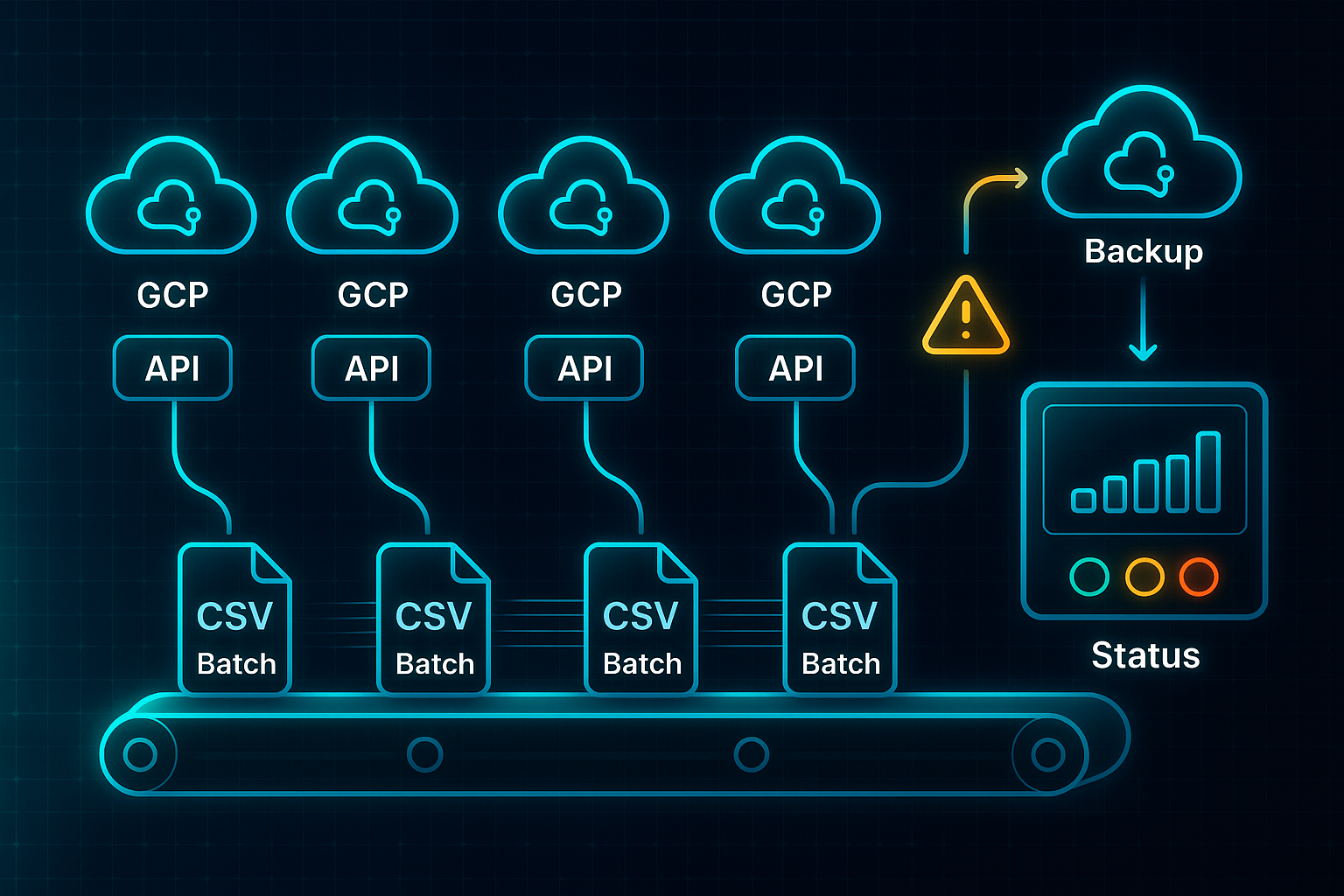
Bulk uploads become routine—think CSV batches flying through the pipeline—and real-time dashboards track every update, pinging you with fresh index status every 5–10 minutes.
If Google throws up quota errors like `quotaExceeded` or HTTP 429, there’s no need for panic.
The platform simply shuffles jobs over to backup accounts, re-queues the failed URLs, and nudges you via email, Slack, or SMS.
When those persistent errors linger, automated log exports (CSV/JSON) are generated for pro review or escalation to Google support.
In practice, what difference does this make?
Traditional manual pipelines can chew up over 30 admin hours a month to get 10,000 URLs indexed.
On an agency platform—like our own SEOSwarm—those hours plummet to just four, focused mainly on quick review and coordination.

Agencies routinely see 70–90% indexing success for massive batches (2,000–10,000 URLs) inside 24–72 hours.
All the reporting, monitoring, and error handling happens in one place.
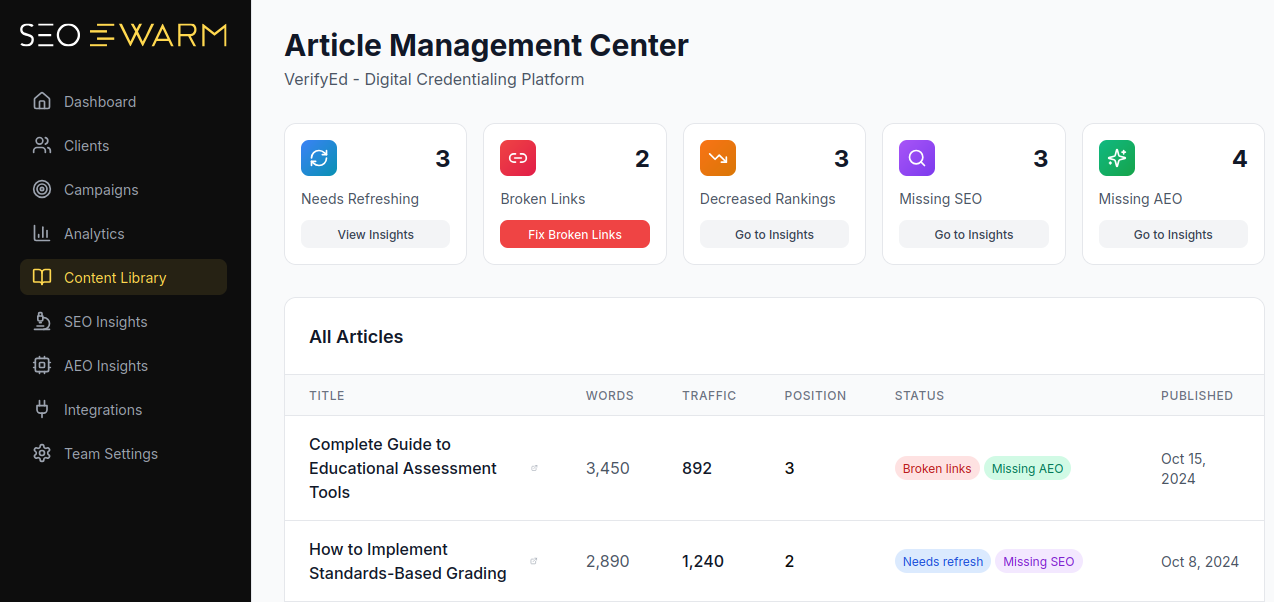
That means less firefighting and more energy spent on strategy.
This is where real advantages surface: multi-client scaling, centralised reporting, automated error resolution, and guaranteed Service Level Agreement (SLA) turnaround.
Agencies or brands running complex sites and campaigns benefit the most.
Solo site owners with modest needs—like WordPress users handling under 200 URLs a day—are better off with plugins or simple SaaS tools.
Agency-managed platforms don’t just speed things up—they turn SEO submissions into predictable, reliable backbone processes that safeguard visibility and maximise ROI.
For everyone involved, the move means less time wrangling problems and more time driving results.
And a word to the wise: always have your bulk rapid indexing set up—and overseen—by skilled agency staff, sticking closely to Google’s API policies.
Finding the right match for your workflow—whether it’s a plugin, SaaS, or agency platform—removes bottlenecks, shields your campaigns, and lays the foundations for ongoing SEO growth.
Of course, seeing the technical possibilities is one thing, but what about real-world value?
Next, we’ll dig into use cases—from new site launches to big e-commerce rollouts and multi-brand campaigns—to show rapid indexers in the wild.
Practical Use Cases: When and How Rapid URL Indexing Tools Deliver Results
Rapid URL indexers deliver outsized results—if you match the right tool to your workflow and follow clear action triggers for troubleshooting.
Let’s walk through where each approach excels and the precise steps to stay on track.
WordPress Launches: Rank Math & WP Instant Indexing
Launching with WordPress? Rank Math and WP Instant Indexing complete setups in 15–30 minutes and let you queue up to 100 URLs per batch (2,000 per day).
If you see three consecutive ‘red’ status icons after submitting, split batches further and reset API access.
Always keep CSVs to aid plugin support if needed.
Bulk E-commerce: IndexMeNow & RapidIndexer
Managing a large online catalogue? IndexMeNow and RapidIndexer process up to 10,000 URLs per batch.
Dashboards monitor status; refund policies kick in after 10–14 days if links remain unindexed.
If two consecutive batches underperform or show repeated errors after resubmission, break down those batches and inspect URLs in Screaming Frog.
Retain your batch files for backup and troubleshooting.
Link-Building Campaigns: Omega Indexer
Scaling link-building? Omega Indexer offers quick CSV uploads and lets agencies push thousands of URLs.
Recent campaigns have raised indexed rates from 70% to 85% within a week.
If you spot three failed batches in a row, filter out questionable links and submit batches in staggered rounds.
Always have the original link files handy for support tickets.
Agency Projects: SEOSwarm
For agencies running multisite launches, SEOSwarm delivers rapid batch handling (10–2,000+ daily), dashboard analytics, and Service Level Agreement escalation.
If any project’s batch fails after three automatic retries and 48 hours, rotate API credentials and escalate using logs and CSVs for efficient vendor support.
At-a-Glance Platform Comparison
Pricing is per month or year, according to vendor:
| Platform | Price | Min Batch/Limit | Success Rate | Validation | Refund/Backup |
|---|---|---|---|---|---|
| Rank Math | $83.88/year | 1/100, 2,000/day | 90–98%/72h | Dashboard/GSC | CSV for rollback |
| IndexMeNow | $0.10/URL | 1/1,000 | 85%/72h | Dashboard/GSC | 10-day refund |
| RapidIndexer | $0.05/URL | 10/10,000 | 91%/72h | Dashboard/GSC | 14-day refund |
| Omega Indexer | $0.07/link | 10/5,000 | 80–85%/7d | Dashboard/GSC | CSV for rollback |
| SEOSwarm | £79–£1,299/month | 10/2,000+/day | 70–90%/72h | Dashboard/API | SLA escalation |
| Screaming Frog | £259/$249/year | N/A | N/A (diagnostic) | Crawl/report | Export for QA |
Key Operational Safeguards
Before moving on, these rules keep your indexing workflow robust:
- Batch Monitoring
Three consecutive batch failures mean split and resubmit. - Error Escalation
Persistent errors after three retries? Rotate API credentials and escalate with logs and CSVs. - Pre-Upload Checks
Always filter for quality—especially in high-volume or link-building batches. - Validation Sequence
Double-check all indexed statuses in both dashboards and Google Search Console. - Backup Discipline
Save all submission files for troubleshooting and rapid recovery.
With the right tool and decisive action, you’ll unlock fast visibility and keep SEO campaigns moving.
Blog-in-one-minute
Add a fully SEO-optimised blog to your website with just 2 lines of code.
Learn more
Up next: the mistakes that slow teams down—and easy ways to dodge them.
Limitations, Risks, and Best-Practice Guidelines for Rapid Indexers
Where Rapid Indexing Software Faces Limits
Rapid URL indexers promise faster visibility, but there’s a catch—platform quotas that can stop you in your tracks if you’re not paying attention. Plugins like Rank Math and WP Instant Indexing are capped at 200 URLs per day, while SaaS platforms such as IndexMeNow and RapidIndexer set limits of 500 per day and 50,000 per month, respectively.
Agency-managed systems—think our solution, SEOSwarm—get clever by spreading tasks across multiple Google Cloud Platform (GCP) projects, slashing manual hours and dodging those frustrating single-account ceilings.
Success rates also vary by tool. WordPress plugins usually land between 90–98% indexed in 72 hours, while SaaS options hit an 80–91% range. For campaigns that stumble, IndexMeNow and RapidIndexer process automated refunds after your error logs and job IDs are sent in, helping safeguard your budget.
Quality Assurance and Troubleshooting
Quality checks are non-negotiable before blasting big batches. You’ll want to run Screaming Frog to weed out any URLs with non-200 status codes or crawl blocks, plus clean your lists with Google Sheets or dedupe.io.
Attempting to submit batches larger than 10,000 URLs can trigger API suspensions or lock you out of dashboards—a pattern we’ve noticed even in SEOSwarm logs.
If something goes off the rails, back up all failed URL CSVs and dashboard logs for evidence, then escalate issues with your batch IDs to support. Enterprise and agency platforms typically reply within 24–48 hours under their Service Level Agreement.
Best-Practice Guidelines
- QA Batches
Audit with Screaming Frog and dedupe before submission. - Monitor Quotas
Use alerts or webhooks to watch for quota approaches. - Split Large Batches
Keep troublemakers below 500 URLs for smoother processing. - Archive Evidence
Save failed CSVs and logs for quick help and review.
International campaigns or domain transfers add even more complexity, demanding careful batch splitting and recordkeeping.
These solid habits—too often skipped by others—are the secret to safe, scalable rapid indexing.
With these habits and systems in place, you can finally focus on the technical and strategic SEO advances that unlock long-term wins.
Integrating Rapid URL Indexers Into a Broader SEO Strategy—Coordination, Analytics, and Enterprise-Scale Execution
If you’re managing SEO for hundreds or thousands of URLs, rapid indexers change the game. When quotas tighten or deadlines approach, these tools get your important pages seen in hours, not weeks.
So, what’s the best way to build them into daily SEO workflows for maximum reliability and speed?
Enterprise Workflow, Resource Allocation, and Safeguards
Begin with a deduplicated URL list and a validated XML sitemap. Always lock in your GSC or GCP access before launch.
A pre-launch crawl with Screaming Frog (£259/year) checks crawlability, meta tags, and internal links.
Pick an indexing lead to handle setup, batch submissions, and analytics. For ongoing ops, plan 30–60 minutes a week.
Major launches need 3–6 hours (more if scripting or API configuration is involved).
Automate batch log exports and keep rollback CSVs on hand. If you hit a quota wall or a batch stalls, switch to parallel accounts or escalate with your vendor—platforms like SEOSwarm make this seamless with SLAs.
Now, 100% indexing isn’t realistic, especially at scale. But with a robust process, 85–95% of priority URLs are indexed inside 24–72 hours. Enterprise teams notice time-to-index shrinks by a week, and migration traffic dips soften by 35%.
Here's how these workflows fit common scenarios:
| Scenario | Platform | Resource/Skill Need | Indexing KPI | Measured Benefit | Escalation/Support |
|---|---|---|---|---|---|
| Bulk launch | RapidIndexer | API setup, status review | 91%/72h | 30% faster indexation | Refund/14 days |
| Enterprise migration | SEOSwarm | GCP config, team lead | 70–90%/72h | Traffic dip cut 35% | SLA/24–48h |
| Ongoing ops | Rank Math/WP | Plugin admin, batch checks | 90–98%/72h | Fast cycles for small ops | Plugin/community |
| Quarterly audits | Any/API/CSV | Analytics/dev support | Custom/week | Trend alerts, early fixes | Log export |
RapidIndexer is stellar for urgent launches needing speed and refund guarantees. SEOSwarm excels for enterprise workflows demanding SLA support.
Plugin solutions like Rank Math are smart for smaller, steady indexing. Whether you’re using plugins or enterprise platforms, assign clear ownership, automate analytics, and document escalation plans. Quick response to quota shifts and consistent monitoring keeps campaigns moving and every URL visible.
My Take on SEO Software Rapid URL Indexer
Speed isn’t just a luxury in SEO—it’s the difference between being found and being forgotten. I’ve seen too many campaigns stall because new pages or backlinks languished, invisible, while competitors raced ahead. Rapid URL indexers exist to close that gap, but only if you match the right tool to your scale and workflow.
Here’s my advice: start by auditing your needs—batch size, technical comfort, and budget. For solo sites, plugins like Rank Math are plug-and-play. Growing businesses should consider SaaS platforms with refund guarantees, while agencies need bulk workflows and robust dashboards. Always validate results in Google Search Console, and keep logs handy for troubleshooting or escalation.
The fastest path to search visibility is built on decisive action and disciplined monitoring. Don’t let your best content gather dust—choose your indexer, set up smart processes, and make every URL count.
- Wil