
Piecing together SEO content that actually ranks is a headache for most marketers. Manual research, outlining, and endless edits eat up hours, and the pressure to scale output without losing quality is relentless.
I’ve seen how these bottlenecks slow teams down, especially when competition for search visibility ramps up. That’s where AI-powered platforms like NeuronWriter come in, streamlining research, drafting, and optimisation into a single workflow.
In this guide, I’ll break down exactly how NeuronWriter works—from semantic SEO and NLP term extraction to step-by-step onboarding and troubleshooting. You’ll get practical validation tips, workflow walkthroughs, and a clear comparison between DIY and agency-led optimisation.
By the end, you’ll know which features matter for your needs, how to avoid costly mistakes, and what metrics to track for real SEO growth. Whether you’re a solo creator or managing a team, you’ll walk away with actionable strategies for faster, smarter content optimisation.
What is NeuronWriter?
The core pain point: Why efficient, high-ranking SEO content is difficult
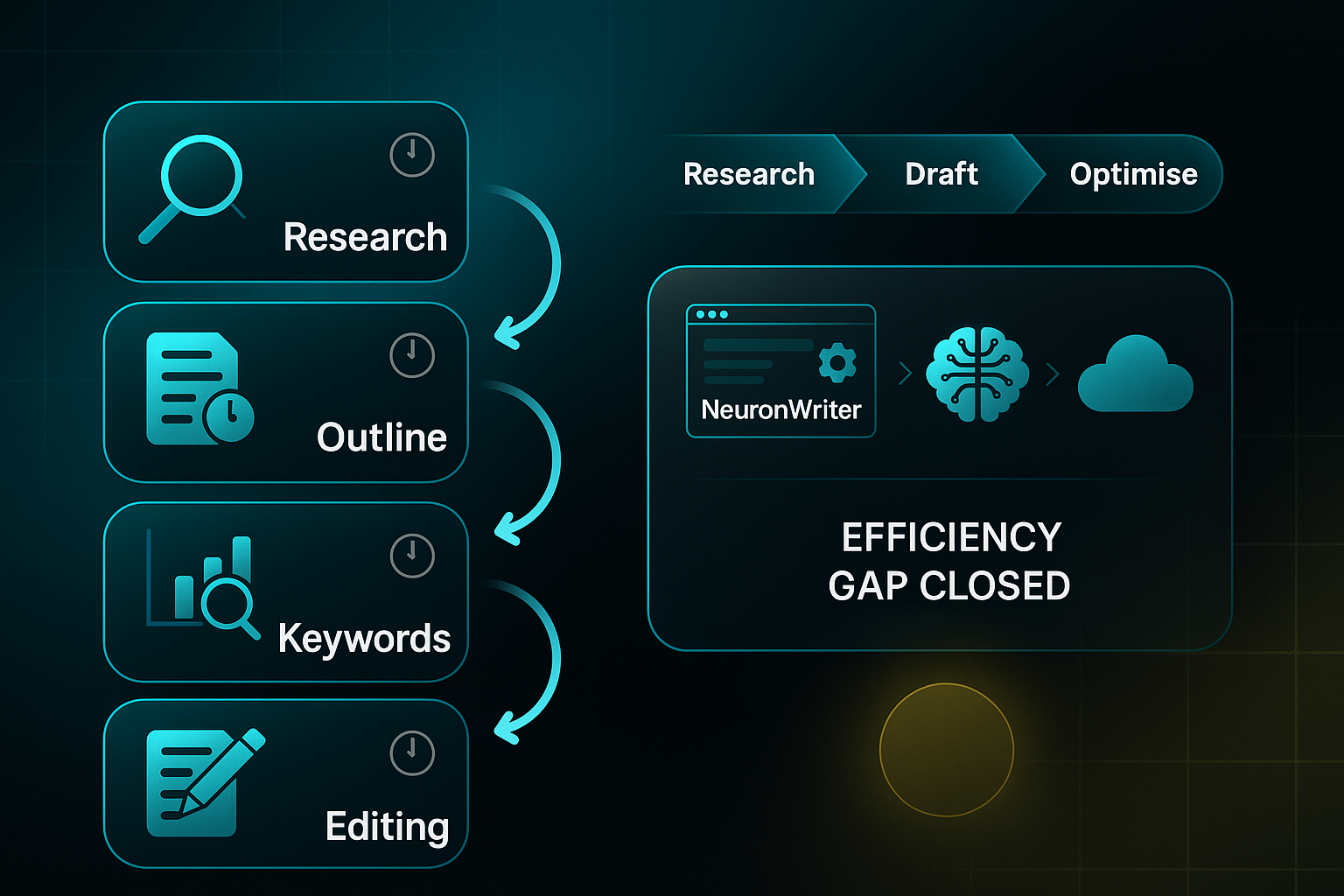
It’s no secret: piecing together search-optimised content is one of those major headaches that digital marketers know all too well. Manual workflows mean endless cycles of research, outlining, keyword chasing and, worst of all, relentless edits and rework.
Marketers spend around four hours per long-form article, but much of that dissipates in technical SEO fixes and fragmented revision routines. And with so many companies clamouring for the spotlight, those manual bottlenecks become even more punishing.
No wonder teams feel swamped when content competition ramps up. The pressure to scale output—without sacrificing quality—is enormous, especially when traditional processes leave you lagging behind. Addressing this efficiency gap is no small matter for organisations wanting sustainable search performance and growth.
NeuronWriter explained: Definition, audience fit, and platform overview
So, what’s NeuronWriter in plain English? It’s a cloud-based platform using Artificial Intelligence to pull together every stage of SEO writing—research, drafting, optimisation, and revision. You get support for blogs, landing pages, product copy, and all sorts of web content.
Who actually benefits from NeuronWriter? Here’s how key groups typically use the platform:
- Agencies
Run bulk SEO campaigns and manage multiple clients with centralised workflow processes. - In-house marketing teams
Improve planning and streamline collaboration across projects. - Small businesses
Unlock advanced optimisation tools for better Google rankings on a start-up budget. - Solo creators
Access intuitive SEO features without specialist training—goodbye confusing jargon! - Bloggers
Get instant, targeted feedback for each draft, making revisions less daunting.
The interface is available in several languages—such as Spanish, German, French, Japanese, Polish, and more—so global access isn’t a barrier. What really stands out is how NeuronWriter condenses everything into a single dashboard, letting agencies benchmark top-ranking pages and individuals see usable feedback as they draft.
That’s huge for smaller companies, because previously all those tasks were scattered, slow, and often—frankly—a drain on energy.
How NeuronWriter harnesses semantic SEO and NLP—core mechanisms
Let’s get to the clever engineering. NeuronWriter relies on semantic SEO and Natural Language Processing (NLP)—and together, these shake up how optimisation works.
Semantic SEO focuses on topic meaning and addressing real user intent beyond just keywords. This ensures writers tackle the full spectrum of searcher questions, which search engines now value most.
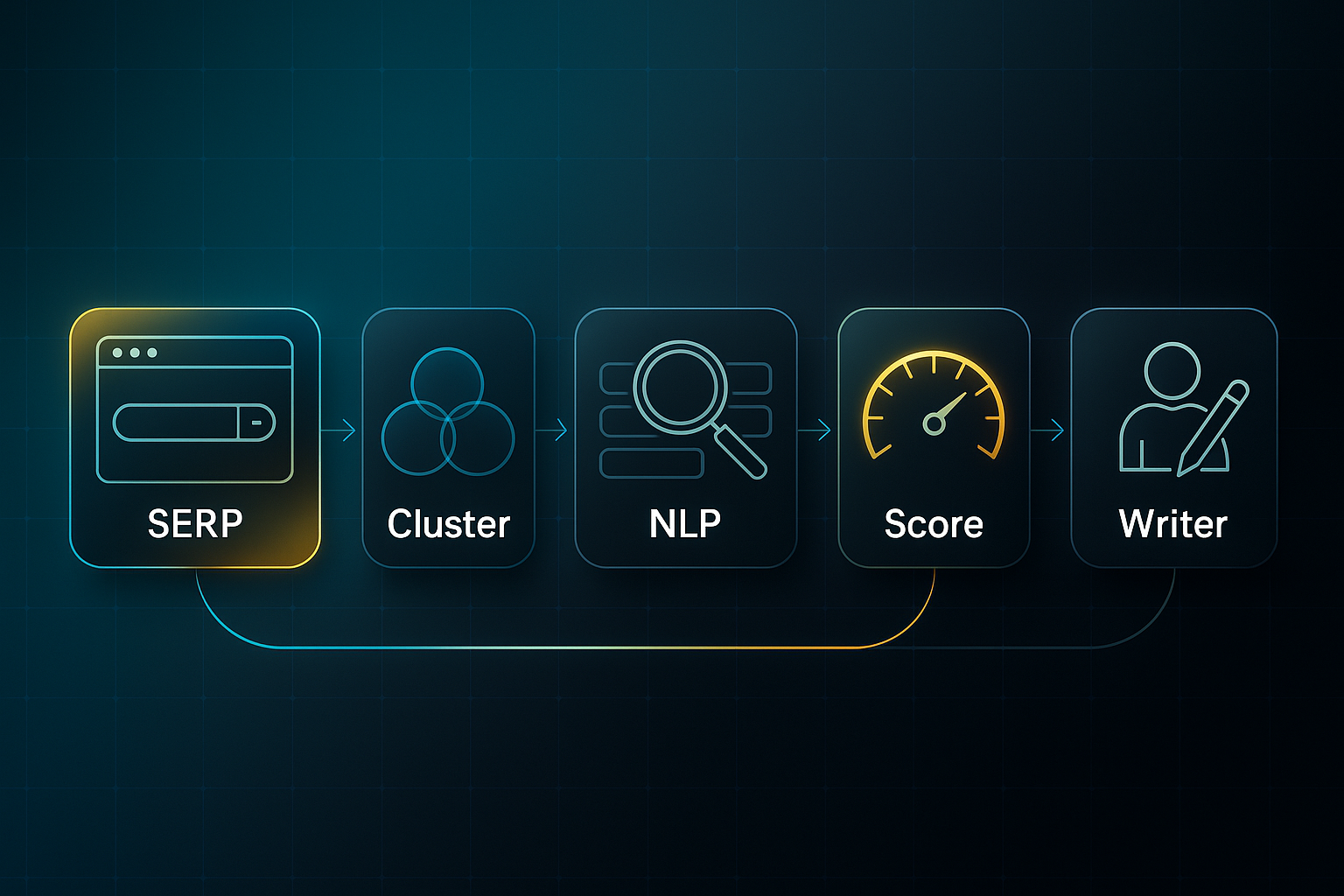
Meanwhile, NLP lets the software scan live competitor content and extract crucial terms, patterns, and popular FAQs. It's like having a grammar teacher cross-referencing every top answer, but in seconds.
Here’s another nifty trick: semantic clustering. If you’re writing about “healthy snacks”, NeuronWriter instantly builds clusters like “meal prep”, “protein options”, and related FAQs. That instantly widens your topical reach—manual sorting would take ages.
The platform analyses live Search Engine Results Pages (SERPs), then scores your draft for topical completeness. What used to be a three-hour minefield of guesswork and manual research? Now, it’s orchestrated with data, not intuition.
Of course, automating these heavy lifts doesn’t mean ignoring human input—writers still shape tone and intent. Knowing these core foundations sets you up well to see how onboarding and project planning work once you step inside NeuronWriter’s unified system.
Getting Started with NeuronWriter: Project Setup and Onboarding
Ever felt overwhelmed by a brand-new SEO platform? You’re not alone. The good news is, NeuronWriter’s onboarding is refreshingly straightforward.
All you need is a NeuronWriter account, a laptop or desktop running Chrome, Firefox, or Edge, and a steady internet connection.
If you’ve filled out web forms or navigated dashboards before, you’re set.
Most first-time users get through setup in just 10–15 minutes.
Step-by-Step Onboarding and Numeric Validation
Curious what it actually looks like in practice? Let’s walk through the key steps—each with concrete validation points so you know you’re on track:
- Log in and access dashboard
Enter your credentials and you’ll land on the Dashboard (/app/dashboard). - Create a new project
Click “Projects,” then “New Project.” Enter a clear name—like “EcoSnacks-BlogSEO-052025”—and confirm it appears in the Projects list. - Select precise niche
Under “Niche/Topic,” pick the most specific category. If your sub-niche just says “Business,” delete and retry for better semantic clustering. - Input main keyword and analyse SERP (Search Engine Results Page)
Add your main keyword, select “Analyze SERP,” and check the metrics. Look for 30–60 SERP Competitors, 10–25 Extracted Headings (H1/H2), and at least 15 missing terms in the Keyword Gap. Not hitting those numbers? Adjust your keyword—changing “healthy snack idea fast easy” (7 competitors) to “healthy snacks” (36 competitors) can make all the difference. - Interpret competition and Top Terms feedback
Look at the “Competition” sidebar. You want a Content Score (NeuronWriter’s optimisation metric) above 65. Optimise by adding green terms until you have ten or more, and hit ‘Refresh Score.’ A jump from 59 to 71 means your clusters are working. - Validate and address issues
Stuck with empty panels, red bars, or a Content Score under 60? Double-check your naming, niche, or keyword. Try a browser refresh, and if there’s still trouble, hit ‘Help’ for support.
Prerequisites, Resource Scope, and Limitations
Before you start, know what’s required—and where you might run into limitations. Here’s the essentials in quick-scan format:
- Prerequisites
NeuronWriter account, desktop or laptop, modern browser, stable internet. - Resource Requirements
Around 10–15 minutes for onboarding; only basic digital skills needed. - Browser Compatibility
JavaScript enabled; mobile setup isn’t recommended. - Account Limitations
Lower-tier plans: fewer projects, limited AI tools, keyword quotas. - Potential Outages
Rare downtime might pause optimisation tools, but saved projects stay secure.
If you encounter issues during onboarding, such as empty panels or stuck red bars, even after following every step, don’t stress. Just revisit your steps, refresh, or open the built-in help.
SERP (Search Engine Results Page) and Content Score (NeuronWriter’s numeric optimisation metric) are the key numbers you’ll watch.
By keeping an eye on these, you’ll move smoothly into NeuronWriter’s advanced workflow—without stumbling into the usual traps.
Core NeuronWriter Features: Step-by-Step User Interface and Optimisation Walkthrough
Fast Workflow: From Idea to Published SEO Content
Let’s cut to the chase—how does NeuronWriter actually speed up your SEO workflow?
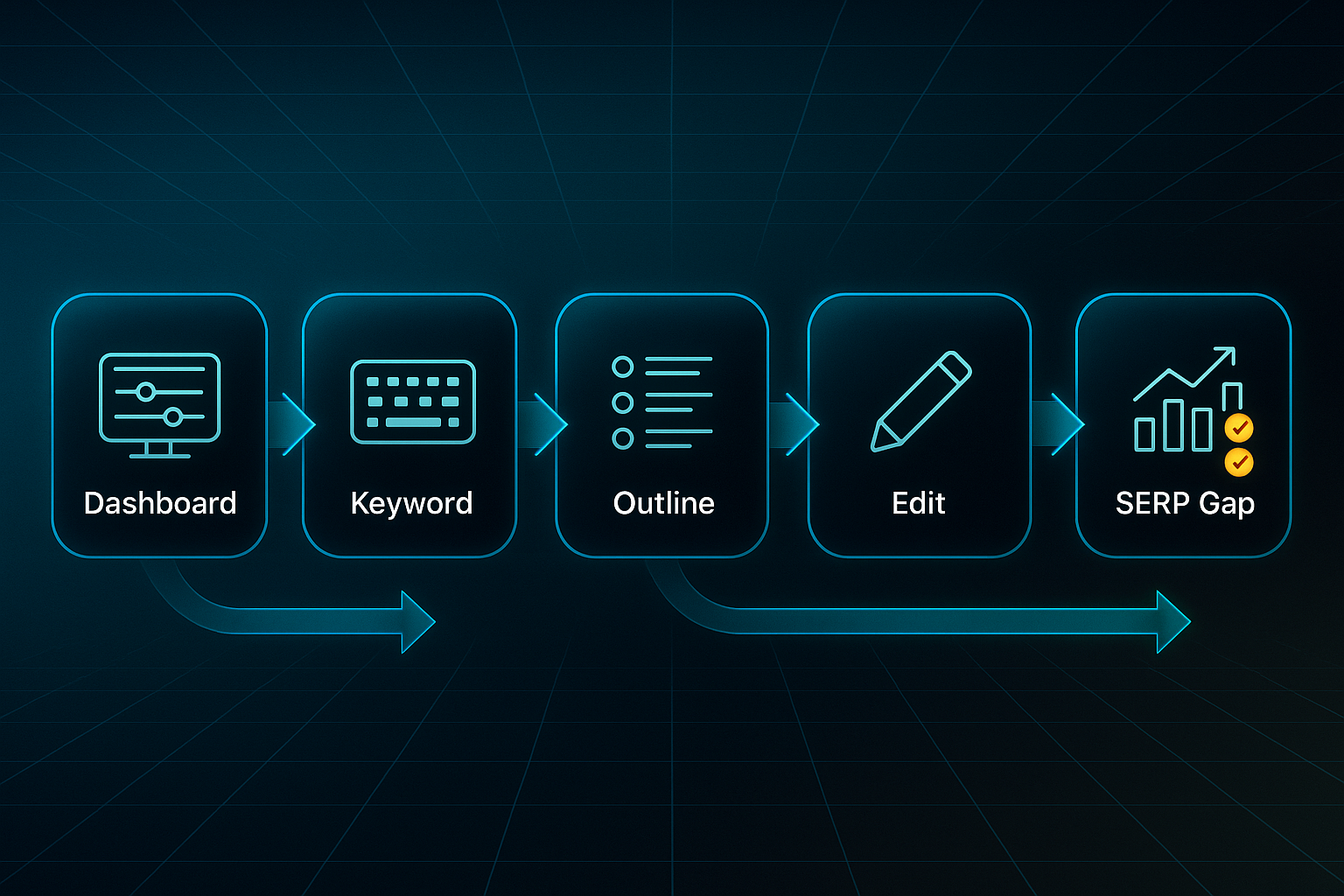
Right after onboarding, the dashboard walks you through building a 1,200–2,000 word article in just 60–90 minutes.
Every time you improve your draft, you’ll see your Content Score climb—expect a 20–40% jump each cycle, closing 80–100% of SERP gaps.
Traditional SEO methods, reliant on manual research and incremental updates, often fail to keep pace with evolving algorithms. AI-powered SEO tools address this challenge by automating complex tasks and aligning content more precisely with user intent.
You don’t need much to start: a NeuronWriter account (Bronze–Diamond, $23–$117/month), a laptop or desktop browser (Chrome, Firefox, or Edge), and if you want instant publishing, a WordPress site with REST API.
For batch or bulk features, plan on using a higher tier.
Drafting with AI Outline Generator and Content Editor
Starting a piece is simple.
After creating your project, pop your keyword into the Content Editor—something like “Sustainable Gardening Tips for Beginners”—and click “AI Outline.”
Instantly, you get a data-driven structure built from top competitors.
Organise the outline by dragging headings, adding any missing themes.
To hit the sweet spot, stick to 4–7 H2 headings, 1,200–1,800 words, and check that you’re covering at least 80% of key competitor themes.
See “Outline Ready!”? You’re set.
If you spot duplicates or gaps, tweak the headings or keyword and check again.
Semantic Clustering and NLP Term Optimisation
Move to the “Terms & NLP” tab to plug semantic gaps.
Gold tiers and above let you AutoInsert terms, but on Bronze and Silver, you’ll do this by hand.
Your goal: 15–30 dark green optimised terms matching what’s working for your rivals.
If “red” markers pop up, rephrase or swap words until you’re back in the green.
This one phase can lift your Content Score by another 15–25%.
SERP Competitor Analysis and Gap Filling
In “SERP Analysis,” compare your draft against up to 40 competitors.
Your aim is to land within 95–105% of their word count (avg. 1,600–1,900) and borrow at least 80% of leading headings.
After clicking “Refresh,” any lingering orange gaps usually signal spots that need direct competitor phrasing.
Content Scoring and Checklist Prompts
NeuronWriter’s Content Score (0–100) and visual checklist steer you step-by-step.
You can publish above 60, but target 77+ for a shot at page one.
Every sidebar item should turn green; any stubborn score beneath 60 often means it’s time to add detail or strengthen your structure.
Ever caught yourself stumped by a yellow prompt?
That’s the platform nudging you towards missing depth.
Plagiarism Checking and Originality Validation
On Gold plans and up ($69+/month), the built-in PlagiaShield checks your text in 30–90 seconds, flagging duplicate phrases in red.
Paraphrase or add unique details until “No Issues Detected” appears.
Set aside 10 minutes for this, especially for longer content.
WordPress Integration and Manual Publishing
Publishing is easy with Gold or higher.
Just connect via REST API and hit publish; always test the connection first.
If it ever fails, exporting as .docx or .html means you’re never stranded—minutes later, your article goes live.
Feature Access by Plan Tier
Curious which features you’ll actually use? Here’s the run-down:
| Feature | Bronze ($23/mo) | Silver ($45/mo) | Gold ($69/mo) | Platinum ($93/mo) | Diamond ($117/mo) |
|---|---|---|---|---|---|
| AI Outline/Content Editor | Yes | Yes | Yes | Yes | Yes |
| NLP/Terms Optimisation | Yes | Yes | Yes | Yes | Yes |
| SERP Analysis | Yes | Yes | Yes | Yes | Yes |
| Plagiarism Check (PlagiaShield) | No | No | Yes | Yes | Yes |
| WordPress Integration | No | No | Yes | Yes | Yes |
| AutoInsert (Batch NLP) | No | No | Yes | Yes | Yes |
Now, what does this mean in practical terms?
For freelancers and small teams working on a handful of articles each month, Bronze and Silver give you all the basics: deep competitor analysis, smart outlining, and core keyword optimisation.
Why pay more if you don’t need batch tools or instant publishing?
The Gold tier is where workflow transforms for content marketers or growing agencies.
Batch NLP, plagiarism scans, and WordPress integration come into play if you’re managing 4–8 posts a month or collaborating across a team.
Don’t underestimate how much time these features save when the schedule gets busy.
Thinking about upgrading?
The moment you find yourself manually checking for duplicates or juggling dozens of terms, a move to Gold or above pays off.
But if you’re just testing NeuronWriter or running a solo blog, it’s wise to master the essentials before climbing the ladder.
Every team is different, so ask yourself: Am I hitting workflow roadblocks, or am I just looking for fancier features?
That decision point tells you everything about when an upgrade is worth it.
Quick Troubleshooting Table
Everyone hits a snag—here’s how to keep momentum:
| Issue | Action/Validation |
|---|---|
| Outline lacks SERP depth | Add more competitor headings until over 80% coverage. |
| NLP batch inserts ‘reds’ | Undo batch, add terms by hand, confirm all go green. |
| Score stuck <60 | Add headings, boost word count, fill structure gaps using competitors. |
| Plagiarism flagged | Paraphrase/add original examples until clear. |
| WordPress publish fails | Test REST/API; if broken, export .docx/.html and upload. |
After these troubleshooting steps, outline and score frustrations are common among users.
If you’re stuck, the fastest remedy is always adding one or two fresh headings or referencing a top SERP result.
Batch NLP “reds” usually mean too many terms at once, so slow down and prioritise.
In such cases, if these routes don't solve your issue, you might feel like you’re just repeating fix after fix.
For most new users, these patterns are normal.
Over time, you’ll spot where the workflow catches and learn to blitz through resolutions.
Plagiarism nags are almost always solved by sharing a new stat, story, or angle.
Even WordPress connection issues lose their sting.
If you remember that manual export is always a backup, NeuronWriter’s colour prompts and fallback routes keep even tricky projects moving.
As you gain experience, if you’re completely stumped or an error persists despite your best tricks, don’t hesitate to bounce it to support.
There’s rarely a dead end.
By your fifth or sixth article, you’ll handle even complex errors like a pro.
When to Consider an Agency-Led Approach
Prefer offloading the whole workflow?
That’s where SEOSwarm comes in—agentic content management and instant blog setup for teams or agencies craving scale without micro-managing every detail.
You’re now poised to dive into practical validation and real-world troubleshooting.
This ensures every piece published through NeuronWriter achieves both strong scores and steady performance.

AI-Powered
SEO Content Strategy
See the AI platform that's replacing entire content teams
(with better results).

Validation, Troubleshooting, and Fixes at Each Step in NeuronWriter Workflows
Nobody loves troubleshooting—but with NeuronWriter, you can usually get back on track fast.
Before you even start, set yourself up right: have an active NeuronWriter account, load a draft in the Editor, and if you’re publishing through the API, you’ll need a Gold plan or higher, plus your WordPress REST API credentials and Editor/Admin permissions.
To measure the impact after publishing, make sure Google Analytics 4 (GA4) and Google Search Console (GSC) are live.
Most issues only ask for basic digital skills—though a little WordPress admin knowledge never hurts.
Diagnosing and Fixing Generic AI Content
You know that moment when your Content Score just won’t budge above 50, or your GA4 bounce rate sits stubbornly over 60%?
That’s often a sign your keywords or structure miss the mark.
In many cases, a 10–15 minute review turns things around.
To target and resolve these issues, focus on:
- Refine Keywords
Use SERP-optimised, niche terms for higher relevance. - Clarify Intent
Clearly state what users want in your prompt; this sharpens AI output. - Adopt Competitor Headings
Pull in 2–3 headings with the Suggestions panel to fill knowledge gaps.
If you’re still stuck, compare your structure to top performers.
With really niche topics, small improvements may be all you can achieve—and that’s perfectly normal.
Resolving Term Density Flags
If you’ve ever seen yellow or red bars in Terms & NLP, you know how jarring it feels.
This usually pops up when you’ve batch-inserted too many terms.
Instead of guessing what to fix, consider these quick wins:
- Use Tooltips
Hover for guidance on using keywords naturally in context. - Rewrite Dense Sections
Break up clusters with synonyms or richer detail to even out usage.
Aim for all green bars and a 10–15 point jump in Content Score.
Persistent yellow? Try synonyms or split large sections.
With Bronze/Silver plans or ultra-niche topics, some flags will linger—don’t sweat it.
API Publishing & Export Troubleshooting
Few things are more annoying than a “Connection Failed” error when publishing to WordPress.
But take heart—most causes are simple and the solutions don’t take long.
For a smooth export or API fix, try:
- Check API and Plan
Confirm you’re on Gold+ and regenerate keys if necessary. - Confirm Permissions
Ensure WordPress access is set to Editor or Admin level.
Manual export as .docx or .html always remains your fallback—especially vital on Bronze/Silver, where API isn’t available.
Iterating for Plateaued Rankings
Wondering if those stubborn rankings ever change?
When GSC shows no growth after a month, it’s time for fresh analysis and targeted revision.
Even a one-position nudge—from fourth to third—can deliver a 13% increase in clicks within two weeks.
Moving up one position in search results can increase CTR by over 30%.
Stay proactive with these checks:
- Spot New Gaps
Use new SERP insights to add or tweak topics and internal links. - Revise Weak Sections
Focus on orange or red-flag content and add depth or examples.
Ranking improvement is slower for low-competition content, so patience is your friend.
Once your revisions are underway, it's just as important to secure your workflow against future setbacks.
Safety Nets, Edge Cases & Prevention
Tempted to skip a backup? Don’t risk it.
Always save versions before major edits.
If persistent errors or plugin problems strike, switch to manual export or contact NeuronWriter support.
And for the odd problem you just can’t fix—think semantic dead ends—redirect your efforts with editorial tweaks and regular monthly audits.
Each fix now means fewer headaches next time, and more time spent on content that actually ranks.
Five Costly NeuronWriter Mistakes (and How to Fix Them Fast)
Ever find yourself following NeuronWriter’s process religiously—and yet, your results stall out? You’re not the only one.
Even experienced users get tripped up by these five classic errors. Happily, each has a practical, quick solution.
Let’s break down the most common mistakes, what to look for, and exactly how to course correct each time.
Mistake 1: Overlooking PlagiaShield Duplicate Alerts
It’s surprisingly easy to let duplicate text slip through and tank your rankings. To ensure this never derails your content, follow this process:
- Detection
PlagiaShield (Gold plan, $69/month) flags over 5% duplicate. - Validation
No Issues Detected and less than 5% duplicate content. - Fix
Rewrite flagged sections; if unresolved, escalate to support. - Resources
Gold plan, basic editing, 10–20 minutes. - Outcome
No penalties; ranking recovery in 7–14 days.
Mistake 2: Ignoring Optimisation Prompts
Those yellow or red prompts aren’t just decoration—ignoring them slows down performance gains. Here’s an easy validation and fix routine:
- Detection
Red/orange Suggestions, or Content Score below 77. - Validation
All prompts turn green, Content Score rises by 5+. - Fix
Address, amend, or justify skipped suggestions. - Resources
Any plan, 10–15 minutes’ editing. - Outcome
15–25% more traffic in less than 30 days.
Mistake 3: Excess NLP Term Insertion
More NLP terms isn’t always better—overstuffing can hurt readability. Spot and resolve this with a simple checklist:
- Detection
Four or more red/yellow bars in Terms & NLP. - Validation
Most terms dark green; text reads naturally. - Fix
Remove, revise, or stagger term inclusion. - Resources
Gold+, manual revision, 10–15 minutes. - Outcome
Bounce rate drops 12%; rankings climb within 1–2 weeks.
Mistake 4: Skipping Final Content/Plagiarism Checks
Relying on Content Score alone is risky for final publishing. Here’s the safety net you need before you hit launch:
- Detection
No All Optimisation Tasks Completed or missed PlagiaShield scan. - Validation
PlagiaShield shows clear; all tasks checked. - Fix
Re-run both content and plagiarism checks after editing. - Resources
Gold+ for plagiarism, 5–10 minutes. - Outcome
98–100% publish success rate.
Mistake 5: Neglecting SERP Reviews After Publishing
Done with publishing? Not quite. Sustained results depend on regular checks. To keep ahead:
- Detection
No Google Search Console progress within 14–30 days. - Validation
Rankings and traffic start moving up. - Fix
Run SERP analysis, fill new content gaps. - Resources
Any plan, GSC login, 15–20 minutes quarterly. - Outcome
Plateau recovery and lasting growth.
Avoiding these mistakes means every NeuronWriter session genuinely counts.
Wondering if hands-on work or an agency fits best? That’s what’s coming next.
NeuronWriter or an Agency Solution? Workflow Comparison and Decision Matrix
You’ve seen how NeuronWriter streamlines hands-on SEO content optimisation. Choosing the right fit—DIY, agency, or a blend—comes down to what each workflow delivers, how much it costs, and which business profile gets the most benefit.
Self-Serve (NeuronWriter): Key Features and Best Fit
NeuronWriter provides AI-driven structuring, semantic clustering (which groups topics by search intent), and NLP keyword suggestions in one editor.
On Gold and above, you’ll also have PlagiaShield for plagiarism checks and WordPress/API publishing.
Plans range from Bronze (£23/month) to Diamond (£117/month).
Teams typically reach Content Scores over 77 and a 98%+ publish rate.
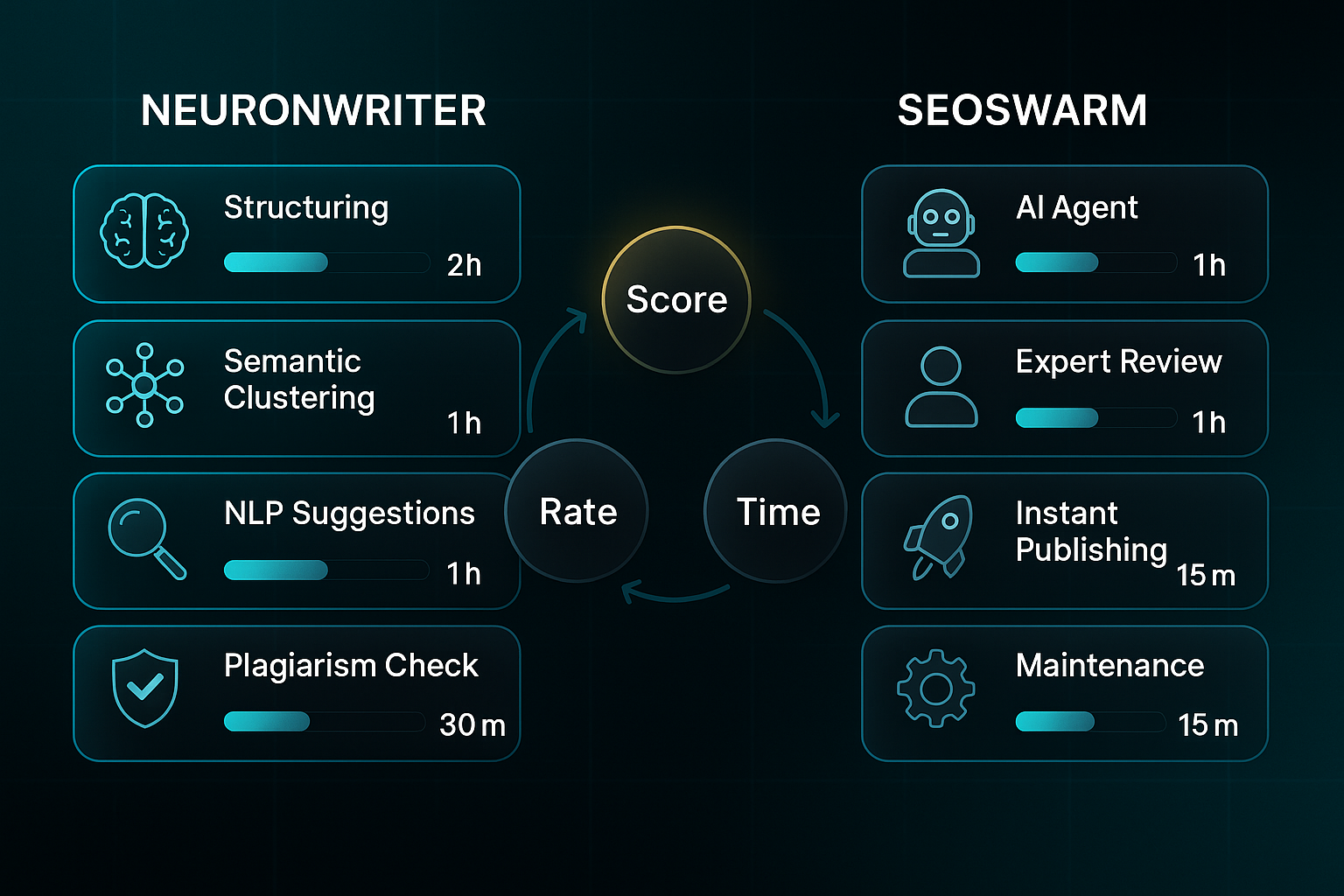
Many users produce an article in less than two hours.
For small agencies, lean teams, or solo creators, this route provides control and a way to strengthen internal SEO skills over time.
Having many features available and the ability to optimise in one platform makes NeuronWriter a strong choice for ongoing, internal SEO content development.
Blog-in-one-minute
Add a fully SEO-optimised blog to your website with just 2 lines of code.
Learn more
Agency-Led (SEOSwarm): Turnkey Workflow and Scale
SEOSwarm takes the weight off your shoulders. AI agents and real experts handle research, strategy, writing, auditing, formatting, publishing, and ongoing maintenance.
Its blog-in-one-minute feature gets SEO content up quickly.
Onboarding is about 30 minutes.
First articles are usually live in 1–2 days.
SEOSwarm shines for brands and franchises producing hundreds of articles monthly with minimal internal oversight.
Pricing is tailored for each campaign.
The main trade-off is less in-house upskilling in exchange for pure speed and scale.
If a business requires operation at scale and direct expertise, SEOSwarm provides a streamlined workflow with fast turnaround and comprehensive management.
Transitioning between self-serve and agency is common; many teams will consider hybrid solutions to balance control and scale.
Hybrid Models and What To Consider
Many teams use NeuronWriter for day-to-day writing but bring in agency support for peak periods or specialist audits.
Team experience, content volume targets, required turnaround speed, and available budget all matter in deciding the right approach.
For routine content, NeuronWriter is usually ideal. For urgent scaling or technical depth, agency input adds real value.
Direct metric comparison can clarify your options and help you weight each approach.
Transitioning from one workflow to another can be guided by practical KPIs and performance goals, ensuring the chosen model delivers results aligned with your business needs.
| Model | Content Score | Publish Rate | Bounce Rate Reduction | Traffic Gain (1 Month) | Time to Indexed Results |
|---|---|---|---|---|---|
| NeuronWriter | 77+ | 98%+ | 8–24% | 15–37% | 1–3 weeks |
| SEOSwarm | 77–95 | 100% | 14–38% | 28–52% | 3–7 days |
| Hybrid | 71–94 | 99%+ | 10–32% | 18–44% | 5–10 days |
The above table highlights the measurable differences and target ranges across the available models. Reviewing these numbers can help identify which workflow matches your priorities most closely.
If hands-on control and team skill-building are highest on your list, NeuronWriter consistently delivers strong results.
For rapid launches, technical work, or very large content output, SEOSwarm usually wins out.
Most SMBs and agencies settle somewhere in the middle—a hybrid lets you scale flexibly, add expert audits, and keep your own team’s capabilities growing without blowing your budget.
Keep tracking your content scores, publish rates, and incoming traffic so you always know your workflow is really delivering.
The next section will cover practical hybrid strategies and how to measure agency ROI.
Essential Metrics and Benchmarks for Measuring Your SEO Content Optimisation Success
If you’re serious about SEO gains—using NeuronWriter or an agency such as SEOSwarm—it’s all about benchmarking your results. You’ll need these in place: a NeuronWriter account (Gold+ for plagiarism checks), Google Analytics 4, Google Search Console, and PageSpeed Insights. With agency support, you may get regular reports, but it’s wise to watch your own metrics for clarity.
This checklist keeps your progress measurable. No matter your workflow, it ensures you know what’s really driving improvements.
- Draft and Optimise
Create a draft in NeuronWriter Editor and target a Content Score of 80+. If it’s lower, add headings or more NLP (Natural Language Processing) terms until the guidance turns green. - Plagiarism Validation
Use the Plagiarism Panel (Gold+) to keep duplication below 5%. Always scan again after significant edits. - Efficiency Audit
Track how long writing takes: aim for 2–4 hours per article (DIY) or 1–3 days (agency). NeuronWriter plans are $23–$117/month; SEOSwarm provides individual campaign pricing. - Ranking and Traffic Monitoring
Check Search Console for SERP (Search Engine Results Page) improvement after two and four weeks. Target top 10 ranking in 2–4 months (agency) or 4–8 months (DIY). In Analytics 4, seek 25–40% traffic gains, CTR (Click-Through Rate) over 3%, bounce below 45%, and sessions over two minutes. - Technical Troubleshooting
In PageSpeed Insights, keep LCP (Largest Contentful Paint) under 2.5s, CLS (Cumulative Layout Shift) below 0.1, and INP (Interaction to Next Paint) under 200ms. For large or multilingual sites, audit monthly and always back up first.
Tracking these KPIs gives you a clear performance snapshot—which you can use as benchmarks against industry standards. Here’s a handy reference table to guide your evaluation:
Reference Table: Numeric KPI (Key Performance Indicator) Targets and Tools
| Metric | Target | Tool/Definition | Outcome |
|---|---|---|---|
| Content Score | 80+ | NeuronWriter Editor | Ranking |
| Plagiarism | <5% | Plagiarism Panel (Gold+) | No penalty |
| Production Speed | 2–4h/article, 1–3d agency | Time tracking | Efficiency |
| Pricing | $23–$117/month, agency quoted | Plan/quote | Budget |
| Ranking timeline | Top 10 in 2–4m/4–8m | Search Console | Success |
| Traffic growth | 25–40% in 6m | Analytics 4 | ROI |
| Engagement | 3–5% CTR (Click-Through Rate), <45% bounce, >2m session | Analytics 4 | Quality |
| Technical UX | LCP (Largest Contentful Paint) <2.5s, CLS (Cumulative Layout Shift) <0.1, INP (Interaction to Next Paint) <200ms | PageSpeed Insights | SERP/UX |
By monitoring your Content Score, technical UX, and SERP data, these KPIs (Key Performance Indicators) reveal whether your optimisation is actually working.
Next up: blending agency and in-house strategies for scalable results.
Expert and Scalable Optimisation: Advanced NeuronWriter Workflow Strategies
Building and Validating Multilingual SEO Campaigns with NeuronWriter
Breaking into new language markets with NeuronWriter is achievable if you follow a clear structure. Begin in ‘Projects’ and choose ‘New Project’.
Set your language and region precisely. These selections establish the SERP context for term clustering.
This ensures you target the right search landscape. Always double-check your language and region choices are listed correctly—they’re crucial for later reference.
Once you’ve confirmed settings, you’re ready to launch your campaign. Validate your campaign in two key steps:
- Analyse SERP and Export Term Clusters
Run ‘Analyze SERP’, export the Term Cluster Report, and confirm at least 20 clusters with 90%+ coverage. - Publish and Track Results
Use Google Search Console, filter by country/language, and aim for a 12–22% CTR increase in two weeks over your baseline.
If you’re not seeing enough clusters or missing region data, refine your keywords and start the analysis again.
Still facing low CTR? Adjust meta descriptions and review regional search trends using Google Search Console’s ‘Enhancements’ tab.
With your multilingual setup complete, scaling workflow through effective team roles and output tracking becomes the next priority.
Team Roles and Output Tracking for High-Throughput Campaigns
NeuronWriter Gold and Diamond plans provide team collaboration tools. Go to Settings > User Management and assign Writer, Editor, and Reviewer roles found in the Collaboration Panel.
As you organise tasks, use the Checklist tab to delegate work and monitor progress in the Team Dashboard’s Productivity section.
The benchmark: each team member publishes 1.7+ articles weekly, with checklist completion above 93%. If productivity falls or assigned work isn’t visible, review project assignments and reload the dashboard.
Small fixes keep output steady. After optimising team roles, keeping workflow efficient demands regular process updates.
Accelerating Workflow with SOP and Changelog-Based Review
Maintain Standard Operating Procedures (SOPs) by checking NeuronWriter’s Changelog every few months. Test new features in a sandbox.
Update SOPs only when changes deliver a 10%+ faster workflow or higher Content Score. If an update causes problems, log the issues and temporarily return to the previous method until the next SOP review.
Shared documents keep everyone aligned. Building on updated SOPs, quarterly audits confirm sustained rankings.
Quarterly Audits and Manual Overrides for Sustained Rankings
Each quarter, use “Review All Projects” to address NLP prompts and verify Content Scores reach 77 or higher.
Compare SERP and CTR pre- and post-audit in Google Search Console, targeting an 8%+ improvement per cycle. If numbers plateau for two cycles, switch to manual review and benchmark against top competitors to spot weaknesses.
Integrating these strategies helps marketing teams ensure consistent performance and scalability.
With advanced NeuronWriter workflows, campaigns align to KPIs, and every project delivers measurable ROI.
My Final Thoughts on NeuronWriter
Most marketers waste hours wrestling with fragmented SEO workflows, but NeuronWriter proves that smart automation can close the efficiency gap. I’ve seen firsthand how semantic clustering and NLP tools turn guesswork into data-driven action—making high-ranking content achievable for teams of any size.
If you’re ready to move beyond manual edits and endless keyword chasing, start by tracking your Content Score and benchmarking against top competitors. Use NeuronWriter’s prompts and troubleshooting guides to refine each draft, and don’t skip regular SERP reviews or plagiarism checks. For larger campaigns or rapid scaling, consider blending in agency support or hybrid workflows.
Here’s my advice: treat SEO optimisation as a living process, not a one-time fix. The teams that win are those who iterate, validate, and adapt—every article, every month. Consistent action beats perfection; the only real mistake is standing still.
- Wil