
If you’re still juggling paper checklists, scattered photos, and endless admin for site inspections, you’re not alone. Manual auditing slows everything down, introduces errors, and makes compliance a headache—especially when teams are spread across multiple locations.
I’ve seen firsthand how digital tools can change the game for construction, property, and safety professionals. Site Audit Pro promises to streamline every step, from capturing annotated photos to generating branded reports in minutes.
In this article, I’ll break down exactly how Site Audit Pro works, who benefits most, and which features actually save time on real projects. You’ll get a clear look at its workflow, reporting tools, collaboration options, and where it fits—or falls short—in demanding environments.
By the end, you’ll know whether Site Audit Pro is the right fit for your team, what to expect from onboarding and support, and how it stacks up on security and integration. Let’s get practical about digital site audits that actually deliver.
What is Site Audit Pro?
Purpose and target audience of Site Audit Pro
Site Audit Pro is a digital inspection app that completely changes the way professionals handle site audits, snag lists, and compliance documentation. Say goodbye to paper forms and juggling handwritten notes; with this intuitive mobile platform, you capture data, annotate photos, and generate polished reports — all from your smartphone or tablet.
So, who’s using Site Audit Pro? There are a few core groups who really benefit. Construction professionals rely on it to track snag lists, document site progress, and perform safety checks, all supported by photographic evidence. Property and facility managers make use of its features for routine inspections, maintenance audits, and asset tracking, whether they’re dealing with just one building or a sprawling portfolio.
Then you’ve got health and safety specialists who can log risks, hazards, and workplace compliance with annotated pics and notes — no more scrambling for missing paperwork. And consultants and auditors find it invaluable too, with customisable reports delivered to clients or authorities, ensuring a distinctly professional finish.
What's clever is that Site Audit Pro is not just for solo field inspectors. Whether you’re working independently or as part of a large, dispersed team, it scales beautifully. Everything you record — from site data to snags and inspections — is shared instantly across locations, creating true oversight and collaboration for management roles.
Core problems addressed by Site Audit Pro
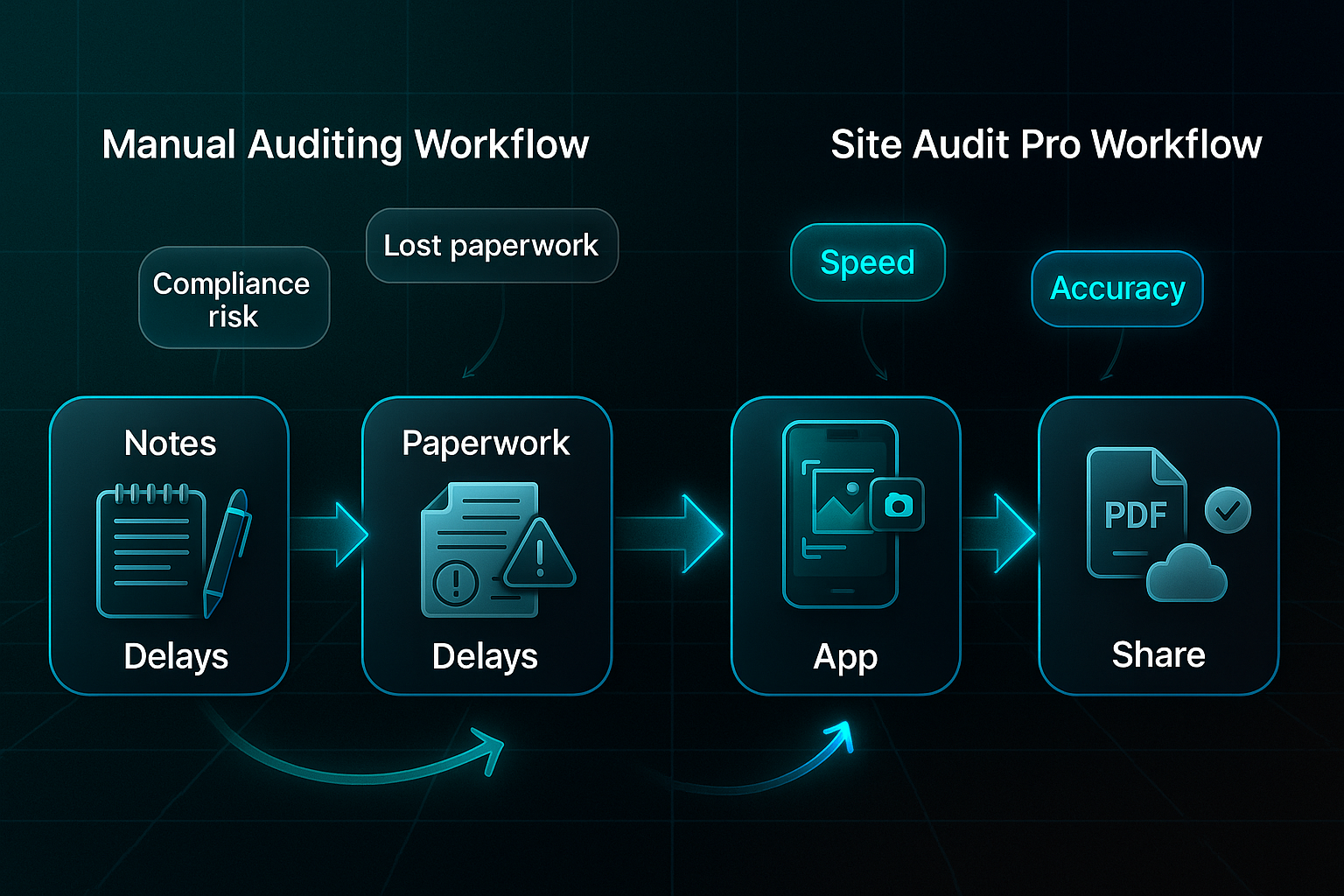
Now, let’s talk about the headaches caused by manual auditing. Handwritten notes, separate cameras, and tedious report writing — it’s a recipe for lost paperwork and mismatched images. Delays pile up, errors creep in, and before you know it, compliance risks become a real concern.
Here’s where Site Audit Pro makes all the difference. You record everything on site, annotate photos as you go, and keep your data secure in one place. And yes, you get instant PDF reports ready to email or share via the cloud. Administrative bottlenecks shrink fast.
With standardised templates and workflow tools, errors drop and documentation stays consistent — no surprises between different projects or teams. You can assign and track issues, maintaining transparent accountability so nothing slips through unnoticed.
And the impact? Users regularly report that site issue resolution times go from days to mere hours. Fewer miscommunications, audits that actually drive action — you get a robust, digital-first approach to compliance and reporting. The result is documentation that's always sharable, accurate, and ready when you need it.
Key features and functionalities of Site Audit Pro
Let’s step inside Site Audit Pro and see what makes it tick for professionals demanding rock-solid inspection, documentation, and compliance across construction, property, and regulated sectors.
It’s much more than a digital notepad; every feature is built to replace those messy workflows and bring order to every inspection. The focus here is on documentation, project organisation, collaboration, seamless cross-device access, and serious data security.
So, how do these features actually work for users? Let’s dig in.
Documentation and reporting tools
Photo and issue capture with annotations
When you’re on-site, taking a photo in the app is as straightforward as grabbing your mobile—no more fumbling with separate cameras or waiting until you’re back at the office.
With Site Audit Pro, each image gets instant context. The annotation toolkit allows you to pin arrows, highlight areas, or jot notes straight onto the photo. It’s a digital highlighter and sticky note in one easy package. Colour-coded markings help sort out urgent hazards from less pressing issues in seconds.
It’s not just for neatness; this clear visual communication means teams avoid time-consuming clarifications. Many field professionals report a 42% drop in requests for clarification once they switched to annotated photos. To give clear evidence, every entry automatically includes a timestamp and GPS coordinates for proof of issue location and timing.
Customisable, professional audit reports
Here’s where things ramp up. Site Audit Pro collects all your images, comments, and site data, pulling everything into polished PDF or CSV reports. But it doesn’t simply push out plain files—these reports come fully customisable with branding, auditor details, cover images, and any reference info you need.
Need sector-specific flexibility? You can add health and safety grading, compliance terminology, or urgency categories for maintenance and tenant requests, with no technical hassle. Auditors drop in digital signatures and commentary, and those GPS stamps help you meet regulated industry standards.
Changing regulations or client demands? Admins can quickly update layouts or categories without needing developer support. That means your reports are always professional and entirely tailored to whoever receives them—clients, management, or regulatory authorities.
End-to-end issue documentation workflow (Example)
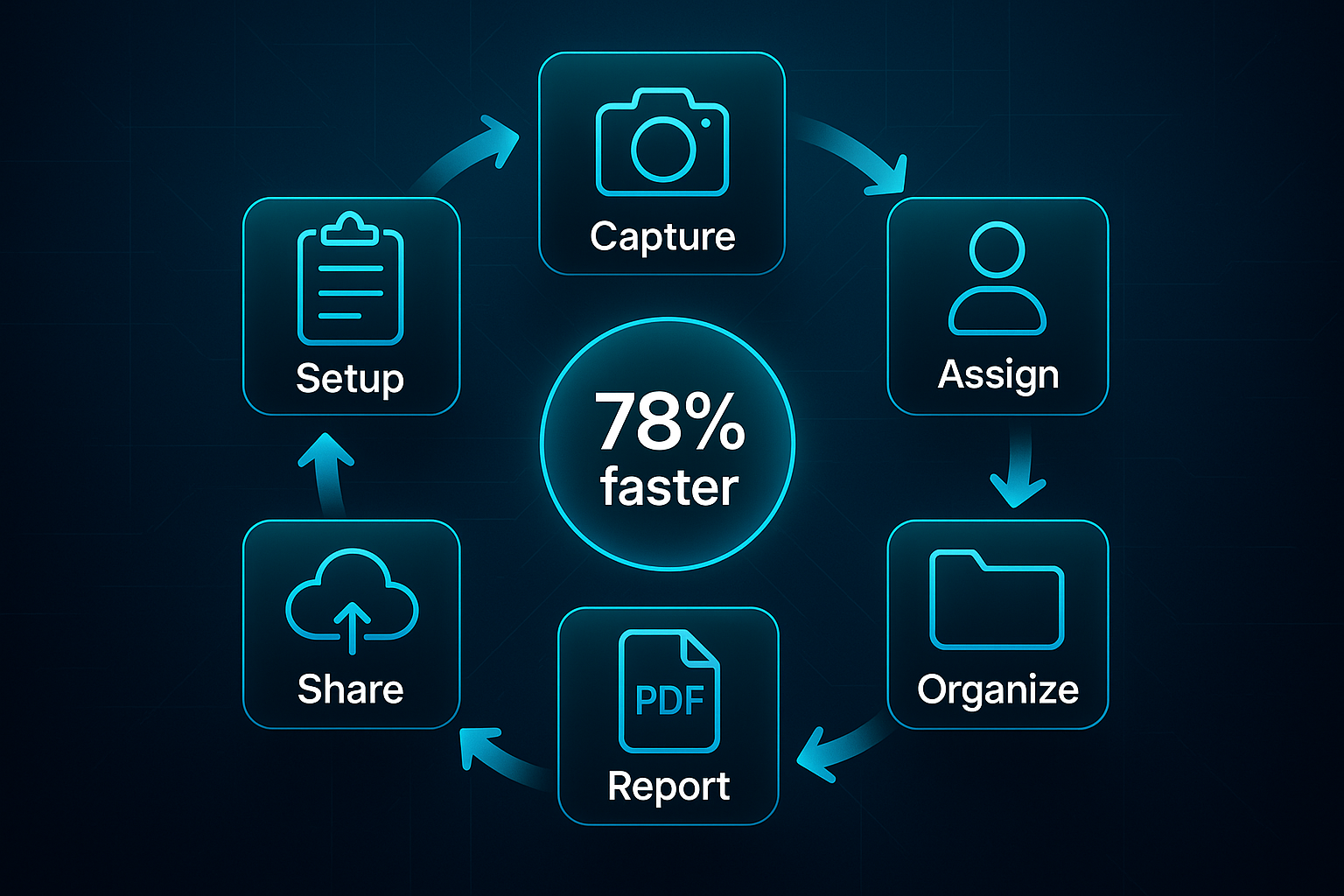
Wondering how all this looks day-to-day? Start by creating your project, entering site and client details. On-site, just snap and annotate your findings, immediately assigning issues or jobs to teammates within the same folder.
Every observation is neatly organised by location and issue type, making past documentation lightning-fast to find. When you’re ready, hit “generate report” and you’ve got a formatted summary—packed with everything you documented—ready to share as a PDF, email, or secure cloud link.
Here’s the turning point: organisations using this workflow see up to a 78% faster turnaround for site documentation. That’s more than tidier paperwork; it’s improved traceability and accountability for every job. And that, really, is why professionals stick with Site Audit Pro when inspections need to be done right.
How Site Audit Pro fits into real-world workflows
Step-by-step workflow for site audits and inspections
Pre-inspection setup (customising checklists, templates)
Let’s start with the groundwork. Before anyone steps on site, Site Audit Pro gets you ready with solid project setup.
You create a new project, add the important site and client details, then build custom templates for precisely what you need to check. These templates aren’t just basic forms — you pick categories like safety or property condition, bring in company branding and inspector details, and include essentials like digital signatures or unique job codes.
Checklists are your safety net, making sure nothing is missed. They can pull directly from your team’s tried-and-tested protocols.
Big names like Balfour Beatty and Savills use folders and uniform templates to manage multiple sites. This setup means new inspectors settle in quickly, and every audit follows a consistent process — perfect if you want to scale up without losing control.
Capturing site data, photos, and assigning actions during inspection
Imagine yourself walking the site. No scrambling with paperwork or mismatched photos — everything is logged as it happens.
With the app, just snap photos and use annotation tools to highlight problems, hazards, or urgent snags. Observations land in the system with images and clear notes attached.
When something needs fixing, you simply assign the job to a colleague or contractor on the spot, add instructions, and let Site Audit Pro send instant notifications. Every entry gets a timestamp and geolocation, keeping your audit trail flawless.
That’s why contractors like Kier Group have made it their standard. In early 2024, digitising these tasks saved their teams 22 hours a week — that’s a massive upgrade for efficiency.
Reporting and sharing outcomes with stakeholders
Forget slow, manual reporting. Site Audit Pro transforms all that site data into smart, branded reports within minutes.
These reports pull in annotated photos, comments, and results. PDFs or CSVs come ready-to-share, always topped with your company logo and credentials.
It’s a breeze to distribute updates to management or clients — no missing info, no formatting headaches. That centralised audit trail keeps compliance easy.
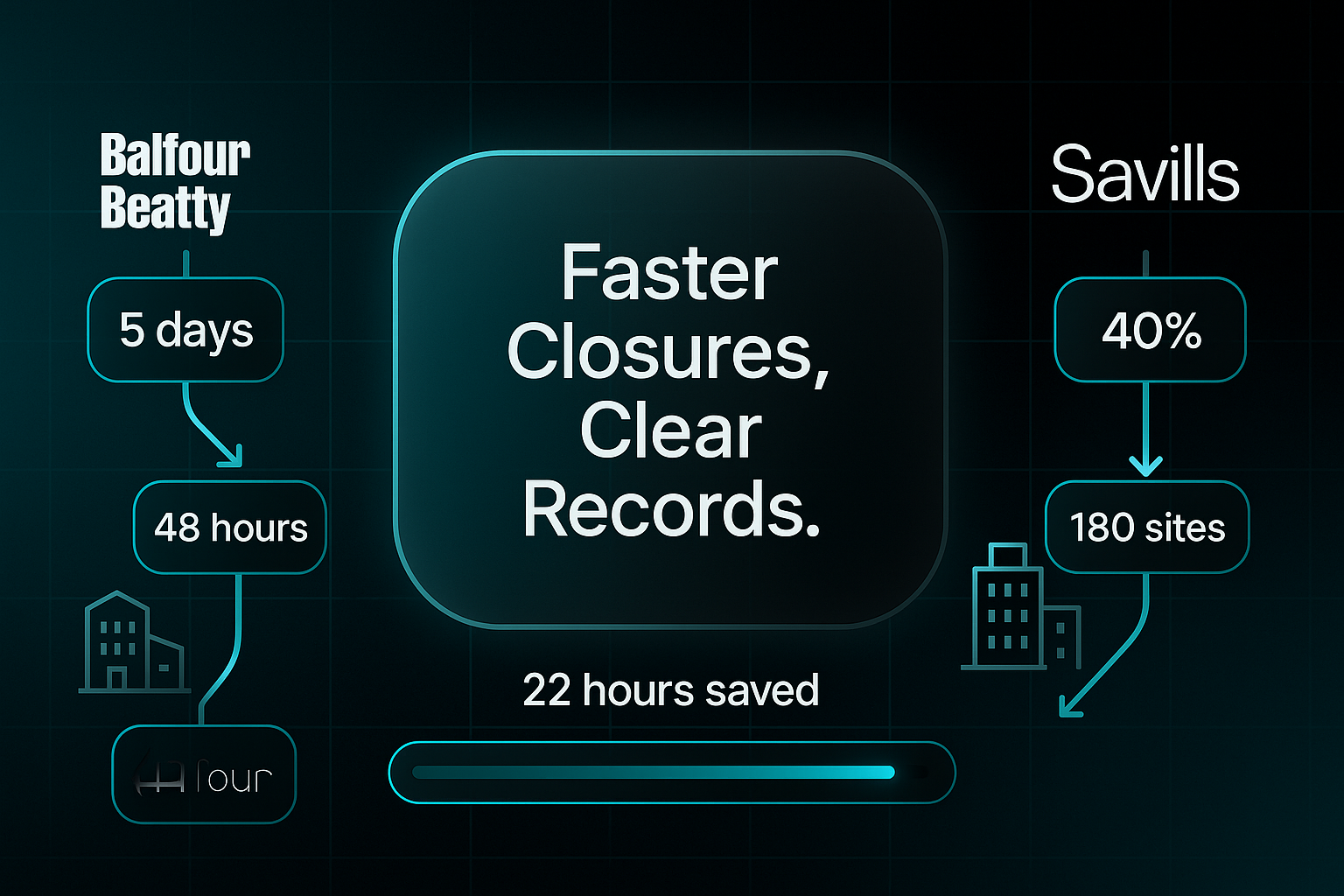
Look at Balfour Beatty’s London division: report turnaround fell from five days to under 48 hours. Savills cut audit-to-report cycles by 40% across 180 sites. That’s faster closures, clear records, and joined-up workflows that actually work.
Key benefits of using Site Audit Pro
Efficiency and time-saving gains
Let’s get straight to it—Site Audit Pro means you finally ditch messy paper forms and endless manual note-taking. Everything you need—photos, notes, issue assignments—goes directly into the app right there on site.
No more dragging paperwork back to the office or copying your findings later. You can generate a PDF or CSV report in minutes and share updates instantly. Kier Group cut 22 hours a week from admin, while Savills reported a 40% drop in audit-to-report time across 180 sites.
The real surprise? In 2023, over two-thirds of digital audit users said their reporting workload dropped by at least a third. That’s less time stuck at your desk, more time solving onsite issues.
Accuracy, accountability, and standardised reporting
Speed isn’t the only story. Site Audit Pro actually boosts accuracy with automatic date/time stamps and GPS-tagged images for every entry. Nothing slips through the net—every issue stays assigned, documented, and visible on your secure audit trail.
Templates enforce consistency, ensuring every report features your company branding and industry terminology. It means nobody is reinventing the wheel or missing key points. Savills even saw a 27% improvement in report accuracy after switching.
A digital quality control system serves as a fundamental tool for achieving reliable on-site inspection and standardized documentation, which is essential for maintaining quality across multiple project sites.
This standardisation makes large-scale quality control much simpler—especially for businesses covering multiple locations.
Enhanced compliance and professional image
If you’re aiming to impress regulators or clients, digital records really shine. With Site Audit Pro, reports are always accessible and secure, supporting things like sector grading, digital signatures, and your branding. That ticks all the right compliance boxes and actually boosts your professional reputation.
Some contractors have even landed extra projects thanks to the consistently clear, branded reports produced by the app. It’s not just admin—it’s business development, too.
Collaboration and team productivity
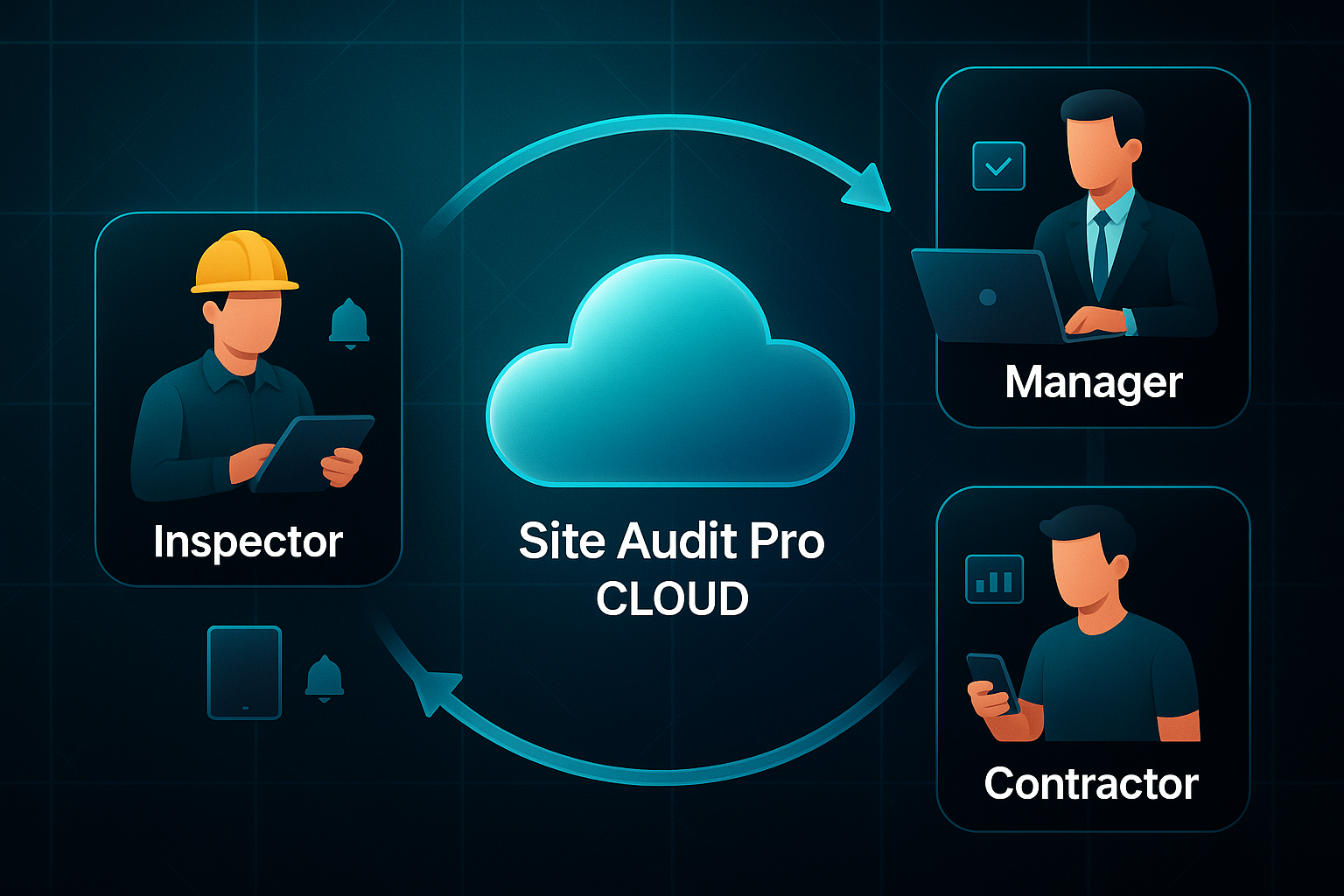
Finally, here’s where teamwork steps up. Everyone—onsite or remote—works from the same up-to-date data thanks to live cloud sync.
Real-time notifications, easy task assignments, and dashboard updates keep everyone moving and ensure actions never get lost. Case studies from Balfour Beatty and Savills show this leads to faster handovers, better cross-team visibility, and a true productivity boost.
Integrations and workflow compatibility of Site Audit Pro
Direct integrations supported by Site Audit Pro
Getting your audit results into your everyday workflow matters, so how does Site Audit Pro actually fit into that picture? The app’s built-in tools for syncing, sharing, and archiving make documentation simple—but integration isn’t completely seamless.
Site Audit Pro Cloud sync and real-time collaboration
For teams using iOS devices and web browsers, Site Audit Pro Cloud genuinely delivers instant updates. A photo snapped on-site appears live for office staff, speeding up action and keeping everyone aligned.
But here’s a limitation: Android users can’t access Cloud sync as of 2024. If your team’s a mix of device types, you’ll need a workaround for real-time collaboration, which can slow things down for hybrid environments.
PDF, CSV exporting, and Dropbox integration
Generating branded reports is easy—you export polished PDFs or CSVs directly and save them locally or share via Dropbox. That centralises files for departments and clients, so there’s no endless stream of email attachments to manage.
Remember, though, exported files are static. Any further editing or task management must happen outside Site Audit Pro. And while Dropbox offers a handy cloud archive, there’s no in-app live editing or workflow automation with these exports.
Manual integration and workflow limitations
No direct API or project management integration
Keen to connect Site Audit Pro with platforms like Asana or Procore? Currently, there’s no API or dashboard integration. Teams must manually upload reports and keep track of versions via their own routines, which means careful coordination is key to avoid mistakes.
Summary of integration capabilities
- Cloud sync
Instant updates for iOS/web; Android excluded. - PDF/CSV export
Branded reports; manual sharing and tracking needed. - Dropbox integration
Central cloud archive and sharing; static files, no live co-editing. - Manual PM tool workflow
Export then upload to project platforms; manual tracking required.
Ultimately, Site Audit Pro boosts inspection and reporting speed, but some manual steps are needed for connected workflows. It’s ideal for fast, clear documentation—but for deeply integrated project management, hybrid processes still play a role.
Blog-in-one-minute
Add a fully SEO-optimised blog to your website with just 2 lines of code.
Learn more
Usability, onboarding, and support in Site Audit Pro
Learning curve and accessibility features
Let’s talk about what makes Site Audit Pro genuinely welcoming for all, regardless of digital experience. With its mobile-first layout, large labelled buttons, and simple navigation, new users move confidently from their first tap. Even non-technical staff find the setup intuitive—there’s no complicated training required.
Interactive checklists and handy tooltips guide you through each key action, from starting new projects to taking photos and assigning issues. Using report templates becomes second nature, and features like editable project details mean teams can easily maintain consistency, no matter how often staff rotate sites.
The best part? There’s no need for prior technical expertise. Site Audit Pro is intentionally stripped back, built for mixed-ability teams—including those new to digital audits. However, here’s a caveat: screen reader compatibility or high-contrast modes aren’t built in, so teams with accessibility requirements will need to consider their options.
Support resources and user feedback
Support is focused around an in-app knowledge base packed with step-by-step guides and troubleshooting articles. Most teams solve everyday problems—like account setup and sync issues—without outside help, speeding up onboarding and weekly workflows.
If a bigger issue crops up, email support is on hand. You’ll usually get a reply within 24–48 hours, which is enough for most queries, though not instant. While there’s no live chat, webinars, or user forums, reviewers often praise the self-help options for helping teams get productive quickly. That said, some users mention that urgent problems or advanced troubleshooting could benefit from instant support.
Support resource availability summary
What you get: documentation and an email helpdesk—no forums, live chat, or webinars. This suits mobile, independent teams for quick onboarding and basic troubleshooting. The lack of real-time support is worth noting if you’ve got urgent or accessibility requirements.
Security and privacy practices in Site Audit Pro
Data security protocols
Let’s cut to the chase on security. You’d expect a site audit app to highlight SSL/HTTPS encryption for transferring sensitive data, but Site Audit Pro’s documents don’t actually confirm this for 2024.
Now, here’s another surprising omission: there’s no mention of encryption at rest. So, when your data sits on your device or their servers, it’s likely not encrypted by default.
What does this mean for you? The risk management largely falls on your shoulders. You manually export PDFs or CSVs, so protecting reports depends on your own device security and storage solutions.
And authentication? Don’t expect two-factor or strict password policies—access controls are very basic. There’s no audit log either, so you won’t know who’s viewed or changed what, making it tougher if you need traceability for investigations.
Privacy and compliance notes
Site Audit Pro keeps its privacy policies minimal: user data isn’t shared unless required by law, but specifics are thin.
Support staff treat your information as confidential. However, the app doesn’t let organisations set privacy tiers, custom retention policies, or advanced permissions through an admin dashboard.
If you need GDPR controls or compliance certifications for regulated industries, you won’t find them here. This raises genuine risks—potential audit failures, legal penalties, even contract loss.
So what’s the workaround? Organisations typically export data for secure, external storage, enforce strong device protections, and anonymise personal details prior to upload. For those with higher security demands, these extra steps help keep everything on track.
To minimize endpoint risk, organizations should adopt the principle of least privilege management, eliminating excessive admin rights while allowing for safe, rule-based user actions.
Limitations and considerations of Site Audit Pro
Feature and workflow scope constraints
Let’s talk about where Site Audit Pro draws the line. It’s fantastic for quick, straightforward reporting, but it’s not built to rival enterprise giants. Craving advanced automation, project merging, or seamless integration? You’ll encounter some clear limits.
- Manual photo import and project merging
Photos go in one at a time—no bulk upload or merging projects. - Lack of advanced maintenance features
No preventive maintenance, asset registers, or bulk editing tools. - Absence of deep integration APIs
Can’t directly connect to CMMS, ERP, or analytics software.
So, what do users do? They usually export reports to PDF or CSV, then copy information by hand into their own systems. For bigger audits, this slows you down, makes avoidable errors more likely, and complicates tracing data. Audit leads often point to manual photo uploads and syncing as ongoing challenges at scale.
Suitability for different organisation types
Site Audit Pro excels for smaller teams who need quick, clear site reports. Its simplicity helps with evidence capture and hassle-free reporting, but it won’t fit every situation.
- Ideal for small teams and field inspections
Perfect for individuals or compact groups who value easy reporting. - Limitations for large or regulated enterprises
Not ideal if you need scaling or automatic, central dashboards.
Take a close look at your project size and reporting needs. That’s how you’ll know if Site Audit Pro sits comfortably in your workflow—or if it’ll feel restrictive.
Supplementary digital reporting solutions: SEOSwarm as a parallel example
When should you look at digital reporting platforms?
Swamped by compliance or stakeholder updates? This is where a platform like SEOSwarm can transform your routine.
For regular audits, financial updates, or marketing reports, it’s about shifting from manual effort to hands-off workflows. With consistent branding and built-in analytics, every report looks sharp and is easy to track.
What does SEOSwarm actually do?
SEOSwarm isn’t just software—it’s a managed, AI-powered service. The agency team handles strategy, research, writing, compliance checks, and publishing. You approve a plan and let their hybrid AI-human team take care of the rest. There’s no chasing drafts or editing stress. You enjoy high-quality reporting at scale, all without the daily grind.
A hands-off workflow in action
Imagine a property firm needing regular compliance reports. Leadership approves the plan, then SEOSwarm does the research, writing, and publishing. Managers just check the final result. This approach often cuts admin time by over 50% and creates consistent records across every property.
Is SEOSwarm right for you?
SEOSwarm fits any team needing regular digital documentation—especially with stretched resources. For very creative campaigns or strict legal standards, add a final review. For most, SEOSwarm brings efficiency, scale, and accuracy that manual approaches can’t match.

AI-Powered
SEO Content Strategy
See the AI platform that's replacing entire content teams
(with better results).

Why I Trust Site Audit Pro for Clarity
The real advantage of Site Audit Pro isn’t just speed—it’s the confidence that comes from having every detail documented, shared, and ready to act on. I’ve seen teams cut days off their reporting cycles and finally leave behind the chaos of lost paperwork and unclear communication.
If you’re ready to streamline inspections, here’s my advice: start by mapping your current workflow, then test Site Audit Pro on a live project. Focus on using templates, annotations, and instant sharing to see where your process improves—and where manual steps remain. For larger or regulated teams, weigh the app’s simplicity against its integration and security limitations before making it your standard.
Every audit tool has trade-offs, but the best ones make your work visible, actionable, and consistent. In site management, clarity isn’t just a feature—it’s your edge.
- Wil