


Getting people to actually click, sign up, or buy often comes down to the words you choose. In my experience, even a single phrase can spark action or leave your message ignored.
Marketers and sales teams know the frustration of crafting campaigns that fall flat. If you’ve ever wondered why some emails or ads get instant results while others stall, you’re not alone.
This article breaks down the science behind trigger words, showing how they tap into urgency, curiosity, trust, and more. I’ll share real campaign data, practical workflows, and a massive list of 250+ trigger words sorted by category and use-case.
You’ll get actionable templates, tool recommendations, and troubleshooting tips to help you test, measure, and optimise your messaging—no matter your budget or team size. By the end, you’ll have everything you need to influence action and boost engagement across any channel.
What are Trigger Words?
Definition and Scope: Unpacking Trigger Words in Marketing and Sales
Trigger words are something of a secret weapon in marketing and sales. These aren’t just random persuasive phrases—you can think of them as deliberately selected words or short phrases that have the special ability to grab attention, spark emotion, or provoke an instant response the moment someone encounters them.
What’s fascinating is that every trigger word is chosen not just for its dictionary definition, but for the psychological jolt it delivers. These are the words that can break someone’s passive scrolling and get them to click, sign up, or make a purchase in seconds.
But here’s an important distinction: the “trigger” in trigger words is used purely in the world of marketing, advertising, and persuasive communication—not in topics like psychological trauma, programming, or safety protocol.
You’ll run into these words across marketing channels: catchy subject lines, pop-up CTAs, ad copy, social posts, and more.
Wherever they appear, their job is the same—serving as catalysts that turn an idle browser into an active participant right at a crucial decision point.
In digital campaigns, specific words act as catalysts by tapping into core human emotions like urgency, curiosity, and trust, which in turn prompts immediate consumer action and drives conversions.
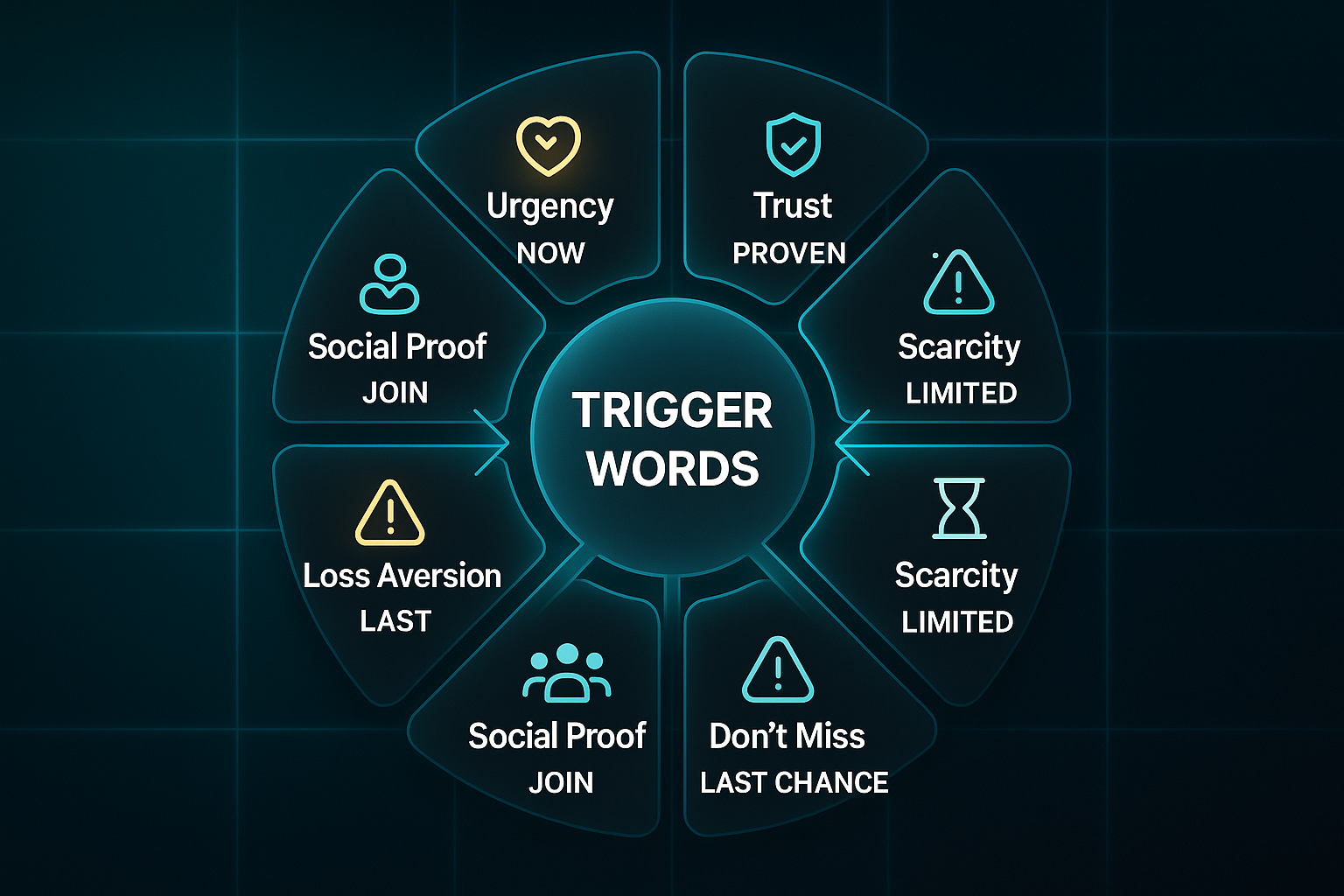
Core Categories: Emotional and Motivational Leverage Points
Ever wondered why you just can’t resist clicking some offers or opening certain emails? Trigger words often work because they target very specific emotional or motivational buttons. Grouping them by the type of reaction they stir helps make sense of what’s going on.
Let’s break them down:
- Urgency/Scarcity
Pushes rapid action with “now,” “limited,” or “last chance.” A low supply or deadline nudges people to decide quickly. - Excitement/Desire
“Amazing,” “new,” “must-have” build emotional anticipation, making products or offers feel irresistible. - Trust/Safety
Words like “guaranteed,” “proven,” and “risk-free” calm doubts, reassuring people they won’t regret taking part. - Curiosity/Discovery
Terms like “secret,” “discover,” or “revealed” leave people hungry for answers so they’re drawn to find out more. - Direct Action
Commands like “buy now” or “get started” offer clear next steps, cutting through confusion.
Knowing which group a trigger word falls into helps you understand exactly why it nudges someone to act. Each targets a different part of what makes people tick—whether it’s urgency, excitement, or just simple clarity.
Underlying Psychology: Why Trigger Words Have Impact
So, why do these words pack such a punch? Think of a trigger word as the brain’s version of a green traffic light—fast-tracking emotional and instinctive responses straight past slower, logical thinking.
How much difference can a single word really make? It turns out, quite a lot.
One primary benefit of trigger words is their ability to drive conversions. By compelling readers to take action, whether it’s making a purchase, signing up for a newsletter, or clicking on a link, trigger words can significantly improve conversion rates and ultimately contribute to business growth.
This comes down to deep-seated cognitive biases and built-in psychological tendencies. Take scarcity: when things look like they’re about to run out, nobody wants to miss their chance.
Urgency works in much the same way. And then there’s FOMO (fear of missing out)—something as simple as “don’t miss out” can suddenly make waiting feel silly.
There’s also social proof, where phrases like “bestseller” or “trusted by thousands” quiet doubts by showing what crowds of others have chosen.
Loss aversion might be the sneakiest of the lot: most people would rather avoid losing something than chase after a gain.
The really clever marketers? They combine several triggers at once. Picture the line, “Only today: secure your risk-free trial!”—in just a few words, it stirs urgency, scarcity, and safety all at the same time.
Measurable Impact: Evidence of Trigger Word Effectiveness
But do these special words actually work? The data suggests they make a remarkable difference.
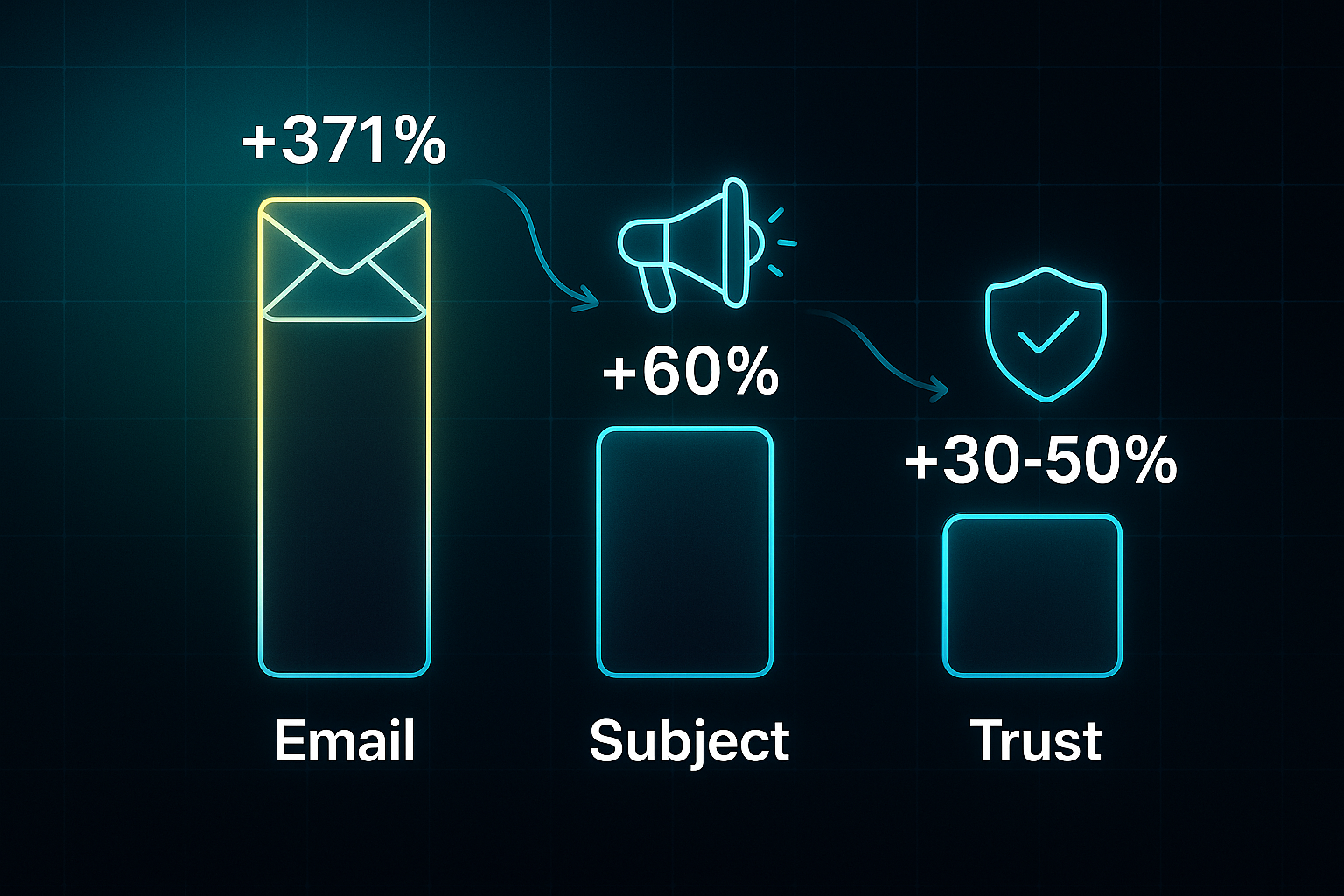
Here are some striking stats:
- Email Clicks Soar
Trigger-based marketing emails can result in 371% more clicks and boost sales opportunities by over 1600%. - Subject Lines Win Attention
Using words like “free,” “now,” or “guaranteed” in subject lines leads to open and click rates up to 60% higher. - Trust Converts
Phrases such as “risk-free” and “trusted by thousands” are linked to 30-50% more conversions in real campaigns. - Action Gets Results
Headlines and CTAs featuring urgency and exclusivity often double or triple engagement.
Isn’t it fascinating how tiny language tweaks can double results? It’s almost surprising how much a single word swap can affect outcomes. No wonder marketers spend so much time perfecting their trigger lists.
If you’re curious about which channels let these words shine brightest—or want to see how different contexts change their power—things are just about to get even more interesting.
Where and How to Maximise Trigger Word Effectiveness Across Marketing Channels
Let’s face it—getting maximum impact from trigger words isn’t just about choice of language, but about knowing where and how to use them. The best marketers carefully match trigger words to specific channels, test systematically, and always validate results.
But what’s the actual process?
Prerequisites and Resource Checklist
Testing trigger words without the right groundwork is like flying blind. Without segmentation or clear goals, it’s nearly impossible to know if a word change made the difference. The essentials below ensure your campaigns yield accurate insights and not just guesswork.
- Segmented lists
Audiences divided via CRM or platform export - Clear KPIs
Decide open rates, CTR, or conversions before tests - Analytics tools
Bitly, TinyURL, or platform reports for measurement - Time/budget
1–3 hours per cycle; free–£15/month analytics
If you don’t have fancy tools, just split lists by hand and track results in Google Sheets or Excel. It takes more effort—but you’ll still get solid data.
Step 1: Best-Practice Workflows for Each Channel
What actually works? Here’s a channel-by-channel workflow for using trigger words, with real 2024 campaign numbers along the way.
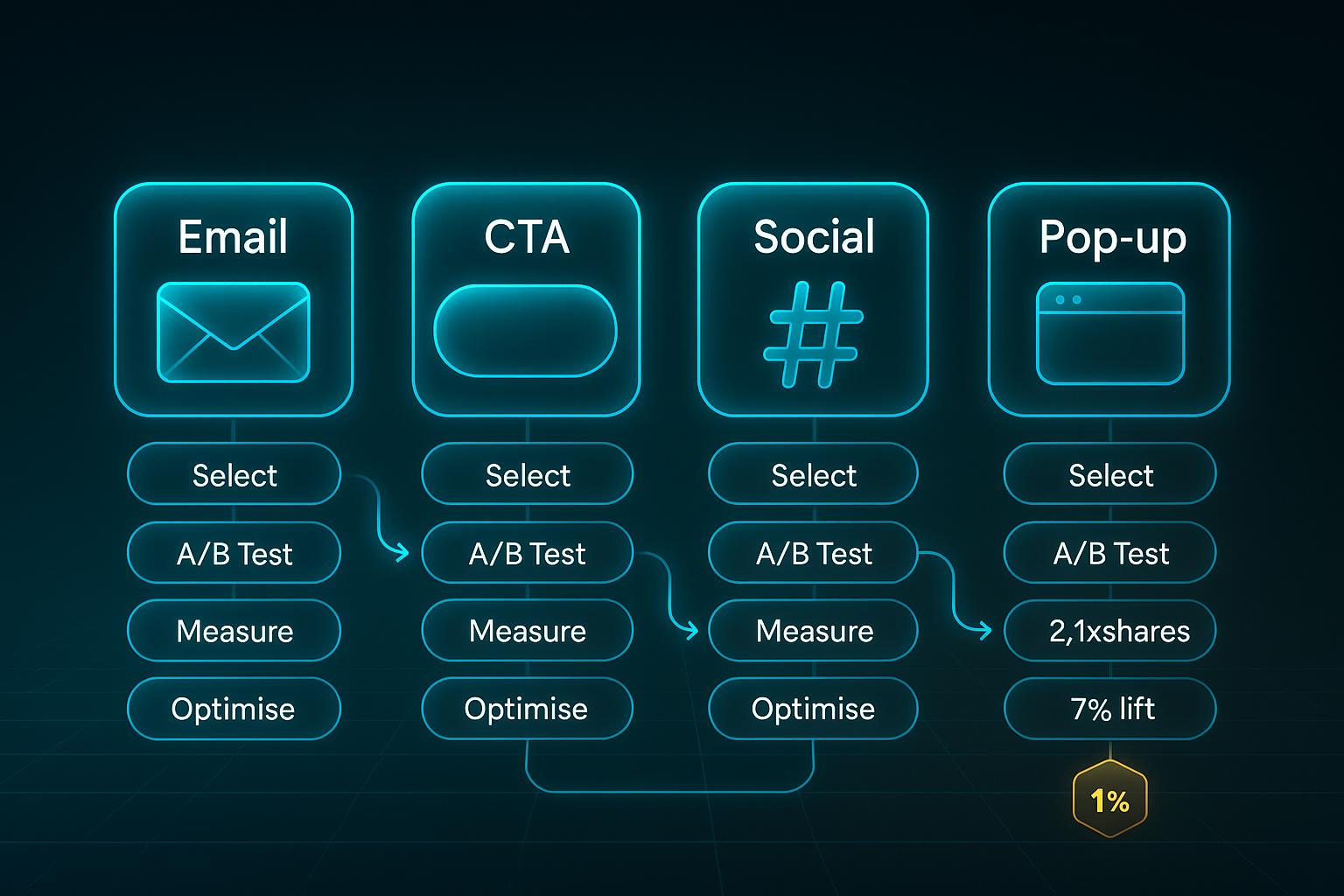
- Test A/B subject lines for 1–2 weeks on 1,000+ subscribers each
- Seek a 5–10% open/CTR lift for success
- Example
“Exclusive Offer” gave a 12% open and 8% click boost over “Special Offer” in a UK retail campaign
CTA (Landing Pages)
- Tweak call-to-action words for 7–10 days, 1,000+ visitors per version
- Goal
5%+ increase in clicks/conversions - Example
“Try for Free” outperformed the default CTA by 15% for a SaaS brand
Social Posts
- Rotate urgent/emotional triggers for 3–7 days, 1,000+ audience per option
- Look for a 10–20% engagement lift
- Example
“Join Us Today” beat “Become a Member” with 20% higher engagement and a 10% click increase for one UK nonprofit
Landing Pages (Pop-ups)
- Test scroll-triggered pop-ups for 1–2 weeks; 1,000+ sessions per variant
- 8–18% sign-up bump is strong
- Example
A discount pop-up at 75% scroll depth raised sign-ups by 18%
Step 2: Validation and Troubleshooting
Wondering how to tell if your trigger words are actually converting? Keep everything else the same, swap just the trigger word, and log metrics daily. A good test produces a 5%+ gain over baseline—or beats averages like 21% open or 3.5% CTR for emails.
If there’s no clear lift, extend tests, inspect targeting, and consider seasonality or external changes. For low traffic, run longer, reduce significance thresholds to 90%, or track micro-conversions (like comments and replies).
Troubleshooting Checklist
Every campaign has the odd wrinkle. Here’s what to watch for:
- Noisy results
Overlapping variables or weak segmentation - Spam issues
Too much urgency causes filtering; balance with trust words - Missing analytics
Track clicks/replies in a spreadsheet - Rollback safety
Duplicate lists/creatives before making changes
Once you address these common pitfalls, a disciplined, channel-specific approach like this—backed by hard numbers—helps you isolate which trigger words move audiences. Next up? Prepare for the ultimate trigger word list: sorted by emotion and use-case, ready for instant action.
The Complete List: 250+ Trigger Words Sorted by Category, Channel, and Purpose
Trigger words shine when paired with a structured workflow, the right tools, and precise metrics.
This guide makes it practical: here’s a category-by-category breakdown featuring over 250 trigger words, plus actionable matrix, tool details, word definitions, and specific campaign requirements.
Treat it as your quick-reference for any marketing test. Grab a category, line up the right assets, and deploy with confidence.
Resource and Workflow Requirements
Before you run a campaign, get these essentials in place. This checklist guarantees your results are robust—not guesses.
- CoSchedule Headline Studio
Scores headlines for impact; starting at $9/month (£7/month). - WPBeginner Headline Analyzer
Free tool for evaluating headline quality. - Beehiiv
Free tier for up to 2,500 subscribers, Scale £33/month, Max £72/month. - Copy.ai
Trial free credits; Pro suite at £28/month. - GrowthBar
SEO and content testing at £28/month (Standard), £58/month (Pro), £117/month (Agency). - Grammarly
Free basic plan. Premium: £9/month for clarity benchmarks. - Ahrefs
Industry go-to; £77/month. - SEOClarity
Enterprise-focused. Starting around £1,560/month. - PageTest.AI
Free for up to 10,000 impressions; Startup at £39/month.
Minimum A/B test sample is 1,000 contacts or impressions per variant. Double the test window if you have fewer than that.
For best results: urgency triggers run for 3–7 days; curiosity for 1–3 days; exclusivity 7–14 days; benefit 14–21 days; trust/safety 7–14 days; and FOMO 5–14 days.
Only use one or two trigger words per asset, such as headline or CTA. Headline scores should be 70/100 or higher, while clarity via Grammarly should break 80.
Initial setup takes 1–2 hours, each campaign prep 20–30 minutes, with daily monitoring.
These tools fit small teams, except SEOClarity, which is suited for large-scale enterprise campaigns.
Category-Based Trigger Words and Implementation
Different trigger word categories give your campaigns unique strengths.
The following tables show core words, usage tips, real results, mistakes to avoid, recommended tools, and validation methods.
By understanding these categories, you can fine-tune your message and focus every campaign for maximum impact.
| Category | Core Trigger Words | Usage | Tools | Validation | Example | Mistake to Avoid |
|---|---|---|---|---|---|---|
| Urgency & Scarcity | Hurry, Now, Last chance, Ends today, Only, Limited, Act fast, Today only, Rush, Final hours, Gone soon, Don’t wait, Time’s running out, Immediate, Instant, Quick, One-time | Place in emails, CTAs, pop-ups; run for 3–7 days. | CoSchedule, Beehiiv | Aim for 8–15% uplift in CTR. | "Ending Soon" banner increased CTR from 6.3% to 10.7% for UK SaaS. | Too much urgency breeds trigger blindness—rotate categories. |
| Curiosity & Discovery | Secret, Discover, Revealed, Uncovered, Hidden, Insider, Unlock, Find out, Guess, Why, What if?, Exposed, Did you know, Breakthrough, Surprising, Unveiled | Put in subject lines, intros; test 1–3 days. | WPBeginner, GrowthBar | Seek 12–29% open rate improvement; headline scores over 70. | "Discover Our Secret" headline gave 13% lift in retail. | Always satisfy the curiosity—avoid mismatched teasers. |
| Exclusivity | Exclusive, Invitation only, Members only, VIP, Reserved, Access, Just for you, Elite, Private, Priority, Insider, Chosen, Top-tier | Segmented loyalty lists; run 7–14 days. | Beehiiv, Copy.ai | Open rates over 40% are ideal; segment if below 30%. | "Exclusive for Gold Members" doubled open rates vs generic offers. | Do not use for mass lists; it weakens exclusivity. |
| Benefit & Gain | Boost, Maximise, Success, Save, Win, Improve, Grow, Upgrade, Enhance, Streamline, Double, Transform | Landing pages, CTAs; test for 14–21 days. | GrowthBar, PageTest.AI | Expect 8–15% higher conversions. | "Boost Your Results" CTA improved click rate by 14%. | Avoid vague claims—be direct. |
| Trust & Safety | Guaranteed, Proven, Secure, Verified, Certified, Safe, Trusted, No obligation, Risk-free, Backed | Checkout/sign-up pages; test 7–14 days. | Grammarly, Copy.ai, PageTest.AI | Aim for 10–20% more completions. | "Guaranteed Secure Payment" saw 11% conversion bump. | Support claims with examples and badges. |
| FOMO | Don’t miss out, Selling fast, Be the first, Reserve now, Last call, About to go | Events, launches, timed offers; test 5–14 days. | Ahrefs, WPBeginner | Seek 5–12% conversion improvement. | - | Use on only one asset per campaign—overuse causes fatigue. |
| Social Proof | Top rated, Bestselling, Trusted by thousands, Voted #1, Popular, Endorsed, Expert-approved | Banners, checkouts, testimonials; test 2–4 weeks. | SEOClarity, Copy.ai | 10–25% lift in conversions or sign-ups. | - | Use real, quantified data for proof. |
For campaigns needing extra leverage, try categories like authority, simplicity, personalisation, sensory experience, pain relief, excitement, or attention/alert.
These additional triggers are best suited to specific campaign goals, such as credibility, ease of use, personalised offers, vivid imagery, solving pain points, anticipation, or instant alerts.
| Category | Words/Example | Implementation Hint |
|---|---|---|
| Authority/Expertise | Award-winning, Certified specialist | Boost credibility in B2B and testimonials. |
| Simplicity/Ease | Plug-and-play, Hassle-free | Use for onboarding and product demos. |
| Personalisation | Handpicked just for you, Designed for your goals | Insert customer names in emails or ads. |
| Sensory/Experience | Delicious, Luxurious, Refreshing | Best for food, beauty, and travel promotions. |
| Pain Relief | Fix, Prevent, Relief guaranteed | Highlight pain points in CTAs. |
| Excitement | Countdown, Unveiling, Exciting launch | Apply to product launches and seasonal campaigns. |
| Attention/Alert | Breaking, Warning: read now, Urgent alert | Use for urgent push notifications. |
Once you understand the categories and implementation details, a fast, practical lookup matrix helps you match each trigger word to a channel, select relevant tools, and set performance targets for validation.
Lookup Matrix: Channel, Tool, and Validation Table
Refer to this matrix for tactical examples and benchmarks as you optimise your trigger word campaigns. It gives you a quick way to match triggers with the best channel, tool, and performance metric.
| Trigger | Category | Channel | Tool | Price | Test Length | Validation | Example | Edge/Alt |
|---|---|---|---|---|---|---|---|---|
| Hurry | Urgency | Email, Ad, CTA | CoSchedule | £7/month | 7 days, 1,000+ leads | +8% CTR | Ending Soon (+4.4%), SaaS | Double test window for <200 leads |
| Secret | Curiosity | Email, Blog | WPBeginner | Free | 2 days, 1,000+ opens | +12% opens | Secret +13%, retail A/B | Add benefit word for extra impact |
| Exclusive | Exclusivity | Segmented email | Beehiiv | £33/month | 10 days, 500–1000 list size | 40%+ opens | Gold only +25pts opens | Refine segment for best results |
| Guaranteed | Trust | Checkout, sign-up | Grammarly | £9/month | 14 days, 1,000+ completions | +15% conversion | +11%, travel startup | Add proof badge for credibility |
| Trending | Social Proof | Banner, checkout | SEOClarity | £1,560/month | 21 days, 3,000+ sales | +10% sales | - | Localise numbers to market |
Tools like CoSchedule and WPBeginner work well for small marketing teams. Beehiiv is ideal for loyalty and exclusivity campaigns, while SEOClarity suits large organisations doing large-scale social proof projects.
For smaller lists, run longer tests and focus on narrow segmentation. Tightly defined segments consistently outperform generic broadcasting.
Use real numbers wherever you can. Test length and tool choice should match your budget and campaign size. Always validate with click-through rates, open rates, or conversion uplift.
Common Mistakes and How to Prevent Them
When you follow the right sequence with trigger word campaigns, you get predictable, scalable results.
The next steps should become part of your standard workflow.
- Rotate trigger categories
Switch to a fresh category type between campaigns to keep impact strong. - Test with enough contacts
Increase test length if you have fewer than 1,000 impressions for reliable measurement. - Micro-segment lists
Base segments on engagement or purchase history for more meaningful results. - Vary language with each launch
Avoid campaign fatigue. Switch up trigger words and rotate types every cycle. - Monitor negative signals
Watch for unsubscribes or spam marks and dial down the most aggressive categories if needed. - Link each trigger to audience benefit
Always pair a trigger word with a clear offer or direct next step. - Review analytics daily
Set rigorous success benchmarks and monitor closely to know when to double down—or pivot fast.
Mastering the workflow and these tools will not only improve opens and clicks. It also gives marketers the insight to drive conversions for any use-case.
Next, explore how disciplined trigger word strategies have powered real-world campaign lifts. This proves the value of matching language to measurable outcomes.
Trigger Words in Action: Streamlined Campaign Replication Frameworks
Reliable results with trigger words come from tried-and-tested processes and smart use of modern tools. To drive engagement, you’ll want workflows refined by actual teams—especially those working in SME and mid-sized environments where resources are tight but measurable wins matter.
Here are three practical scenarios for 2025, each optimised for email, landing, and paid ad campaigns. Every workflow includes direct steps, clear metrics, and essential troubleshooting.
Adestra Email Campaign: Urgency Subject Line Split Test (£400–£1,200/month)
Boosting email open rates with urgency needs deliberate actions:
- Import at least 20,000 subscribers to Adestra (pricing £400–£1,200/month).
- Write 1–2 urgency-based subject lines such as “Last Chance: Offer Ends Today!” plus one neutral control. Set up split test in Adestra.
- Send variants to randomly segmented lists. Track open and click-through rates, aiming for a 10–25% lift (e.g. open rate 18%→22%).
- Switch in benefit/curiosity triggers if open rates drop below 18%. Reduce frequency to under two urgency triggers per quarter if you get high unsubscribes. Check segmentation accuracy.
Set-up takes about an hour, with 10 minutes a day for monitoring. For lists under 2,000 contacts, extend the test window or use Mailchimp (from £9/month).
Travello-Style Landing Page: Social Proof CTA A/B Test (VWO/PageTest.AI, £49–£199/month)
Social proof boosts sign-ups and credibility best when steps are disciplined:
- Connect VWO or PageTest.AI (starting at £49/month) and aim for 5,000+ unique sessions weekly.
- Create a basic CTA like “Sign Up” and a variant with social proof such as “Join 10,000+ Travellers”. Add a testimonial or badge.
- Run the split test and target a conversion increase from 4.2% to 5.3%. Monitor bounce rates, device splits, and significance (p<0.05).
- Simplify testimonials and reposition CTAs higher if uplift stays below 10%. Extend test up to three weeks if traffic drops or merge audience segments.
Expect a two-hour initial set-up and brief daily monitoring. Use phrases like “Top-rated by UK travellers” if you lack badges; extend test length if sessions are low.
Refersion Facebook Ad: CTA/FOMO Variant Split (£69–£900/test)
Ads convert more reliably with clear, repeatable steps:
- Set aside a budget of £69–£900/test for 75,000+ impressions via Meta Ads Manager (free) and Refersion (from £69/month) as needed.
- Write concise CTA variants (e.g., “Try Now”, “Limited Spots” using 14–40 characters) and split test in Meta.
- Track click-through rates and aim for 1.1%–1.8% (+63%). Review cost-per-action and device split with Meta Analytics.
- Rotate trigger words or refresh creative if CTR stalls. Stretch test duration if budget is tight. Use trust-based triggers like “Official Partner” if wording gets rejected.
Set-up takes an hour. Monitor in 10-minute daily bursts.
A side-by-side table makes choosing a workflow easier, highlights key requirements and guides troubleshooting. Use this for matching your goals, traffic, and constraints to the best-fit workflow:
| Channel | Tool/Pricing | Primary Metric | Secondary Metrics | Setup Time | Edge Advice |
|---|---|---|---|---|---|
| Email (Adestra) | Adestra £400–£1,200/mo | Open rate 18–22% | CTR, unsubscribes, device split | 1hr/10min-day | Small list: Mailchimp, longer test |
| Landing (Travello) | VWO/PageTest.AI £49–£199/mo | Conversion 4.2–5.3% | Bounce, device, segmentation | 2hr/15min-day | Low traffic: combine weeks, generic proof |
| Paid (Refersion) | Meta/Refersion £69–£900 | CTR 1.1–1.8% | Cost/action, split-test | 1hr/10min-day | Low budget: organic, alternate triggers |
Match your automation, audience size, and budget to the scenario that suits you best.
Run any test for at least a week, then change trigger word category or channel if you’re stuck, and group small segments for better data.
With split testing and analytics built in, these frameworks let any marketing team unlock gains—even with tight resources or oddball constraints.
Now, once your campaign workflow is set, you’ll be ready for matrices and templates to pick trigger words that deliver results even faster.
How to Select and Apply Trigger Words: Stepwise Frameworks with Budget, Resource and Edge-Case Clarity
Step 1: Create an Audience–Channel–Goal Matrix
Let’s kick things off with a decision matrix—a tool that makes sure every trigger word lands in the right place, for the right person, with a clear purpose.
The matrix fields you’ll want to include are: Audience, Marketing Channel, Campaign Goal, Trigger Word Category (urgency, proof, exclusivity), Example Trigger Words, Tool/Method (Mailchimp, spreadsheet, or whatever you’re working with), Budget/Resource (cost, team skills, initial setup time), Validation Metric (your targeted uplift), Limitation, and Edge-Case Action.
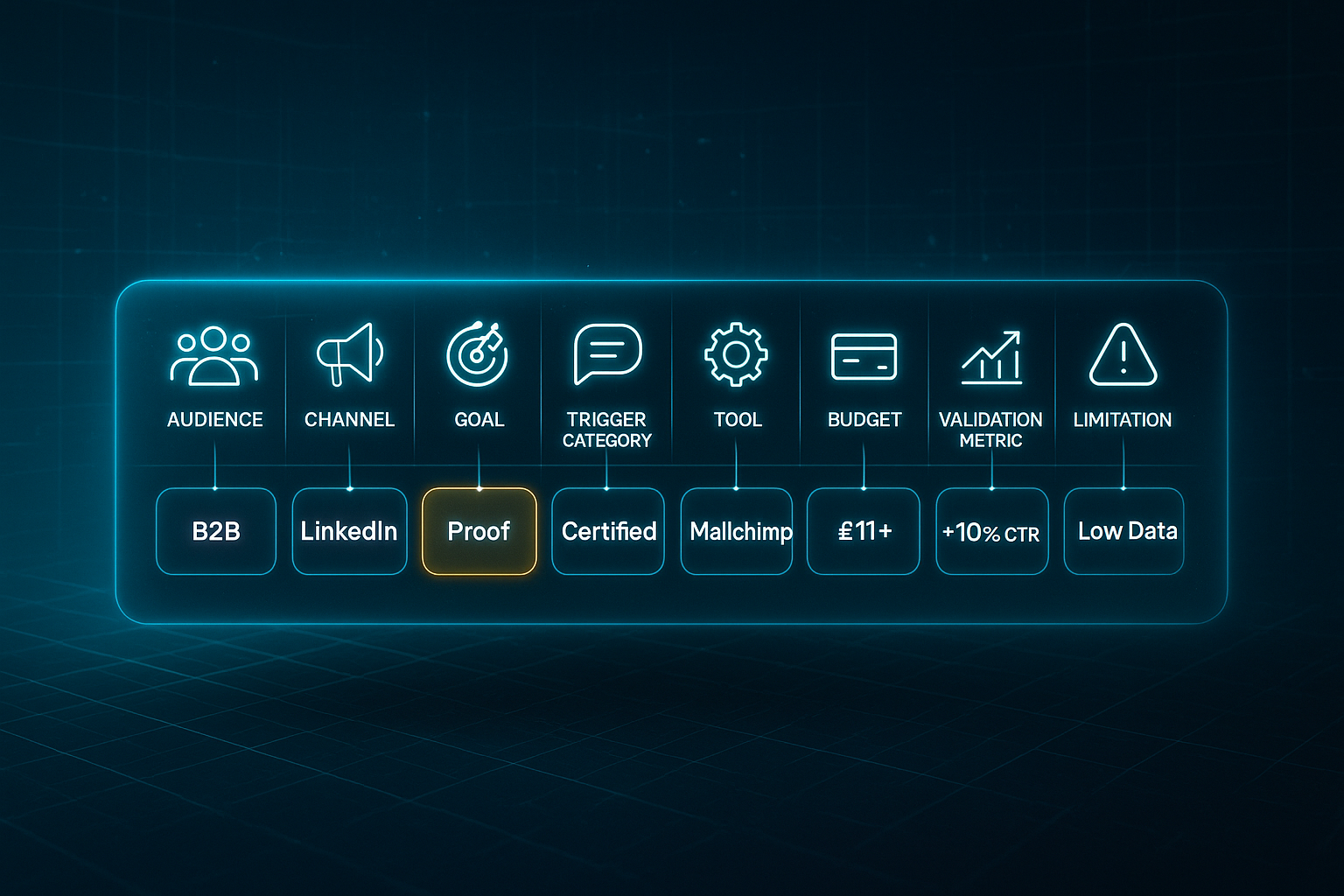
This matrix is your recipe for building campaigns with real clarity—no more guessing what works for whom, or blind allocation of resources. For instance, if you’re mapping out B2B LinkedIn lead gen, your matrix might look like: Audience—B2B; Channel—LinkedIn; Goal—Leads; Trigger—Proof (Certified); Tool—Mailchimp (at £11+/month) or manual (£0); Validation—aim for a +10% CTR in 7 days.
Now, say you have a micro-segment (think fewer than 200 contacts): switch to direct one-to-one outreach and track responses manually.
Step 2: Segment and Validate by Resource & Results
Next up, segmentation. Whether using your CRM, ESP (like Mailchimp), LinkedIn, or just Google Sheets, the goal is always to match the right trigger word to the right group.
Give yourself 15–30 minutes to segment lists, then plan for a daily check-in—5 to 15 minutes just to see how things are tracking. Each test really needs at least a week (or 1,000 contacts) to get reliable results.
If your segments are on the tiny side (<500 contacts), drop your focus to replies, comments, or honest feedback over pure metrics.
In sectors with stricter compliance (think regulated professions or sensitive data), budget an extra half hour for a compliance check and keep a light audit log—it’s rarely glamorous, but absolutely necessary.
Step 3: Channel-Specific Templates with Resource Signals
Let’s make it even easier: channel-by-channel templates, each with their own price signals and what to expect in terms of validation.
This way, even a small team can put things into action quickly.
- Email Subject
Template: Unlock [Benefit]: [Urgency] (like Unlock Double Points: Limited Time). Mailchimp (£11+/mo) or manual (£0). Target: over 35% opens. - Landing CTA
Template: Claim Your [Exclusive Offer]: [Action]. Example: Claim Your Free Trial: Start Now. VWO (£49/mo) or HTML/free. Aim for more than 3% clicks; rotate if uptake stalls. - Headline
Template: Unlock [Benefit] Now: [Urgency] (Unlock Healthy Skin Now: Offer Ends Friday). CoSchedule (£7/mo), WPBeginner (free), aim for 70/100+ score, more than 3% CTR. - Paid Ad
Template: Upgrade Your [Result] Instantly. Meta (£5/day+) or Refersion (£89+/mo), with a target CTR of 1.4–1.8%. If wording gets rejected, swap for generic benefit or testimonial. - Social Post
Template: Ready to [Achieve Outcome]? Here’s How [Brand] Helps. Buffer (£0–15/mo) or manual, aim for 10–20% engagement.
For those in tricky edge-case sectors (like compliance or micro-niches), switch things up—personalise, extend timelines, or combine manual tracking with direct feedback.
Small lists do better with bespoke, not broadcast—so it’s about quality over sheer volume.
Step 4: Troubleshooting and Edge-Case Best Practices
Sometimes, trigger word magic fizzles. If you see lagging results, look for category burnout (people get tired of urgent every week), message fatigue, or spam-filter blocks (especially on imperative-language FOMO like Don’t Miss Out!).
For regulated sectors, double down on compliance review and keep up with quarterly logs.
When digital outreach stalls (or audiences shrink), go old school: print, phone, focus groups, even direct messages—whatever matches your list and goal.
Step 5: Continual Optimisation
Building on the troubleshooting advice above, here’s where the real gains come in.
Keep rotating trigger word categories, update templates every campaign, and log each test’s outcome by channel. Every quarter—or sooner if you hit compliance walls—refresh your language and records.
If you miss your KPIs, move rapidly to qualitative feedback or group chats to dig into why.
Framework Wrap-Up
This modular, resource-savvy framework lets any marketer wring out measurable wins—from nimble startups through to niche B2Bs. Match your trigger word, channel, and campaign goal carefully, and you’ll always have an edge.
Blog-in-one-minute
Add a fully SEO-optimised blog to your website with just 2 lines of code.
Learn more
Next, we’ll dive into diagnosing and fixing common pitfalls, so your messaging keeps its influence and credibility intact.
Audit and Correct Trigger Word Pitfalls: Troubleshooting Matrix and Rapid Fix Checklist
Trigger words seem powerful—until you hit snags like unsubscribes, flat engagement, or sudden complaints. What’s easy to miss is just how quickly overuse, misalignment, or manipulative copy can tank a campaign’s credibility. When that happens, a straightforward troubleshooting matrix makes finding and fixing these pitfalls surprisingly fast. Here’s a practical reference to guide your audit every time an issue pops up. This matrix distils key mistake types, how to spot them, and fix things—fast.
| Mistake Type | Symptom/Trigger | Action Threshold | Quick Fix | Validation/Target | Edge-Case Step |
|---|---|---|---|---|---|
| Overuse | >2 triggers per asset; copy feels pushy | Unsubs/bounce +20% or spam ↑ | Reduce to max two triggers/rotate category; retest | Return to baseline; declining unsub rate, CTR rise | Pause trigger use; run user poll if unresolved |
| Clickbait/Mislead | Promise > delivery; false urgency | Spam ↑ 1% or trust complaints | Review copy for offer match; remove/adjust if not genuine | Spam/complaints drop, conversions +0.5pt | A/B test real claim vs. promise if no change |
| Repetition | Same trigger word >2x in block | Engagement/CTR -15%; 'boring' feedback | Swap to synonyms/rotate type | +10% CTR, engagement up | If flat, refresh creative or take 2-week break |
| Manipulation | Overblown emotional claims | Spam/unsubs >0.5%, negative replies | Add proof, limit strong claims, blend benefit | Trust/CTR recover, negative signals down | Audit or interview if not resolved |
| Irrelevance | Trigger doesn’t fit audience/offer | CTR <1.5%, bounce ↑ | Re-segment, swap to context-fit word | +10% opens/CTR vs last 2 cycles | Run NPS or switch channel if still low |
Before-Launch Action Checklist
A pre-campaign checklist helps you avoid headaches before they start. Here’s what to run through:
- Max 2 triggers per asset
Limit headline, subject, or CTA to two trigger words. - Fact-check promise/urgency claims
Make sure urgent or exclusive language reflects a real offer. - Rotate trigger categories
Change up trigger types every campaign cycle. - Synonym/variation for repetition
Don’t repeat the same trigger more than twice in one asset. - Test segmentation-audience fit
Make sure each trigger matches audience needs and campaign goals.
If your results keep falling short, you might need to try user polls, A/B tests with plain versus triggered variants, or even swap channels. Always log what works (and what doesn’t) for the next round.
With this discipline, you won’t just patch problems—you’ll build a feedback loop for cleaner, more credible campaigns. Of course, that’s how ongoing testing and measurement really start to pay off—which is up next.
How to Measure and Optimise Trigger Word Impact with A/B Testing and Analytics
Resource Snapshots: Time, Skill, Budget Per Channel
Making A/B testing work is all about aligning your team's resources with the demands of each channel.
You need to know up front how much time, skill, and budget to invest for effective trigger word measurement.
Below you'll find the typical requirements for setup, monitoring, skills, and costs per channel. It lets you plan ahead and avoid unexpected snags.
- Email (Mailchimp/Klaviyo)
Setup: 30–60 mins. Monitoring: 10 mins/day. Needs platform skills. Free–£11+/month. - Landing Pages (Unbounce/VWO)
Setup: 1 hour. Monitoring: 10–20 mins/day. Analytics skills needed. £70+/month. - Ads (Google/Facebook)
Setup: 30–45 mins. Monitoring: 10 mins/day. Requires PPC/ad dashboard skills. £40–£160/test. - Manual (Sheets/Bitly)
Setup: 30 mins. Monitoring: 5–15 mins/day. Spreadsheet fluency required. Free–£22/month.
A/B Testing Setup: Sequential Steps and Core Benchmarks
Setting up A/B tests to measure trigger word impact takes a clear process.
Here’s how to do it right:
- Set your hypothesis and choose one trigger word to test (e.g., urgency in a subject line or CTA).
- Randomly split your audience between control and variant.
- Run tests simultaneously for 7–14 days, aiming for at least 1,000 exposures of each version. Smaller lists? Extend up to 4 weeks.
- Track metrics specific to the channel: open rate for email (target 25–40%), CTR for ads (aim for 1.3–2%), conversion rate for landing pages (expect 4–6%).
- Analyse results with platform analytics – seek at least a 10% uplift in your primary metric. Validate by checking statistical significance (p<0.05) with in-tool calculators.
Troubleshooting: Interpreting and Rapid Adjustments
If your uplift is under 10%, swap out the category (for example, move from urgency to benefit).
Limit to one trigger word per asset.
Make sure only a single variable is tested at a time.
High unsubscribes or spam flags (more than 0.7%)? Lower trigger frequency and double-check your audience fit.
Even small tweaks to your CTA can bump landing conversion by 3–7%.
Switching a headline to urgency may lift opens by 10–20%.
Use UTM links and spreadsheets for cost-effective validation.
Logging every test result lets you spot what’s working—and pivot fast when it’s not.
For larger teams, SEOSwarm streamlines campaign testing and tracks analytics in one place.
This helps you optimise trigger word strategy at scale.
With your measurement sorted, next we’ll compare the most practical tools and platforms for refining trigger words—perfect whether you’re aiming for a single campaign or looking to scale across multiple launches.
Tool and Platform Comparison: Maximising Trigger Word Strategy, Measurement, and Scale
Finding the right platform can change everything if you're planning to scale trigger word campaigns beyond manual testing.
The moment you’re ready to grow, this action matrix lays out the core facts for the most popular solutions—setup times, pricing, key performance metrics, ideal team sizes, and the clear markers for when it’s time to move up.
Basically, if you want your team to make quick, confident decisions, this is where you start.
Mailchimp (Budget Split-Test Email)
Mailchimp suits basic split-testing for email, especially if you’ve got a modest list.
Set up and a single test should only take about 45 minutes. Each asset needs 15 minutes per week monitoring.
The platform’s free for under 500 contacts, while Essentials starts at $13 per month. If you get your trigger words right, you’ll see a solid 8 to 15 percent lift in open and click rates, with top segments often pushing 28 to 40 percent opens.
When the list grows past 500 or you manage several workflows, it’s smart to upgrade. For lists smaller than 200, manual tracking via Sheets is usually better.
SEOSwarm (Automated Blog/SEO Content)
If you’re producing posts at scale, SEOSwarm handles everything from setup to automated measurement.
Expect to spend 1 to 2 days on full campaign setup, though individual posts need only a minute.
Weekly check-ins run about 10 minutes. Pricing scales per article or batch, and there are custom deals for those running 100 or more assets.
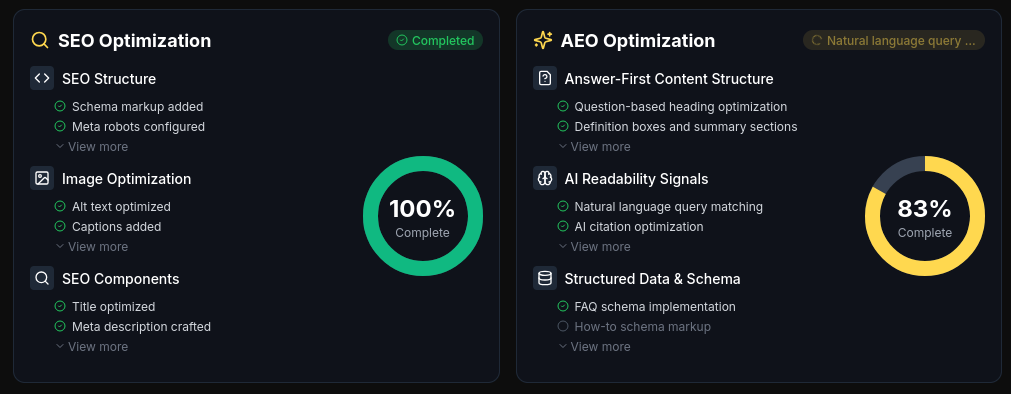
Results include turnarounds 20 to 40 percent faster, 15 to 25 percent more visits and conversions, and blog traffic that climbs 35 to 60 percent in just a few months.

AI-Powered
SEO Content Strategy
See the AI platform that's replacing entire content teams
(with better results).

If you need analytics and automation for over 15 assets monthly, it’s time to switch.
Grammarly (Clarity & Message Compliance)
For clarity and compliance, Grammarly is a no-fuss option.
It’s possible to run reviews in just 10 minutes, with each asset taking less than a minute to check.
Free plans exist. Premium runs 12 pounds per month, and Team is 15 pounds per month.
When your clarity scores hit 80 or higher, expect 28 to 32 percent opens and up to 7 percent click-through rate.
You’ll want to export to Mailchimp or Sheets for split-testing, and add Grammarly to SEOSwarm for reviewing lots of content quickly.
Google Keyword Planner (Trigger Discovery)
Curious which trigger words to pick? Google Keyword Planner is your friend.
You’ll need about 10 minutes to set up a Google account, plus 20 to 30 minutes for solid campaign research.
It’s free of charge and highlights high-search triggers such as “Boost” at 1,900 or more monthly searches. That can bump up click-through rate by 5 to 12 percent.
Build subject lines or calls to action using these keywords to get a further 8 percent improvement over generic wording.
Use these insights in your A/B testing tools.
Following analysis with Google Keyword Planner, move to link tracking and performance measurement.
Bitly (Link CTR & Variant Tracking)
When tracking link performance, Bitly makes it easy and quick.
Setup takes 10 minutes, and it’s 5 minutes per new link.
You get up to 1,000 links free each month, while paid tiers start at $8 for Core and $35 for Growth.
FOMO and exclusivity triggers in links drive 15 to 19 percent higher click rates, and SMS or social channels get 5 to 10 percent extra engagement.
For assets without links, shift your monitoring into Sheets or Mailchimp.
After you’ve sorted your links with Bitly, you may look to manual options that handle small teams and bespoke campaigns.
Sheets/Excel (Manual Campaign/Small Team)
Sometimes, simple really is best.
You’ll spend 30 to 60 minutes setting up a campaign matrix and anywhere from 10 to 20 minutes a day updating assets.
Google Sheets is free, Workspace runs 6 pounds or more per month, and Excel starts at 6.99 pounds per month.
A well-run campaign on Sheets can net 4 to 9 percent uplift, with click rates typically 8 to 12 percent.
If your team’s buried in manual updates, it’s time to upgrade.
So, how should you make the transition?
Begin with Sheets and Mailchimp when you’re running micro-campaigns.
Move up to Essentials or Bitly for proper automation and tracking.
Add Grammarly in when your content volume starts picking up, and look to SEOSwarm if you’re about to scale across multiple assets and want analytics on autopilot.
Of course, a big-picture matrix will help you compare each product’s strengths—next, we’ll break down pricing, use-cases, metrics, and team fit side-by-side, so you can see transition signals for every stage of growth at a glance.
Making Trigger Words Work for You
Small language shifts can spark big results. The right trigger word, placed with intent, can turn passive readers into active customers—sometimes doubling engagement with just a single tweak. But it’s not about stuffing as many power words as you can; it’s about matching each trigger to your audience, channel, and campaign goal.
Here’s what I recommend: build your own trigger word matrix, rotate categories to avoid fatigue, and test every change with clear metrics. Use the tools and frameworks outlined above to validate what actually works for your business, not just what’s trending. If a trigger falls flat, adjust quickly—don’t be afraid to swap categories or channels until you see real uplift.
The most effective marketers treat trigger words as precision tools, not magic bullets. When you combine discipline, data, and creativity, you’ll find that the right word at the right moment can change everything.
- Wil