
Writing meta descriptions for every page on your site can feel like a never-ending chore, especially as your content grows. I’ve seen teams struggle to keep up, only to end up with duplicated snippets or missed SEO opportunities.
If you’re tired of spending hours on manual edits or worried about inconsistent messaging, you’re not alone. Many site owners and marketers face the same challenge—balancing speed, quality, and search visibility.
In this article, I’ll break down what meta description generators actually do, how they work, and why they matter for SEO. You’ll get a clear comparison of rule-based versus AI-powered tools, plus practical steps for integrating them with WordPress, Shopify, or custom platforms.
I’ll also cover advanced features like multilingual support, QA safeguards, and troubleshooting tips. By the end, you’ll know how to choose the right generator, streamline your workflow, and write meta descriptions that drive clicks and keep your site competitive.
What is a Meta Description Generator?
Understanding Meta Descriptions
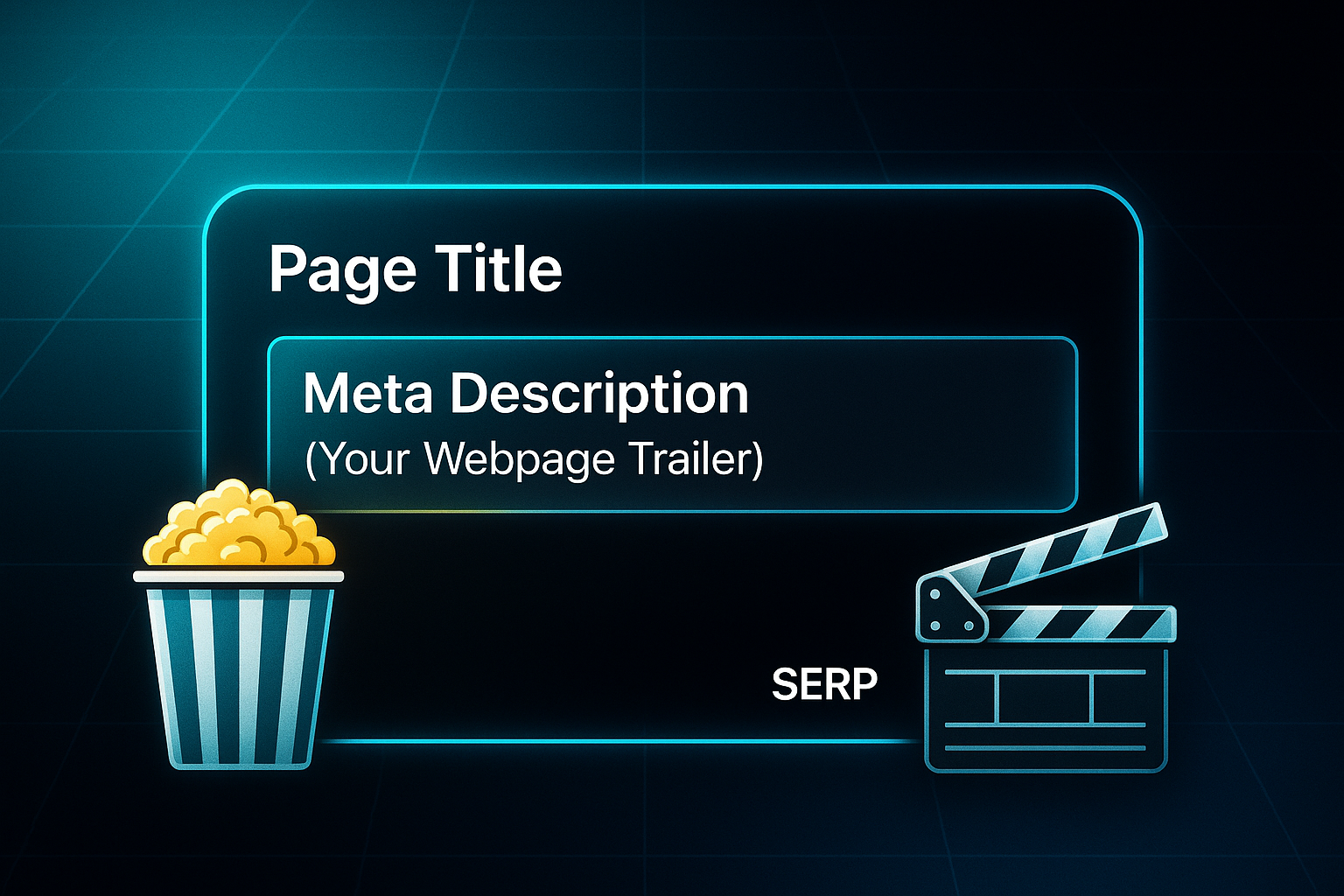
Let’s start with the basics. A meta description is a short, punchy summary tucked within a webpage’s HTML—usually just 120–160 characters long. You’ll see it right below the page title on search engine results pages (SERPs).
Think of it as a trailer for your webpage, giving users a glimpse and letting them decide whether your site’s worth a click. Its real job? Clarity and interest, making it absolutely central to how visible you are in search.
Why Meta Descriptions Matter for SEO and User Engagement
Ever wondered why some sites always seem to grab your attention in search results? The secret is almost always in the meta description. These little snippets decide how your page looks on the results page and give readers a nudge to click.
It’s basically a digital advertisement—done well, you can see your click-through rate (CTR) soar, which leads to more visitors. Sometimes search engines like Google will swap in their own wording, but having a top-notch original makes your brand’s identity shine and keeps content relevant.
It’s easy to overlook, but a missing or repeated meta description can mean your site misses out on SEO opportunities and risks a bland user experience.
In a time-based SEO test conducted over 29 days, removing meta descriptions from a selection of blog posts led to a 6% decrease in clicks.
Challenges in Scaling Meta Description Creation
So, what does this really mean for bigger websites or fast-paced businesses? Imagine trying to write a unique meta description for every page by hand. For small sites, maybe.
But if you have a huge e-commerce or content-driven site with hundreds—or thousands—of pages, keeping up is nearly impossible. These manual approaches leave you with duplication, inconsistent messaging, and missed keywords.
When things start scaling up, the whole process becomes overwhelming, and it’s simply not sustainable.

Definition and Purpose of Meta Description Generators
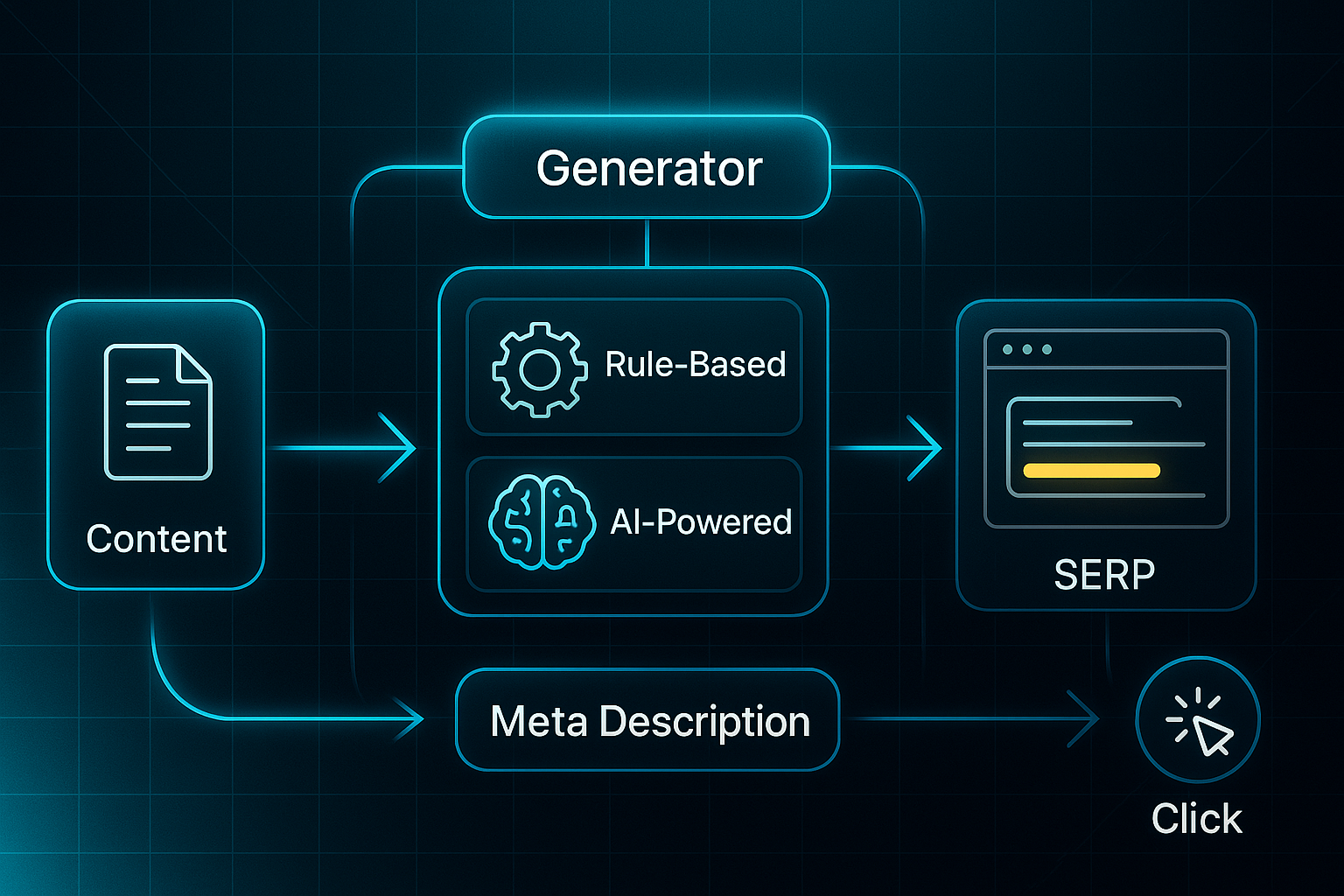
That brings us to meta description generators. These specialised digital tools do one thing: automate the creation of search-friendly meta descriptions. They use rule-based logic or artificial intelligence to scan your page’s content and churn out relevant, optimised summaries.
Their scope is sharp—focused on meta descriptions, not general writing or unrelated copy. Who benefits here? Owners keen on boosting visibility, SEO specialists wrangling huge sites, marketers who want brand consistency, and agencies juggling dozens of clients all find these tools invaluable.
Meta Description Generators in the SEO Landscape
Here’s the thing: meta description generators plug that gap between making content and getting it noticed by search engines. They’re the solution for ensuring every page has a polished, SEO-ready summary—boosting quality and consistency as your site evolves.
Compared with hand-writing these snippets, generators mean you get speed, coverage, and confidence your whole site is following SEO best practice, even as pages change.
Key Concepts and Jargon
You’ll encounter several technical terms as you explore this subject:
- Meta Description
Short HTML summary shown in search results. - SEO Snippet
Block in SERPs showing page title and description. - Meta Description Generator
Tool for automating SEO meta description creation. - Click-Through Rate (CTR)
Percentage of users clicking through from search. - Automation
Software tackling tasks with little manual work. - AI-Powered Tool
Generator using artificial intelligence for smarter summaries.
Understanding these can help you make better use of meta description generators.
So, why does all this matter? The tools we’re discussing make scaling and refining your site’s search performance practical—something nearly impossible by hand. Now that we've set the groundwork, let’s move into how these generators actually work.
Comparing Rule-Based vs AI-Powered Meta Description Generators
Meta description generators can be split into two styles: rule-based and AI-powered. The rule-based generators use templates and keyword fields for predictably consistent summaries—ideal for small, static sites with fixed SEO needs. As soon as your site grows or messaging shifts, though, their generic output soon requires manual updates.
But what if you want meta descriptions that actually reflect evolving content? AI-powered generators are built for that challenge. They rely on machine learning and natural language processing (NLP—technology for analysing page context) to scan your site and inject brand tone, intent, and context into every snippet.
You can generate hundreds or thousands of unique descriptions in one go—a critical edge for e-commerce, publishers, and fast-scaling businesses.
In a 2024 case study, e-commerce furniture retailer VIVO demonstrated the power of strategic SEO by increasing its organic traffic by 351% in just six months, growing from 24,700 to 111,300 monthly visits.
Wondering if this makes a real difference? Here’s the thing: recent studies show AI-driven tools boosted organic click-through rate (CTR) by 31% and organic traffic by 22%—all within just three months. That’s a leap in reach and site engagement.
To simplify decisions, let’s compare the two options:
| Generator Type | Best For | Key Strengths | Limitations |
|---|---|---|---|
| Rule-Based | Small/static sites | Consistency, fast setup | Generic output, manual updates |
| AI-Powered | Large, dynamic/catalogue sites | Automated scale, unique output, adaptation | Higher cost, requires review |
Essential Platform Integration Steps: WordPress, Shopify, Custom CMS
Connecting meta description generators to your platform is usually easier than expected. For WordPress, several popular plugins offer bulk editing and automation features.
Popular WordPress plugins offering efficient meta description handling include:
- AIOSEO
Good for quick bulk editing plus integration with AI tools through API connections. - Rank Math
Streamlines creation across many posts, with robust logging and review workflows. - Yoast SEO
Long-standing choice for automated suggestions and in-depth team collaboration.
Shopify users can tap into focused apps made for seamless automation. You’ll find these especially handy for scaling descriptions:
- Meta Description Generator
Handles mass creation and integrates natively. - SEO Manager
Provides bulk updates and compliance dashboards.
Staging is vital—always run new outputs in a staging environment to catch duplicates or errors before launch.
If you’re integrating with a custom CMS, typical options involve batch API-based integration or custom scripts.
The usual workflow follows this sequence:
- Submit batches of page data for AI-based generation
- Receive optimised snippets ready for automated or manual publishing
- Use extra workflow tools for large projects
QA tools: Detect issues before anything goes live. Override/fallback: Set up backup processes for any failed outputs or edge cases. Audit logs: Keep detailed records for compliance and teamwork.
Getting these steps right helps scale your meta descriptions, supporting your team and site growth.
Advanced Features: Multilingual Support, QA, and Troubleshooting Safeguards
Beyond simple automation, modern generators come packed with extra capabilities. Why do these matter? They’re what will truly save your team time as the site expands.
One such advanced feature is multilingual support. For businesses targeting multiple regions, multilingual support makes all the difference—using locale mapping within WordPress, Shopify, and custom platforms so every region gets accurate, SEO-friendly content.
Alongside multilingual support, robust QA and troubleshooting safeguard your automation process.
QA features you’ll likely encounter in advanced platforms include:
- Error detection
Flags duplicates, missing elements, or off-brand language before descriptions go live. - Consistency checks
Monitors style and tone for brand integrity. - Performance monitoring
Tracks what’s working so you can focus tweaks. - Fallback logic
Automatically fills in blanks if AI output fails. - Manual override
Lets you adjust or replace any snippet for priority pages. - Audit logs
Track all edits—essential for compliance and review.
Blending automation with robust QA means you scale meta descriptions and keep SEO standards high as things change.
Want to know what all this looks like for your bottom line? Next, we’ll dive into the real ROI of deploying these tools.
ROI and Workflow Impact: Why Meta Description Generators Are a Game-Changer
Meta description generators now sit at the heart of many SEO workflows, giving businesses of all shapes and sizes a real edge—especially when it comes to time savings, scalability, and consistency.
Whether you’re an agency, a massive e-commerce site, or a one-person show, making the switch from manual writing to automation delivers bulk editing speed, higher-quality standards, and a measurable lift in organic search performance.

AI-Powered
SEO Content Strategy
See the AI platform that's replacing entire content teams
(with better results).

The Time-Saving Transformation
Ever wondered just how much time you might save? For agencies, handcrafting a single meta description used to take 19.1 minutes on average. Compare that to today’s AI tools—like Frase.io and Jasper—where batch creating meta snippets takes just 2–3 minutes per page, or even lets you whip through 500+ descriptions an hour with CSV imports and templates.
Small business owners and solo teams see similar wins. They now spend around 30–45 seconds per snippet, instead of several minutes.
Ecommerce site owners with enormous product catalogues have it even better—bulk updates and mass publishing happen in hours, not days. Hybrid workflows (AI first draft, then human polish) have become best practice, pushing output up by 40–70% while locking in your brand’s voice.
Streamlined Bulk Workflow
It’s not just about speed, but about having a clear system. Here’s the general shape of a modern approach:
- Gather up your URLs and titles
ready for batch input. - Let your chosen AI tool generate the first drafts
For example: Frase.io, Jasper, or AIOSEO. - Team members or solo editors do a quick review
checking brand tone and compliance. - Run format, length, and uniqueness checks
to ensure everything’s polished. - Push everything live with bulk publishing through your CMS platform
Think WordPress, Shopify, or custom.
Platform Power: Extra Features That Matter
These tools are packed with powerful extras. AIOSEO offers audit logs and template controls for teams.
Jasper brings in brand tone presets and tracks revision history. RightBlogger has A/B testing dashboards,
and Frase.io keeps template libraries organised and analytics close at hand. Editorial workflow features—like assign/review cycles and automatic length validation—keep your outputs sharp and aligned with your SEO and brand strategies.
CTR Boosts and New SERP Challenges
So, does all of this effort actually bring in more traffic? Yes—at least, it does when you’re blending AI with smart human edits. Reports show 8–15% organic CTR gains from these upgraded workflows.
But new Google features like AI Overview SERPs can hit CTR hard; for example, MailOnline’s CTR dropped to under 5% on desktop, and Seer Interactive saw dips of up to 55%.
But teams aren’t powerless. Tactics like A/B testing, crafting meta text around E-E-A-T principles, and diligent analytics tracking (especially for multilingual sites with locale-specific templates) can help you adapt.
Key Takeaways
- Time savings
AI workflows cut meta writing time by up to 90%. - Quality gains
Hybrid editing protects brand voice and lifts CTR. - QA & analytics
Audit logs, split tests, and versioning guide improvements. - Strategic caution
Don’t skip the review—human expertise keeps outputs fresh, not generic.
Meta description generators truly do solve the age-old bulk SEO headache. Still, ongoing human involvement in QA and analytics is critical if you want to lock in—and keep—those SEO wins as trends evolve.
How to Choose and Implement a Meta Description Generator – Outcome-Focused, Scenario-Driven Guide
Choosing a meta description generator is all about matching your platform’s strengths with what matters most for your operation—speed, quality control, and reliable technical fit.
Whether you’re managing a solo blog, an agency workflow, an e-commerce catalogue, or targeting audiences around the world, picking based on scenario means less friction and better results.
To keep things practical, here’s a side-by-side comparison of top tools. This table covers price, batch limits, languages, key integrations, and which user situation each tool suits best. It’ll help you make a focused choice quickly.
| Tool | Price (2025) | Batch/CSV Spec | Languages | Integration | Review/QA Workflow | Best Fit |
|---|---|---|---|---|---|---|
| Jasper | $39+, $99+/mo | CSV 50MB, API 100/min | 35+ | WP, Shopify, Zapier | Audit log, team approval | Agencies, large e-comm |
| Frase.io | $44.99+, $99+/mo | 1,000–5,000 rows | 20+ | WP plugin, API | Live preview, content QA | SEO/content teams |
| Rytr | Free/$9+/mo | 100 items/batch | 30+ | WP plugin, API | Plagiarism/tone scan | Bloggers, SMEs, multilingual |
| ChatGPT | Free/$20+/$30+/mo | Unlimited/manual/API | Many | API/manual | Editable, full regen | Solo/multilingual/global |
| SearchAtlas | Quote-only | Spec. unavailable | English | API/manual | Char-count, preview | SEO specialists |
| SERP Ninja | Free | Manual only | Multiple | None/manual | Keyword-focused output | Budget/single use |
| SEOSwarm | Bespoke package | No batch/API disclosed | Multilingual | WP, Shopify, API | Team-based SEO QA, logs | Agencies/global brands |
Let’s walk through how setup and implementation work, based on who you are and what you need.
For each user type, pay close attention to what’s distinctive about the scenario—especially risks to avoid and efficiency tips.
Solo Owners & E-commerce Managers
If you’re solo or running a shop, you want a process that’s time-efficient and error-proof, without complicated onboarding or risk of data loss.
These steps keep it simple:
- Export titles to CSV
Jasper supports 50MB batches, Rytr accepts 100 items. - Upload and confirm dashboard status
Watch for “Import Complete” or “Meta Description Updated” for final validation. - Fill blank fields only (Shopify)
Prevent accidental overwrites—run a match report to double-check all updates.
Agencies & Larger Teams
For agencies and collaborative teams, quality assurance and transparency are crucial—especially when handling volume across clients.
Here’s how to keep every step robust:
- Assign page ownership and review roles
Jasper’s audit logs or Frase’s dashboard make delegation trackable. - Sample 5–10% of outputs
Check tone, uniqueness, and compliance before large-scale publishing. - Get client sign-off and document approvals
Use “Approved” flags and exportable reports for clear records.
Multilingual & Global Setup
If you’re working across regions, accuracy and localisation are key.
Mismatches can mean lost visibility, so these methods put accountability front and centre:
- Segment locales in CSV for batch processing
Rytr and ChatGPT support precise targeting by market. - Confirm “Language/Locale Pass” and slate native review
For priority regions, have a local expert check output. - Log approvals by team and market
Keeps changes transparent and audit-ready.
Even with a smart setup, technical hiccups can pop up—putting data at risk or affecting SEO.
These troubleshooting checks help catch problems early, keeping your site’s performance intact.
Before and after launch, use these focused routines to safeguard your output and rankings:
- Batch/API Errors
Split jobs, retry uploads, and escalate “spec unavailable” issues as needed. - QA Failures
Regenerate flagged lines, rely on plagiarism/tone checks, and confirm a “Reviewed” status. - Overwrites
Back up your originals, fill only blanks, and confirm “No data lost” notifications. - Tracking Impact
Monitor CTR monthly—adjust by analytics for lasting SEO wins.
Making your choice scenario-driven gives you consistent, scalable quality. Coming up, we’ll focus on writing strategies that make your meta snippets truly irresistible in search.
Best Practices for Writing SEO-Friendly Meta Descriptions: Tactical Playbooks by Use Case
Optimising meta descriptions isn’t one-size-fits-all—let’s look at tactics specifically tailored for solo site owners, agencies, global teams and enterprise operations in 2025. These tactical approaches will help various teams create efficient, compliant, and robust meta descriptions that are fit for today’s SEO landscape.
Solo Site Owners & Small Teams: Automation and SERP Compliance
If you’re relying on automation to save time and keep SEO standards high, a well-honed workflow is essential. The following steps make things efficient and compliant with Search Engine Results Page (SERP) rules:
- Automated meta boxes
Use WordPress tools like AIOSEO or Shopify SEO apps to enforce the 150–160 character limit and live preview. - SERP simulators
Check appearance in Portent and Mangools before publishing to ensure desktop/mobile compliance. - Batch generators
Jasper, Rytr and Frase.io reduce writing time from 20 minutes to 1 minute per snippet. - QA features
Built-in checks flag truncations, duplicates, and help maintain tone and keywords for natural SEO alignment.
Agencies & Large Teams: Approval and Scalable QA Workflows
Managing volume and quality as a team isn’t easy, but following the proper sequence keeps things on track. For optimal results, set up your workflow like this:
- Assign roles and use audit logs
Platforms such as SEOSwarm, Jasper, or Frase.io make tracking creation and review simple. - Batch uniqueness checks
Run AIOSEO Site Analysis or Jasper Uniqueness Checker to spot duplicate meta descriptions before launch. - Sample review
Manually review 5–10% of outputs to ensure standards and compliance. - Centralised approvals
Use approval logs and exportable reports to keep records clear. - A/B testing tools
SplitSignal, SEOTesting, and Google Search Console can help lift click-through rates, with teams seeing up to 30% less manual review time and improved compliance.
Multilingual & Global Teams: Localised Batch QA and Regulatory Review
For global sites, localisation and accuracy are vital. Streamline your process with these methods:
- Segment locale outputs
Use built-in language tools in Rytr or Frase.io for batch processing. - Native review
Send drafts to local editors using Rytr’s Locale QA Module or Frase’s Language Review tools. - Regulatory audit logs
SEOSwarm and agency dashboards help track compliance, achieving up to tenfold faster deployment and 90% fewer translation errors.
Enterprise & Regulated Operations: Audit and Analytics Integration
Enterprises need reliability and audit control at all times, so secure your workflow with these steps:
- Role assignments and version controls
Configure platforms like SEOSwarm for proper team access, version history, and dashboards. - API/GSC integrations
Automate live meta updates and pull real-time analytics for insightful reporting. - Audit trails and rollback
Use detailed logs to maintain regulatory standards and roll back changes when needed.
Mastering these scenario-driven playbooks means your meta descriptions stay efficient, compliant, and robustly optimised—no matter how complex your SEO landscape. Next, I’ll show you how to create meta text that’s irresistible for search clicks.
Blog-in-one-minute
Add a fully SEO-optimised blog to your website with just 2 lines of code.
Learn more
Optimising Meta Description Workflows for Agencies and Enterprises: Tools, QA, and Audit Protocols
Managing meta descriptions at scale—think thousands of pages—is where things get truly challenging for agencies and enterprises. You need robust workflows, smart error detection, and fast review cycles just to keep up.
Most teams pair AI-powered generators with familiar Content Management Systems (CMS—platforms for building and editing websites) like WordPress or Shopify. You’ll see tools like Matrixify, WP All Import, AIOSEO, Jasper, and SEOSwarm in play for bulk creation, auditing, and publishing.
Why does the 150–160 character rule matter? If you break it, search engines might snip off your text, hurting your visibility and click-through rates.
Workflow Automation and Dynamic Templates
The process for automating workflows usually unfolds as follows:
- Build dynamic templates using page-specific variables such as {product_name} or {category}
- Generate batches for all target URLs and collect outputs for quality assurance
- Assign clear review and approval roles within audit logs to keep everyone accountable
- Publish through the CMS, so every action gets tracked
These steps ensure consistency and customisation, even at huge scale.
QA Protocols and Error Handling
Managing quality and catching errors—before they go live—is vital. Error handling at scale usually follows this sequence:
- When over 3% of a batch are flagged as duplicates or show “Default Text,” these lines get queued for manual review
- Meta descriptions too long, missing disclaimers, or flagged as duplicates automatically generate revision requests
- A dashboard tracks error rates live, alerting teams via Slack or email if batch failure climbs above 5%
- Every change and approval appears in your audit log—perfect for version control and regulatory compliance
Ongoing success is measured with CTR (click-through rate), organic traffic uplift, compliance pass rate, and time-to-review. If CTR dips more than 30% after an update, or Google rewrites your snippet over 20% of the time, those pages get flagged for attention.
SEOSwarm: Enterprise Workflow Support
Our solution, SEOSwarm, supports direct CMS integrations, agent-driven workflows, batch QA triggers, and audit trails. Teams can push thousands of meta descriptions live, lock in compliance, and shrink review cycles by up to 70%.
As international sites grow, multilingual QA and localisation become mission-critical. Next, let’s dive into strategies for managing meta descriptions across global regions.
Meta Description Generators for Multilingual and International SEO
Platform Features and Market Coverage: 2025 Snapshot
Choosing a meta description generator for multilingual SEO is about more than language count. You need to check batch processing limits, support for unique scripts and encoding, and regional modules for market localisation.
To make things clearer, here are some top contenders and what sets them apart:
- Rytr
Supports 35+ languages, offers strong right-to-left (RTL) script handling for Arabic and Hebrew. - Frase.io
Excels with European and Cyrillic script support, easy Shopify/Yandex integration, and can batch 100+ descriptions at once. - Jasper
Scalable for teams, handles Japanese and German encoding, integrates smoothly with WordPress.
But here’s a limitation—only Rytr currently provides robust RTL/script validation for Arabic and Hebrew, and most tools still miss the mark on encoding checks for these languages.
Localisation Workflows and QA Essentials
The best workflow for localising meta descriptions at scale involves several clear steps.
Start by exporting UTF-8 encoded CSVs—the gold standard for multilingual data. Then, activate any regional modules (like Frase.io GEO wizard for German sites) to improve localisation.
It’s good practice to generate 3–5 snippet variants per page and apply a double-layer QA review—that means both an SEO specialist and a native language editor check for regulatory and cultural compliance.
This matters most in markets with high rewrite rates, such as 30% in Japan and 24% in Germany, or where encoding issues can creep in with Cyrillic or Asian scripts.
After following this process, teams using Frase.io in Germany saw a 22% CTR lift and 60% drop in QA errors.
Still, gaps remain: many platforms lack automated regional QA, strong multilingual analytics, and support for non-Google engines like Yandex or Baidu. That’s why real international SEO depends on pairing powerful tools with ongoing market-specific review.
Troubleshooting Meta Description Generators: Advanced Protocols and Solutions
When agencies or enterprises run meta description generators at scale, the challenges go way beyond the basics of QA. The tricky part comes when issues start interfering with integration, scaling, keeping the brand consistent, meeting compliance standards, or delivering quality.
These problems are especially acute for multilingual projects.
To address these escalating complexities, knowing how to tackle the toughest problems will keep your process running smoothly. Here’s what teams usually face and how experts resolve it:
- Custom CMS Integration Issues
You’ll want modular API connectors and middleware to link generator outputs into non-standard CMSs. Watch fields closely and keep an eye on real-time logs. - Ultra-Large Site Scaling Problems
Break updates into micro-batches, respect API rate limits, deploy cloud workers to run parallel jobs, and set up auto retries and rollbacks. - Persistent Brand/Context Drift
Embed your brand guidelines in AI prompts, adapt models with your content, and always queue sensitive pages for human review. - Regulatory Audit/Compliance Challenges
Log every input and output, use integrated compliance checklists, maintain version controls, and keep documentation ready for legal audits. - Encoding/Scripting Errors (Non-Latin/RTL Languages)
Stick with UTF-8 encoding, run both automated and native-speaker QA, adjust prompts for language nuances, and add fallback logic for stubborn issues.
The real secret to solving these advanced problems is blending sound technical practice—like smart batch sizing and middleware—with continual review, robust audit processes, and layered QA.
Why? Because a multi-layer workflow—built on cross-team collaboration—helps your operation stay resilient and compliant as both content and global regulations shift.
Ready for the next step? Up next, we’ll cover essential post-launch optimisation checklists and how to spot anomalies before they impact your search performance.
My Final Thoughts on Meta Description Generators
A well-crafted meta description is more than a technical detail—it's your site's first impression in search results. I’ve seen firsthand how automation tools, especially AI-powered generators, can turn a tedious process into a strategic advantage for any business size.
Here’s my advice: Start by matching your generator to your platform and workflow needs. Use batch processing, QA checks, and scenario-driven playbooks to keep your snippets sharp and compliant. Don’t skip human review—automation works best when paired with expert oversight.
SEO isn’t static, and neither should your meta descriptions be. The sites that win clicks are those that continuously refine their approach, blending smart tools with thoughtful editing. Your meta description generator isn’t just a shortcut—it’s the engine behind your search visibility and brand voice.
- Wil