

Missing out on Google’s local search means missing out on customers—plain and simple. I’ve seen businesses lose leads just because their details were outdated or their listing was nowhere to be found.
If you’ve ever wondered why your business doesn’t show up in local results, or how competitors seem to attract more reviews and bookings, you’re not alone. Setting up and managing a Google business listing can feel confusing, especially with new rules and features in 2025.
In this guide, I’ll walk you through exactly how Google business listings work, who qualifies, and why they matter more than ever. You’ll get step-by-step instructions for creating and verifying your profile, plus practical tips for optimising every detail—photos, categories, reviews, and more.
By the end, you’ll know how to avoid common mistakes, troubleshoot issues, and keep your listing working hard for you. Whether you’re starting from scratch or looking to improve your results, you’ll find actionable advice and real-world examples to help your business stand out.
What are Google business listings?
The Changing Face of Local Discovery in 2025
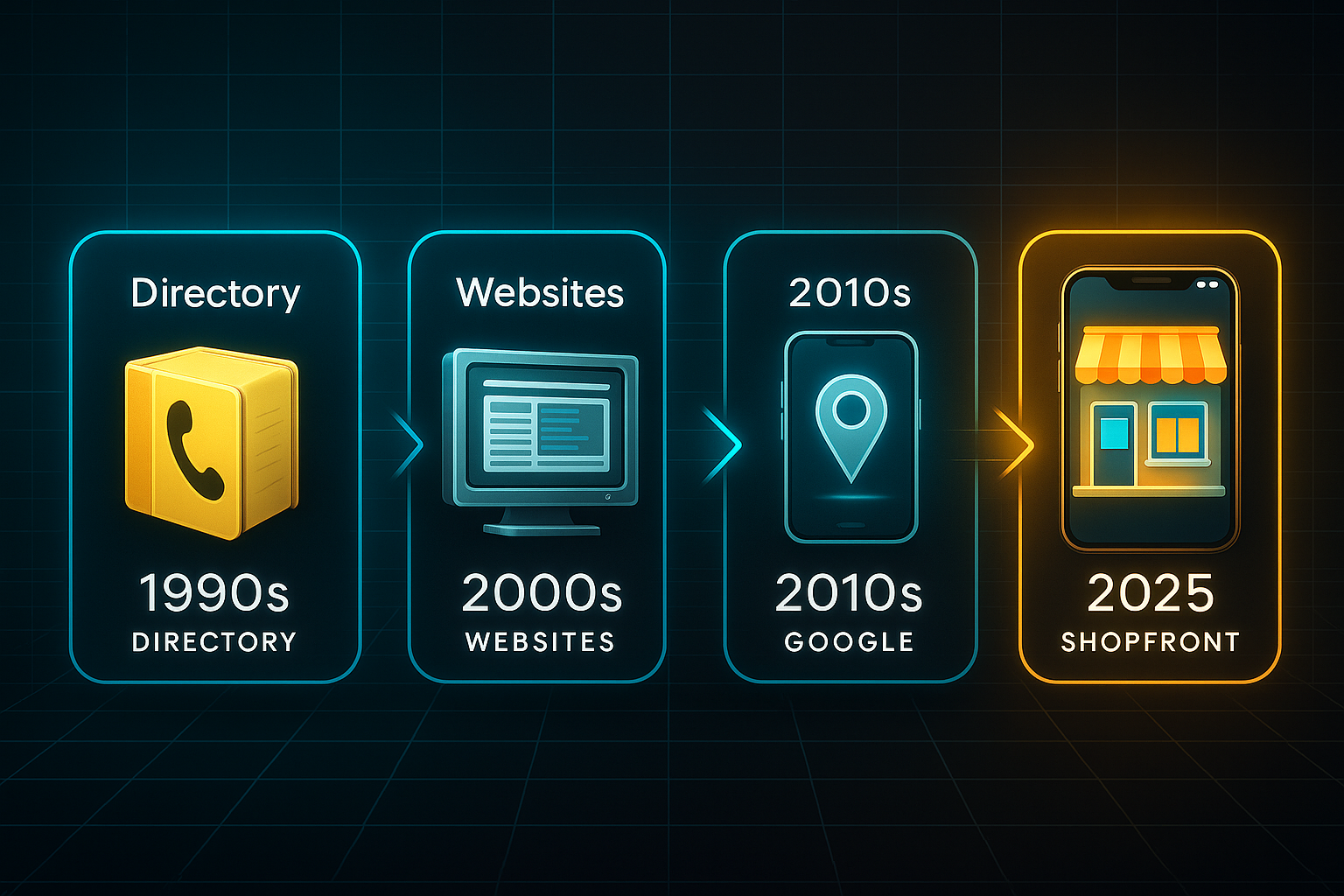
Think back to when finding a plumber or bakery meant flipping through a hefty paper directory or searching static websites. Those days are long gone.
Now, digital search rules, and Google sits at the centre—handling almost 90% of global search traffic. 87% of people now rely on Google to find local businesses.
It’s a major shift. Google Search and Maps have become the default for finding services, making things like photos, contact details, and reviews just a click away. Why does this matter?
Businesses now build reputation and visibility through Google’s platform—if your listing is absent or outdated, you lose leads and customer visits. In 2025, your Google presence is your digital shopfront, and customers expect fast, accurate, and trustworthy information every time.
What Is a Google Business Listing (and the Profile)?
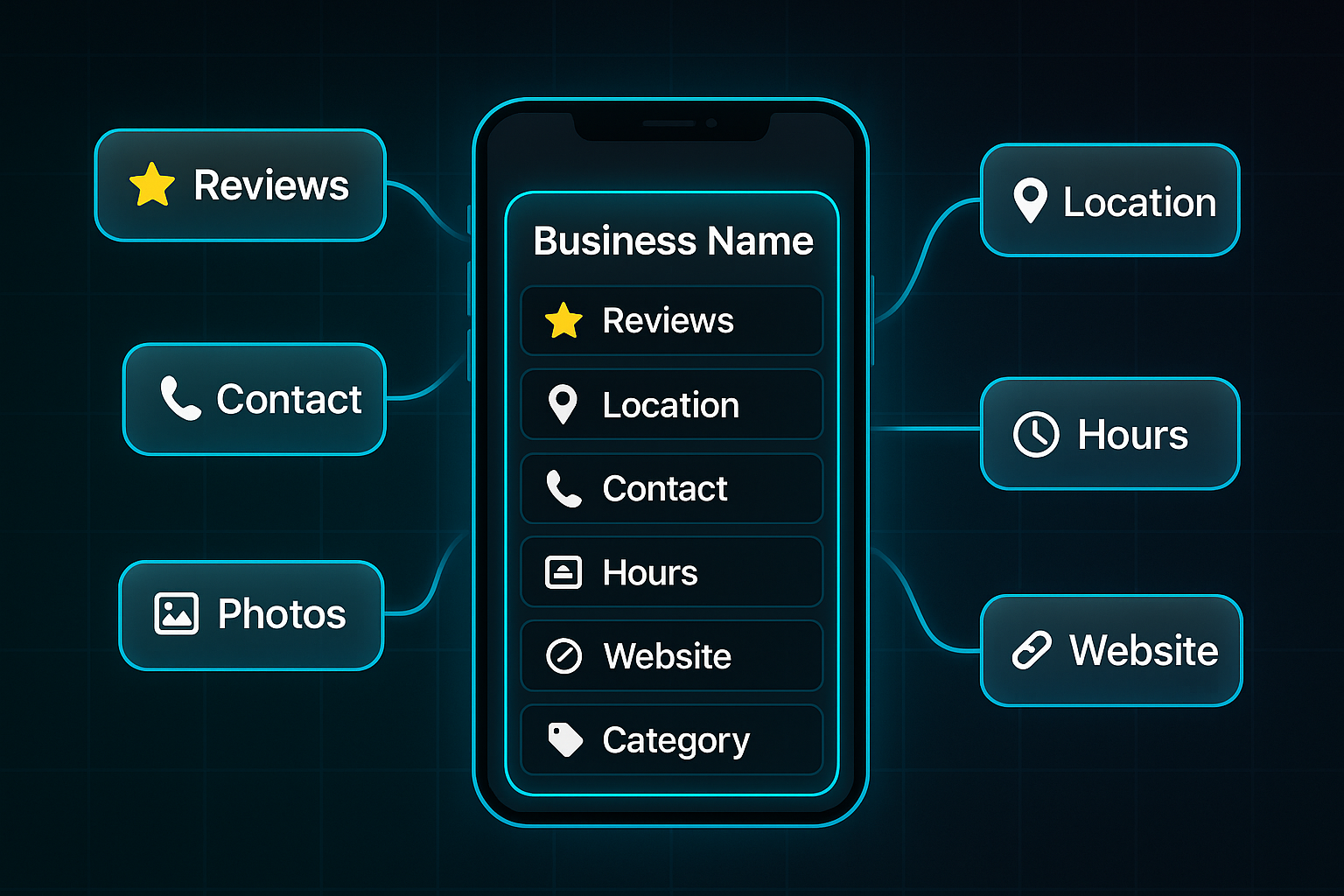
A Google business listing appears in Search or Maps when people look up businesses nearby. It showcases verified details like business name, location, hours, photos, and reviews—helping customers decide if they want to visit, call, or learn more.
Ever wondered why your business appears on Google but not elsewhere? The secret’s the Google Business Profile (GBP). This free tool lets owners claim their listing and update details anytime.
So, listing versus profile: the listing is public, and GBP is how owners keep things accurate and appealing.
What’s Inside a Google Business Listing?
A Google business listing isn’t just a pin on a map. Here’s what people expect to find when they search—each part helps build trust:
- Business Name & Category
Essential label for what’s offered. - Location/Service Area
Address or coverage displayed. - Contact Information
Phone, website, and messaging options. - Business Hours
Operating times, always current. - Photos/Videos
Images show premises or products. - Description
Quick summary of unique value. - Reviews & Ratings
Social proof from actual customers. - Posts & Updates
News, events, and offers, all in one place.
These components do more than inform—they add credibility and encourage new customers.
Who Qualifies for a Listing (and Who Doesn’t)?
Eligibility boils down to customer interaction. If you have a physical premise, serve a geographic area, or combine both, you qualify.
Even coworking-based businesses count if they operate independently. But Google is selective; not every company gets in.
If your office only exists on paper or you never meet customers face-to-face, Google won’t let you join the sandbox.
Online-only businesses, lead generators, virtual offices, temporary setups, and unattended rentals are excluded.
It’s a bit like making sure your neighbours are actual people, not just empty houses on the street. The aim? Keep search results useful and trustworthy for real local seekers.
The Strategic Importance of Google Business Listings
Your Google listing is much more than an address. It’s how local customers find and trust you.
The listing influences whether you appear in the coveted local 3-pack. It also helps you maintain your reputation and combat misinformation.
Compared to platforms like Yelp, Google’s reach and control set it apart. With these fundamentals in place, the next step is seeing how Google Business Profile can drive real organisational growth.
What are the benefits of Google business listings for your business?
Local Search and Maps Visibility
In 2025, your Google Business Profile (GBP) is the digital gateway for local discovery. Having a profile isn’t enough—you need to stay sharp with frequent updates and accurate details.
Keep your NAP (Name, Address, Phone) information current, upload fresh photos each month (aim for 15 or more), and post weekly to maintain relevance. Optimised profiles see up to three times more visits, with higher call and direction requests. One London services firm jumped leads by 123% simply by updating content and categories, earning repeated “3-pack” visibility.
A case study on optimizing a Google My Business profile for a billboard advertising company revealed a 300% increase in calls, a 17% rise in website visits, and an 8% growth in direction requests.
Building Trust and Reputation
Visibility brings you to the customer’s attention, but trust seals the deal. The Google-verified badge increases confidence, and reaching 200+ reviews can make you a market leader.
Timely replies—within 48 hours—can lift your average rating by 0.3 stars and prompt more reviews. Hair Syrup (UK) added £6.5M in sales through active review responses, and a Los Angeles dental clinic hit #2 in “dentist near me” results by encouraging patient images and reviews. Today, 83% of buyers check Google reviews before deciding.
A study found that both online reviews and how businesses respond to them are critical factors in building customer trust.
Driving Customer Actions with GBP Features
GBP does more than display information—it converts interest to action. Use features like Book Now, messaging, and directions to move searchers straight to bookings or visits.
A UK roofing business added booking links and new photos, leading to $220K in bookings in three months. An Austin bakery saw foot traffic rise by 40% with messaging and specials. 78% of mobile users take some action after a GBP search within 24 hours.
Why Google Business Profile Leads in 2025
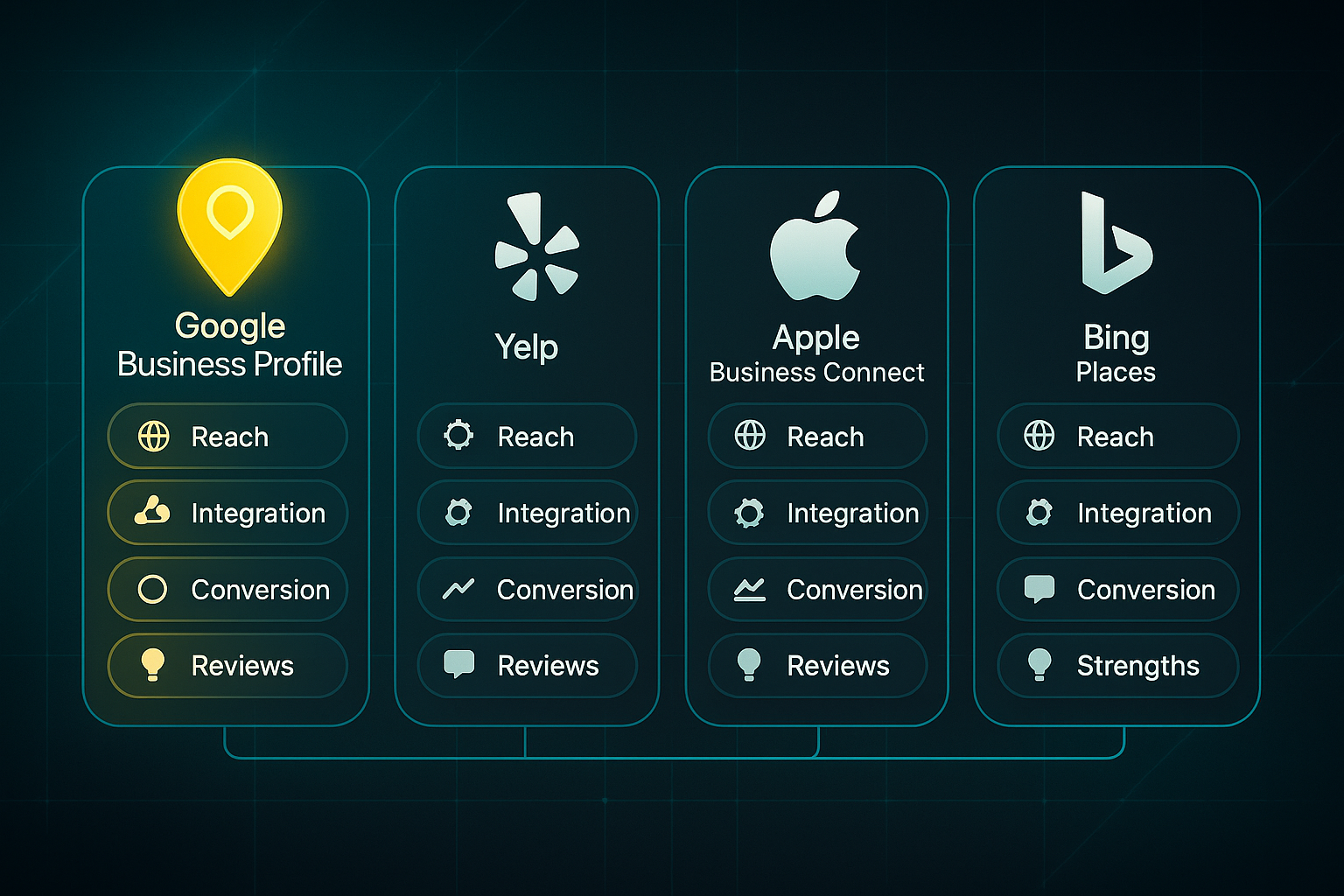
When choosing a local search platform, business owners need to know which option offers the greatest reach and features for driving customer actions. This comparison highlights how GBP stands out for discoverability, interactive tools, and conversion rates.
| Platform | Local Search Share | Feature Depth | Conversion Rate |
|---|---|---|---|
| Google Business Profile | ~70%+ | Posts, messaging, bookings, analytics | Highest—integrated with Search/Maps |
| Yelp | Strong US/niche UK | Reviews-focused, basic posts | Moderate, smaller audience |
| Apple Business Connect | iOS growing | Basic features | Lower than GBP |
| Bing Places | Smaller | Basic, less comprehensive | Lower, niche focus |
Looking at this table, Google Business Profile wins on local visibility and conversion. Its tight integration with Search and Maps, plus tools like messaging and booking, mean information is seen by customers ready to act.
Yelp is useful for industries where reviews drive choices, especially in the US, but doesn’t match GBP’s conversion potential. Apple Business Connect is worth considering for iOS-focused audiences; its feature set is still developing. Bing Places is fine for niche markets with limited reach.
Here’s my advice for local business owners:
- Focus efforts on GBP for the best chance of being discovered and chosen.
- Update profile details, add monthly content, and respond quickly to all reviews.
- Take advantage of booking and messaging tools to turn searches into actual customers.
With a well-managed GBP, local businesses build trust, boost visibility, and reliably drive growth—giving them the edge in today’s digital landscape.
Blog-in-one-minute
Add a fully SEO-optimised blog to your website with just 2 lines of code.
Learn more
How to create and verify your Google business listing: Step-by-step guide
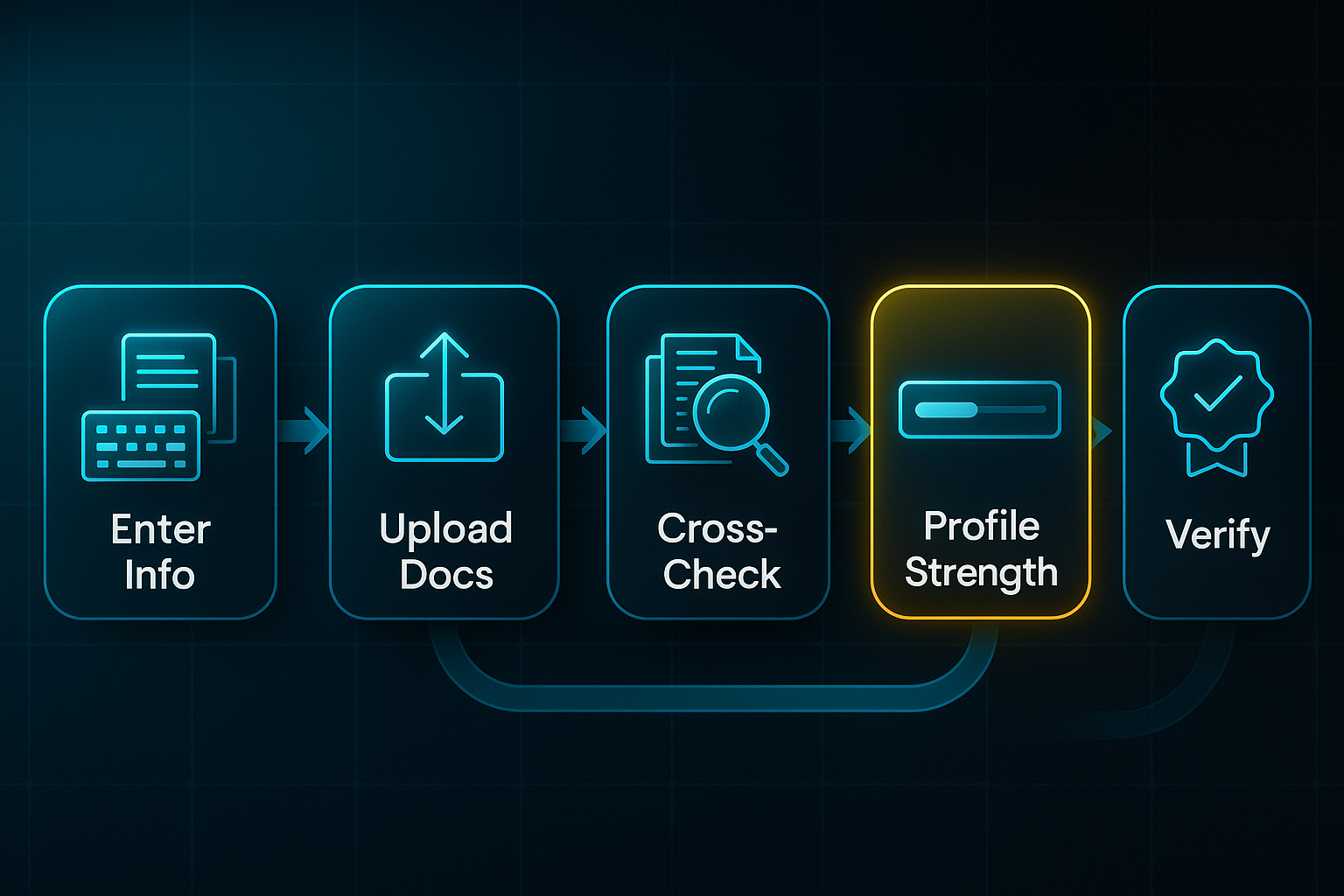
Entering Your Business Information: Field-by-Field Data Entry and Documentation Alignment
Creating your Google Business Profile (GBP) in 2025 feels quite different from the old days. It’s all about structure, accuracy, and compliance now.
Every detail you enter is cross-checked with your business documents. This means you want details that are perfectly clear and consistent—otherwise, expect extra headaches.
You’ll start at the GBP site (no need to memorise a long URL!), signing in with your Google account, ideally tied to your business domain.
When you’re set, click “Add business” or “Manage now”. Every dashboard field comes with an info icon—hover over these for exact requirements. The dashboard’s new 2025 update flags any missing or mismatched fields in real time, so it’s easier than ever to catch errors before you submit.
Entering your information correctly is crucial for a smooth verification process. Here’s how to approach each stage.
How to Complete Each Field (2025 Guidance)
Aim for total accuracy—get these parts right, and verification often just sails through.
Here’s a quick rundown on entering your key details:
- Business Name
Use only the official or trading name as shown on signage—skip keywords or extra locations. - Category
Pick the most relevant option from Google’s 2025 list; avoid extra categories not truly connected to your services. - Business Type
Choose ‘storefront’ for physical locations, or ‘service area’ if you visit clients; add areas served if needed. - Address/Service Area
Enter the full address, including any suite or unit, or list every city/postcode you cover. - Contact Information
Use your main business phone and website, and a business email if prompted. - Hours
Set standard hours and any holiday or event times via the clock icon. - Photos & Description
Upload current, sharp images (at least 1024x768 px) of premises and team; keep your description within 750 characters.
Before starting, gather digital versions of key documents—registration papers, a utility bill, admin photo ID, and recent business photos.
Every bit of info—name, address, phone—must match across all files. Even tiny mismatches like “Rd” versus “Road” can cause delays or rejection.
After you’ve entered your business information, document checks follow. Accurate documentation will help you avoid delays and ensure compliance.
Document Checks and Matching Controls
Google’s system now checks your supplied details against your documentation automatically. Any inconsistency—even something minor—is flagged for correction before you move forward.
Here’s what you’ll typically submit:
- Business Registration Certificate
Validates legal name, registered address, and licence numbers. - Utility Bill or Bank Statement
Confirms the address reflects current, real-world use. - Photo ID for Admin
Needed for whoever controls the main profile. - Up-to-date Premises Images
Clear shots of exterior, signs, and workspace for verification.
Be sure all uploads are clear and easy to read.
Updating a field while verification is underway? Your review may be paused or restarted—that’s a new twist for 2025 compliance.
Once documents are submitted and details are matched, you’re ready to move to the next step. Avoiding mistakes here saves future delays.
Avoiding Common Mistakes in 2025
Certain missteps can trip up the process. Double-check the following to help ensure a smooth journey.
- Consistent Naming
Align name and address (including suite/unit info) everywhere you enter it. - Category Overloading
Never add more than two secondary categories unless absolutely essential. - Incomplete Documentation
Ensure uploads are clear and current for all details and address info. - Contact Info Mismatch
Your phone, website, and address must match receipts, your website, and all official records.
Use the dashboard’s Profile Strength bar—it stops you moving forward until every detail is matched. Getting everything perfectly aligned now makes future verification much easier.
So, once you’ve got all your fields, categories, and documents precision-matched, you’re set for the next major stage: the actual verification itself. Nail this foundation, and everything else is far simpler.
Optimising Your Google Business Listing for Maximum Impact: 2025-Specific Tactics with Clear Outcomes
Selecting Categories That Maximise Discovery and Ranking
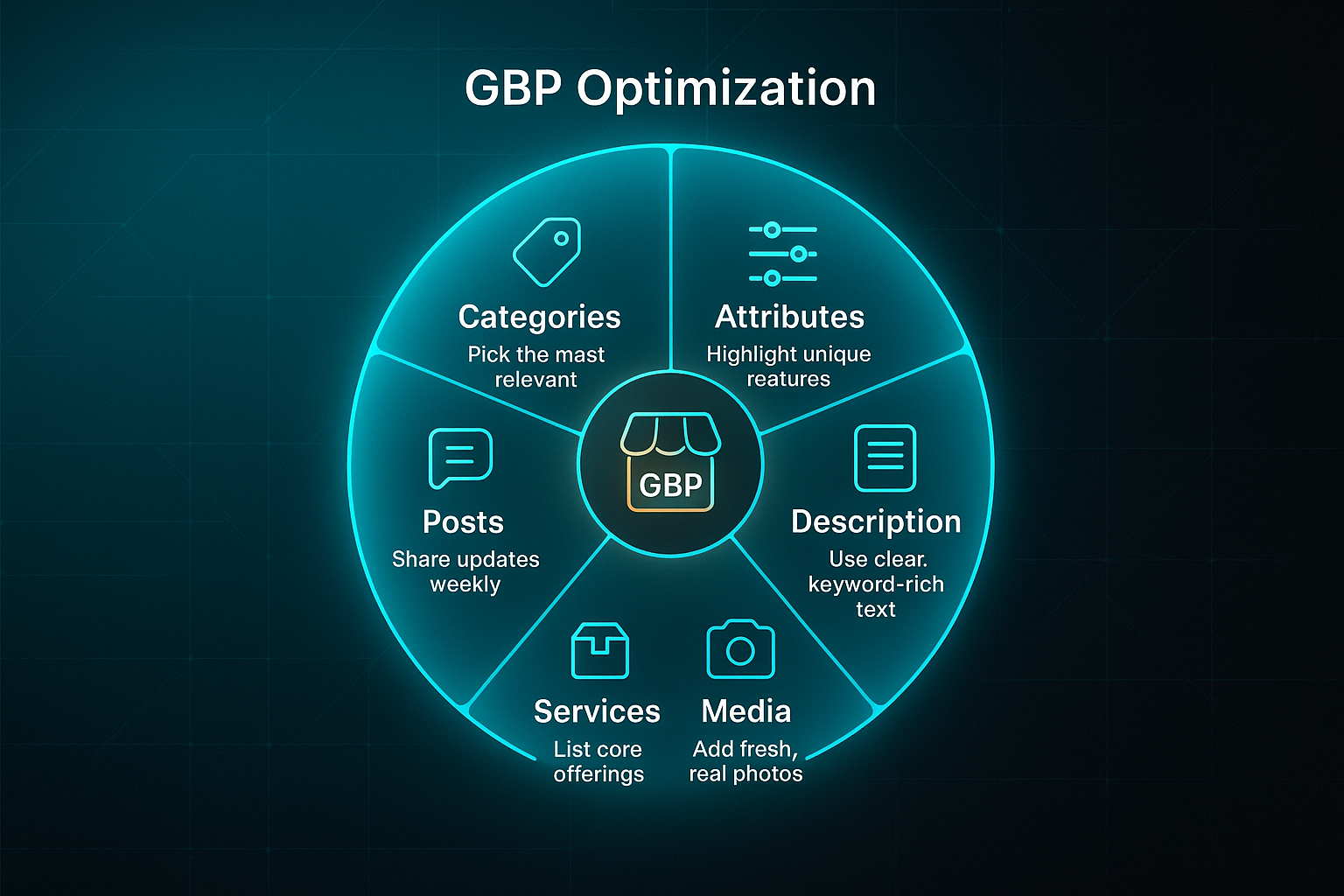
Let’s start with categories—these are much more than a surface-level label. Picking the right Google Business Profile (GBP) categories is a key local ranking factor in 2025, so your choices here really matter.
Always aim for the most specific, relevant primary and secondary categories. If you’re a florist who specialises in weddings, “Wedding Florist” gets you seen by your dream clients far more effectively than just “Florist”. The same goes for “Emergency Vet” over simply “Veterinarian”.
Don’t set it and forget it. Each quarter, review your categories, ideally using the latest industry lists from Sterling Sky or LocalU to keep up.
Tools like PinMeTo or Birdeye can even alert you to any category changes—handy, since missing a sudden shift can sink your visibility overnight. Check GBP’s “Category Source” metric regularly; a quick fix if you spot any issues can keep those all-important views coming.
Using Attributes and Amenities to Attract Customers
Attributes are the easy-win trust builder. Flags like “Black-owned,” “pet-friendly,” or “contactless pickup” stand out right away and have proven to lift engagement.
With the 2025 GBP dashboard, you just toggle attributes on and off—or update them instantly based on your customers’ expectations.
Make it a habit to review your amenities every month; the dashboard now nudges you about hot or trending tags.
If you’re running multiple branches, test out the new bulk attribute editor to keep your info consistent everywhere without drowning in manual edits.
Writing Business Descriptions that Convert and Avoid Penalties
Your business description in GBP is only 750 characters, but every word counts. Start with critical keywords and location—this gives you an edge in those high-intent, “near me” searches.
Look at the “User Queries” report for insight on what your real customers care about, and highlight what sets you apart.
Stay away from keyword stuffing or anything that could trigger Google’s AI moderation, which now checks for misleading claims or spam.
Review your description twice a year and use the dashboard to spot compliance flags early, so you can steer clear of suspensions.
Creating and Uploading Media Assets That Drive Actions
Photos and videos have real power—they’re not just nice to have. Aim for at least 15 up-to-date images, refresh monthly, and prioritise clear, realistic shots of your team and location.
Stick to Google’s recommended specs: logo at 250x250px, cover photo at 1024x576px, and interiors at 1024x768px.
Add brief captions and use geotags where you can, as these help your local SEO.
The public-preview lets you see exactly how your listing will look before it goes live.
Staying consistent with regular updates, measured by GBP Insights, can increase calls or direction requests by up to 40%.
With compelling images established, it's important to shift your focus towards making your services and products stand out for even greater customer engagement.
Structuring Services, Menus, and Products for More Clicks
When listing services or products, be direct—use search-focused titles (think “Wedding Cake Delivery” or “24/7 Vet Consultation”) and upload real photos.
Flag your top items with “special offer” or “new” tags, which help you surface higher in GBP’s Discovery tab.
It’s easy to let this get outdated, so a monthly review checklist is crucial.
Multi-location businesses can save hours by using GBP’s bulk menu editors, keeping everything fresh and consistent across all your branches.
Maintaining fresh services and products keeps your listing relevant and attractive to prospective customers.
Posting Updates: Staying Visible with AI Support
You can’t afford to go quiet. Smart, relevant GBP posts—offers, updates, stories, even event promotions—keep your business visible and landing in the local 3-pack.
Let GBP’s AI-generated suggestions inspire your next post and cut down on time spent brainstorming.
GBP’s latest “Post Performance” metrics reveal what topics and posting frequencies actually work best.
If you run into flagged or rejected content, both the AI moderation dashboard and prompt alerts help you fix things quickly and keep your updates live.
Bringing all of these 2025-optimised tactics together, your Google business listing will remain authoritative, trustworthy, and highly visible—letting you compete for every local search, every week of the year.
Managing Reviews and Reputation on Your Google Business Listing
Encouraging and Collecting Authentic Reviews
Gathering genuine reviews on your Google Business Profile (GBP) in 2025 is easier than ever—but the key is staying authentic and compliant. Now, the 'Ask for reviews' button creates instant review links and QR codes.
Display these QR codes on receipts, checkout counters, or eye-catching signage around your premises to nudge customers to leave feedback while their experience is still fresh.
For follow-ups, send review requests via email or SMS soon after a transaction. Keep your message simple and transparent—like, “We’d appreciate your feedback—please share it on Google using this quick link.”
Resist the urge to cherry-pick happy customers. Google’s AI spots incentives, gating, or unnatural review patterns faster than ever.
Every request must go to all customers, and never offer rewards—otherwise, you risk having reviews wiped out or even getting your profile suspended.
Breaches now mean review removals, new review freezes, or serious profile warnings.
Responding to Reviews—Positive and Negative
Owning your responses makes a massive difference. When you reply to reviews within 24–48 hours, not only does engagement rise, but it can also boost your local ranking.
Start with a template if you like, but always personalise: a simple, “Thank you—glad you enjoyed your visit!” or, “We’re sorry about your experience; let’s talk directly and fix this,” goes a long way.
GBP dashboards now show your average response time.
Don’t lean on automated or repetitive replies—Google’s stricter policies in 2025 mean programmatic responses without consent are a red flag.
Managing reviews for bigger businesses? AI-enabled platforms like Birdeye, Chatmeter, and EmbedSocial have become go-to tools.
With pricing around $99–$199/month for SMEs, these solutions scale up with multi-site analytics, auto-responses (with oversight), sentiment tracking, and CRM links.
Given these options, consider your review volume and team resources when choosing the right platform.
Flagging and Escalating Problematic Reviews
Every so often, you’ll come across a review that just doesn’t sit right—maybe it’s fake or clearly spam. Reporting is simple: find the three-dot menu next to the review in your GBP dashboard, select a policy reason, and upload any evidence you have.
If your case is denied, you can appeal right from the dashboard, though it may take up to a week for a response.
Google’s AI now catches most fakes automatically, often cutting visible spam by up to 80% for strictly compliant businesses.
To stay prepared for escalations, always keep your transaction records on hand—these can back you up if things escalate.
Optimising Q&A and Preventing Misinformation
Don’t neglect the Q&A section. Check for new customer queries, reply with your owner badge, and keep things factual.
Remove anything inappropriate using the platform’s built-in tools, and for repeated questions, publish clear, accurate answers.
Simple upvotes/downvotes, plus Google’s AI-suggested responses, let your real customers guide others with confidence.
By maintaining consistent Q&A practices and actively monitoring your GBP, you’ll provide clarity and build trust for all searchers.
Staying on top of your reviews and reputation isn’t just a technical job—it demands personal attention, transparency, and relentless monitoring.
Master these skills now, and you’ll be ready to handle even bigger challenges, like persistent account or listing issues, in the next phase.
Troubleshooting Common Google Business Listing Problems
Verification and Claiming Issues
In 2025, Google Business Profile (GBP) verification usually means video verification, but sometimes postcard, phone, or email steps are offered.
If your verification code doesn’t come or fails, always confirm your business name and address exactly match your documents. Typos—even a single letter—will throw things off.
Wait at least five business days before hitting “Re-send Code” or “Verify Now” in the dashboard.
If those options vanish or still don’t work, escalate through the GBP dashboard “Contact Support” link.
Be prepared to upload your up-to-date licence, utility bill, and recent site photos that clearly match the listing details.
- Consistency is Critical
Your business info must match documentation 100%. - Dashboard Support
All troubleshooting starts under “Contact Support” in the dashboard.
Duplicate and Lost Listings
Stumbled across duplicates or simply can’t access your listing? Just click “Request Ownership” next to the profile in the dashboard and wait up to seven days for a response.
If no luck, escalate with proof—your company registration, lease, or even a screenshot of your website with the address—using Google’s Help Center form.
- Ownership Request
Use this button in the GBP Manager; escalate if you’re locked out after a week. - Required Documents
Have your registration and matching address info ready.
Suspensions and Policy Violations
A suspension banner in your dashboard typically means a policy issue, mismatched info, or sudden edits.
Sort out mistakes right away and upload accurate details before filing a Reinstatement Form.
Avoid additional profile edits until your case is reviewed.
- Suspension Banner
See your status and what to fix right on your dashboard. - Appeal Steps
Always submit corrections and evidence before requesting review.
Content or Updates Not Publishing
Sometimes new posts or images don’t appear—they may be flagged for things like low resolution, watermarks, or misleading claims.
The Moderation panel in your dashboard points out these problems.
Stick to JPEG/PNG files, at least 720x720px, no overlays.
For chronic issues, use “Report a Problem” and attach screenshots to help support get to the bottom of it.
- Routine Checks
Review Moderation weekly to catch and resolve issues early. - Image Specs
Use clear JPEG/PNG, 720x720px minimum, no edits.
By focusing on documentation accuracy, using dashboard-based support, and acting quickly when a problem appears, you’ll resolve most GBP issues—and keep your business visible and trusted for local searchers.
Maintaining and Analyzing Your Google Business Listing Over Time
Building an Effective Maintenance Schedule
Keeping your Google Business Profile (GBP) fresh isn’t just a one-off task—it’s an ongoing commitment.
Start by uploading around three to five new photos every month. Mix shots of your team, premises, and products for variety. Consistent updates make your business look active to both customers and Google.
Did you know that businesses with 15+ new images a month see up to 35% more calls and direction requests via GBP Insights? This simple routine can yield real-world results.
Each week, post offers, updates, or local highlights to keep interest strong.
For competitive industries, aim for two posts weekly to boost top-of-mind awareness.
Monthly, check your NAP (name, address, phone) data and update seasonal hours as needed. Refresh service descriptions, and reply to every new review within 48 hours.
GBP’s data shows that prompt responses can mean a 12% increase in positive customer feedback.
Automate alerts and assignments in the GBP scheduling dashboard so nothing slips through the cracks.
If you’re running multiple locations, use bulk editing tools for quick updates across every branch.
Multi-User Management & Listing Security
A robust GBP needs teamwork. Owners set permissions and make major edits.
Managers handle posts and reviews.
The 2025 API streamlines onboarding, adjusts user roles, and adds extra security. Instantly alert owners to risky changes like attempted deletions to maintain control.
Protecting Integrity with Revision History & Monitoring Tools
Every change in GBP is tracked for transparency. If something goes wrong, you can roll back edits within 30 days thanks to revision history.
Real-time alerts flag every update and help you maintain a clear overview of activity.
To go beyond basic tracking, advanced monitoring platforms offer extra capabilities to help you manage and analyze your listings more effectively. Here are three leading tools for monitoring and analytics:
- Whitespark
Change tracking and bulk notifications (£1–£2/location/month) - Birdeye
Sentiment analysis and reporting (£99–£199/month) - Brandwatch
Aggregated analytics and alerts (~£150/month)
Actionable Analytics: Key Metrics to Track
Which numbers really matter for your business?
GBP Insights helps track profile views and website clicks. It also shows search queries, direction requests, and review engagement.
“Search Journeys” reveal how people go from search to contacting you. Local Grid Ranker allows benchmarking against local competitors.
Building on these insights, you can add UTM tags to booking and site links so results show clearly in Google Analytics.
AI-powered sentiment analysis and AR (Augmented Reality) tours unlock fresh customer insights for deeper understanding.
From Insight to Action: The Analytics Review Loop
Wondering how those numbers translate into business growth?
Open the Performance tab monthly and look for spikes or drops in calls and visits.
Update posts, images, or keywords based on what you see. Assign analytics collection to managers, and let owners approve necessary improvements.
Treat your GBP as a living asset. Regular review and data-driven tweaks will keep you ahead of local competitors and visible to the customers who matter most.
Going Beyond Google Business Listings: How and When to Expand Your Online Presence
So, you’ve got your Google Business Profile (GBP) running like clockwork—but all of a sudden, progress starts to stall. This is the plateau effect so many see in 2025: your impressions, calls, and direction requests hover within ±5% for eight weeks, even with 15 monthly photo uploads, steady reviews, and weekly posts.
GBP Plateau—Concrete Signals for Action
There are clear red flags that say it’s time to look beyond GBP:
- Stagnant Customer Actions
No change in calls or bookings over two months, despite consistent updates. - Review & Post Slowdown
Monthly review count slides below 2–5 (small businesses) or 5–15 (hospitality/retail), with post CTR dropping under 1–1.5%. - Flat Site Visits and Leads
Visits and form submissions from GBP stuck within that ±5% window for at least eight weeks.
When this happens, it’s not your effort that’s lacking—GBP just can’t stretch to reach new, non-local or high-intent customers.
GBP’s Boundaries: What It Won’t Solve
Even a flawless GBP can’t tackle everything:
- Wider Discovery
You’ll show up for local search—but vanish for national or specific keyword searches elsewhere. - In-Depth Content
Forget in-depth guides, comparison tables, or downloadable resources—GBP can’t host them. - Personalisation and Retargeting
No option to segment visitors or retarget with ads.
Features like segmentation (grouping users by interests) and inbound links (links from other websites) simply aren’t available with GBP.
How to Expand: 2025 Technical Tactics That Get Results
If you’re checking all the right boxes and still feel boxed in, it’s time to expand outward with these proven approaches:
- City-specific Landing Pages
Set up dedicated landing pages for each main location or service area. - Acquire Local Backlinks
Target at least 10 inbound links from relevant local sites—these carry real weight beyond GBP. - Maintain Media Updates
Keep posting 15+ fresh images each month, and publish two blog posts weekly built around local keywords.
Let’s bring this to life. Consider Sweet Bloom Bakery in Austin: after pushing their GBP to its limits, they launched a local blog and saw direction requests jump 60%, web traffic up 45%, and online sales climb 33% in half a year.
Austin Dental Clinic boosted review count and phone calls simply by building out more website content.
One New Jersey bakery even doubled peak-hour sales adding service area pages.
That’s the kind of tangible uplift you can expect—often a 20–50% rise in non-local search visits, a 20% review boost, and a sharp spike in bookings within four months of rolling out these expansions.
Case studies from various companies reveal that implementing a sophisticated landing page strategy is a proven path to achieving next-level growth in local markets.
When it's time to go further, our solution, SEOSwarm, supports every stage—setting up new service pages, targeted local content, and joined-up analytics for measurable, scalable growth beyond the GBP ceiling.

AI-Powered
SEO Content Strategy
See the AI platform that's replacing entire content teams
(with better results).

Frequently asked questions about Google business listings
Verification timelines and escalation (2025 dashboard)
Getting your Google Business Profile (GBP) verified is pretty straightforward. It’s helpful to know the timelines and what to do if things stall.
You’ll usually begin with Video Verification via Menu > Verification > Video. Most users get a decision in 1–3 business days.
Sometimes, you’ll be asked to verify by postcard, phone, or email instead. For these alternate methods, you can expect standard delivery of 3–7 days in urban areas and 10–12 days if you’re rural.
The GBP dashboard lets you check status and escalate if something’s stuck. If your video is rejected twice or a code doesn’t arrive after two attempts, just hit Resubmit or use Contact Support.
Hold on to your Case ID as you’ll need it if you escalate.
To make things clearer, here’s how to tackle common verification holdups:
| Trigger | Action | Dashboard Path |
|---|---|---|
| Video rejected 2× | Resubmit or Contact support | Verification > Video |
| Postcard not received (twice) | Change method or escalate | Verification > Postcard |
| No reply after support escalation | Request live agent | Verification > Support |
Another common challenge business owners face involves urgent ownership and access issues.
Ownership and urgent access issues
Sometimes, you need access fast—for example, if you lost profile access or an employee has left.
To take control, start with Request Ownership under Profile Home > Access & Permissions. Upload the required PDFs or JPGs, such as your ID and company registration, and wait seven days.
If you’re denied, a handy Escalate button pops up for live chat. Still stuck? Escalate through @GoogleMyBiz on Twitter/X or tag a Product Expert in the GBP Community Forum, quoting your Case ID.
When handling access challenges, keep these actions in mind:
- Ownership request pending
Wait 7 days for a reply, then escalate if there’s nothing. - Denied or unresponsive
Escalate directly with new evidence in live chat. - No outcome, forum escalation
Bring it to the forum, tag a Product Expert, and include your Case ID for context.
Keeping your GBP profile active is another area where quick action is important.
Profile activity and recovery
If you skip your monthly photo uploads (at least three) or don’t post every two weeks, you’ll soon see a Profile Incomplete or Inactive Listing alert on your dashboard.
Don’t panic. Just update your info and then click Request Review.
If the warning doesn’t clear, Contact Support for help.
Here are steps for handling profile inactivity or incompleteness:
| Alert | Immediate Step | Escalation If Needed |
|---|---|---|
| Profile Incomplete | Upload photos/details | Request Review from alert |
| Inactive Listing | Post update/change hours | Contact Support |
There are also more technical challenges some businesses encounter.
Advanced issues: API errors, mass suspensions
Tech issues happen. If you hit an API sync error under Dashboard > APIs & Integrations, try Check API status and reauthorise.
If it is still not fixed after 72 hours, send in an API ticket.
For mass suspensions, use the “Appeal All” option in Account > Appeals, submit your evidence, and tag a Product Expert in the Help Community or escalate via Twitter/X.
Here’s how to handle bigger technical headaches:
| Issue | DIY Step | Escalation Path |
|---|---|---|
| API sync failed | Check status/reauthorise | Submit API ticket if over 72h |
| Mass suspension | Appeal All & add docs | Tag Product Expert in Forum |
For all these scenarios, it’s vital to keep good records.
Record-keeping for escalation
A tip that’ll save you endless headaches: always download your chat logs after talking to support. There’s a button in the dashboard for this.
Keep track of your Case IDs. Take screenshots of every action.
If you don’t get a result in three days, switch channels—try email, the forum, or Twitter/X.
- Save Case IDs and evidence
Track everything for fast follow-ups. - Switch channels after 3 days with no progress
Keeps things moving. - Download chat logs and screenshots
Creates a paper trail for future escalations.
With these steps in hand, you’ll be ready for almost anything GBP can throw your way.
My Final Thoughts on Google Business Listings
Most business owners underestimate how much a Google Business Profile shapes customer decisions before they ever pick up the phone. I’ve seen even small tweaks—like updating photos or replying to reviews—turn a trickle of leads into steady foot traffic. The difference isn’t luck; it’s consistent, detail-focused management.
If you’re just starting, my advice is simple: gather your documents, enter every detail with care, and use the dashboard’s built-in checks to avoid headaches later. Once live, set a monthly reminder to update images, post offers, and respond to every review—good or bad. If you hit a plateau, expand your reach with city-specific landing pages and fresh local content on your website.
Your Google listing isn’t a one-and-done task—it’s a living asset that rewards attention and honest effort. The businesses that win in 2025 will be those who treat their profile as a storefront, not just a pin on a map.
- Wil