
Getting noticed by nearby customers isn’t just luck—it’s the result of smart local SEO and the right tools.
I’ve seen how confusing it can be to choose from dozens of platforms, especially when every tool claims to deliver instant results. Many business owners struggle with keeping their listings accurate, responding to reviews, and tracking rankings across multiple locations.
In this article, I’ll break down what actually makes a local SEO tool effective, using real-world benchmarks and examples from platforms like BrightLocal, SEMrush, Moz Local, and more. You’ll get a clear framework for evaluating tools, step-by-step setup tips, and practical outcomes to expect—so you can pick the best fit for your shop, clinic, or restaurant.
Whether you’re managing one location or a whole chain, you’ll find actionable advice for boosting your map pack rankings, automating review replies, and streamlining directory updates. By the end, you’ll know exactly which features matter most and how to avoid common pitfalls that stall local growth.
What Defines the Best Local SEO Tools?
Introducing Local SEO: The Foundation
Local SEO—shorthand for Local Search Engine Optimisation—gets a business noticed when people nearby search for places to shop, eat, or get service.
It’s more than just website tweaks; managing signals from outside sources, like directory listings and customer reviews, makes all the difference.
Why does this have so much impact on shops, clinics, or restaurants?
It comes down to visibility.
Nearly 46% of Google searches have that local intent.
That top “local pack” map grabs 42% of the clicks.
76% of searchers on smartphones looking for something nearby actually walk into a business within 24 hours.
28% end up buying something.
That’s direct action, not just browsing.
Ever wondered why these rankings matter more than plain old web traffic?
Local SEO means clicks actually turn into footfall, phone calls, and loyal custom.
Local SEO is a powerful tool for converting online searches into offline actions, directly driving more foot traffic to a physical business location.
Core Components & Key Terms in Local SEO
Local SEO isn’t just the usual search tricks with a postcode slapped on—it has its own playbook.
Let’s break down the real essentials:
- Google Business Profile
This acts like a digital window display—update your details, hours, and photos so you’re found in Google’s listings. - Citations & NAP Consistency
Matching your Name, Address, and Phone everywhere is vital. If it keeps changing, search engines and customers become wary. - Local Pack
That three-business map box at the top of results—where most local clicks happen. - Review Signals
Star ratings, reply speed, and recent feedback all influence trust for Google and for real people. - Technical SEO
Your site should run smooth and quick—almost like a well-oiled delivery van. If it stumbles, search engines won’t stick around. - Schema Markup
Think of this as a translation tool; special site code helps Google instantly understand you’re open in Falmouth at 5pm, not in York at 7am. - Location-Specific Landing Pages
Pages tailored for each area make sure you’re visible to searchers where it matters.
Every piece must work in harmony—just like a football squad—because if any element slips, your rankings do too.
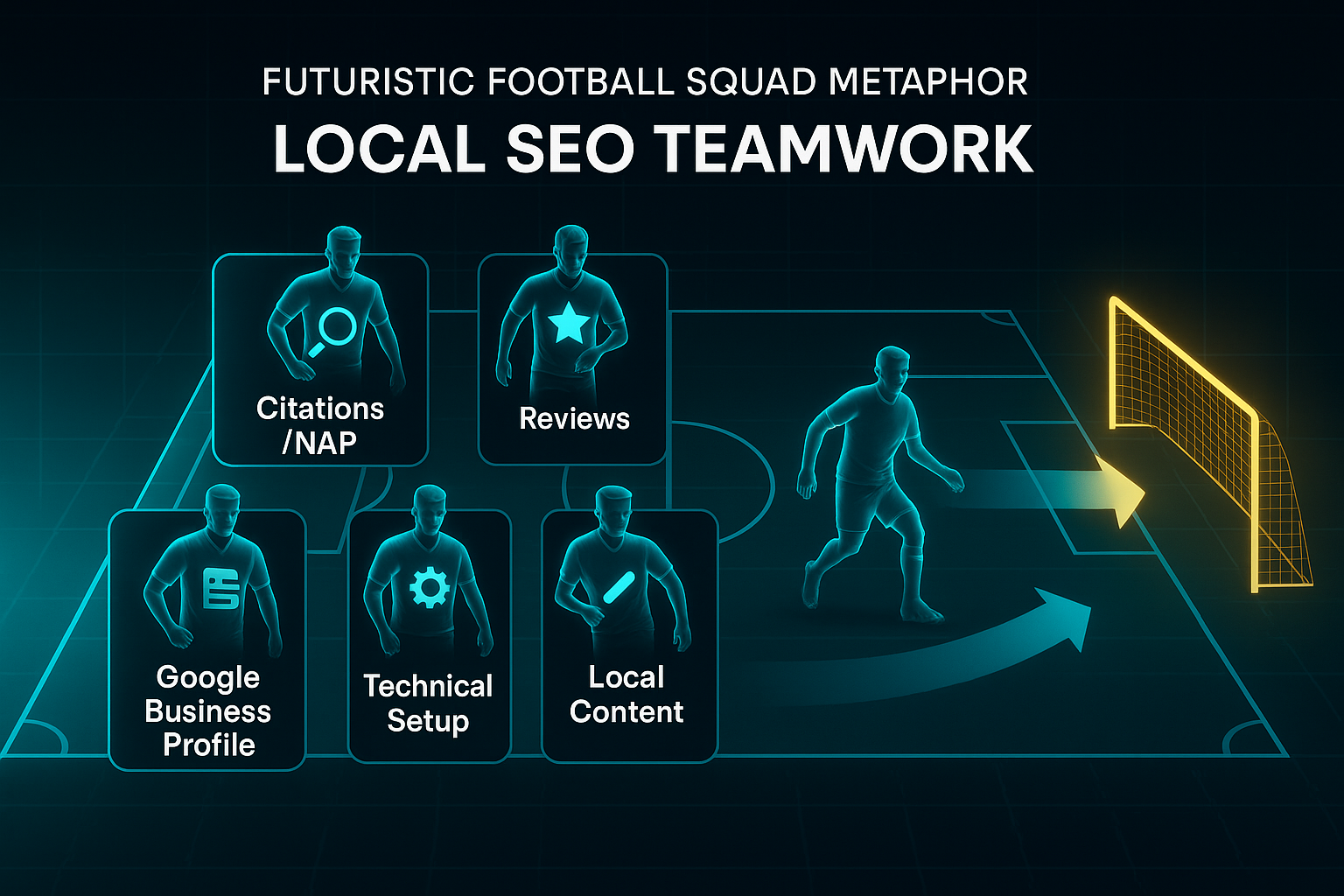
Search engines pay close attention to NAP info, strong reviews, seamless technical setup, and fresh local content.
Business Impact, Challenges, and Common Misconceptions
Picture this: 88% of local mobile searches turn into a call or visit within 24 hours.
That’s huge, isn’t it?
But here’s where things get tricky.
Businesses struggle to keep NAP details lined up, respond to reviews across three sites, and fix every tiny website error.
Inaccurate or inconsistent NAP information is one of the most common local SEO challenges that businesses face. This can confuse search engines and customers, leading to a poor user experience and lost business.
Trying to handle this manually is a bit like patching a leaky roof in the rain—frustrating and never-ending.
Slip up once, and you risk losing visibility, frustrated customers or missed sales.
The myths?
Plenty claim a Google Business Profile is optional, but customers are actually 2.7 times more likely to trust a business with a complete profile.
Others imagine local SEO means stuffing keywords into pages, but it really calls for ongoing technical upkeep and reputation-building.
With so much moving at once, specialised local SEO tools become indispensable.
Automating regular checks and updates means businesses can focus on delivering great service, not just policing their online presence.
So what makes the best local SEO tools stand out from the rest?
Next, we’ll uncover which features truly matter to local businesses—and how today’s platforms stack up when the competition is fierce.
What to Look for in Local SEO Tools
Context: Who Should Use This Framework
Are you aiming to boost local search rankings for your shop or handle a set of bustling branches?
This framework is built for business owners and marketers who want a no-fuss way to choose tools that deliver real, local results.
Feeling overwhelmed by all the options? That’s normal—but with a handful of criteria and a couple of hours’ prep, you’ll avoid settling for a shiny platform that fizzles where it matters.
Before you get stuck in, pull together these essentials to keep your evaluation focused:
- Google Business Profile (GBP) admin
Access for every branch managed. - Name, Address, Phone (NAP) spreadsheet
All location info in one place. - Directory logins
Credentials for sites like Yelp or Facebook. - Performance metrics
Traffic, rankings, and review stats. - Time window
Dedicate 2–8 hours for research.
With these resources ready, follow this stepwise process:
Stepwise Evaluation Essentials
1. Shortlist Tools with Core Features
Ever stared at a checklist wondering what actually matters?
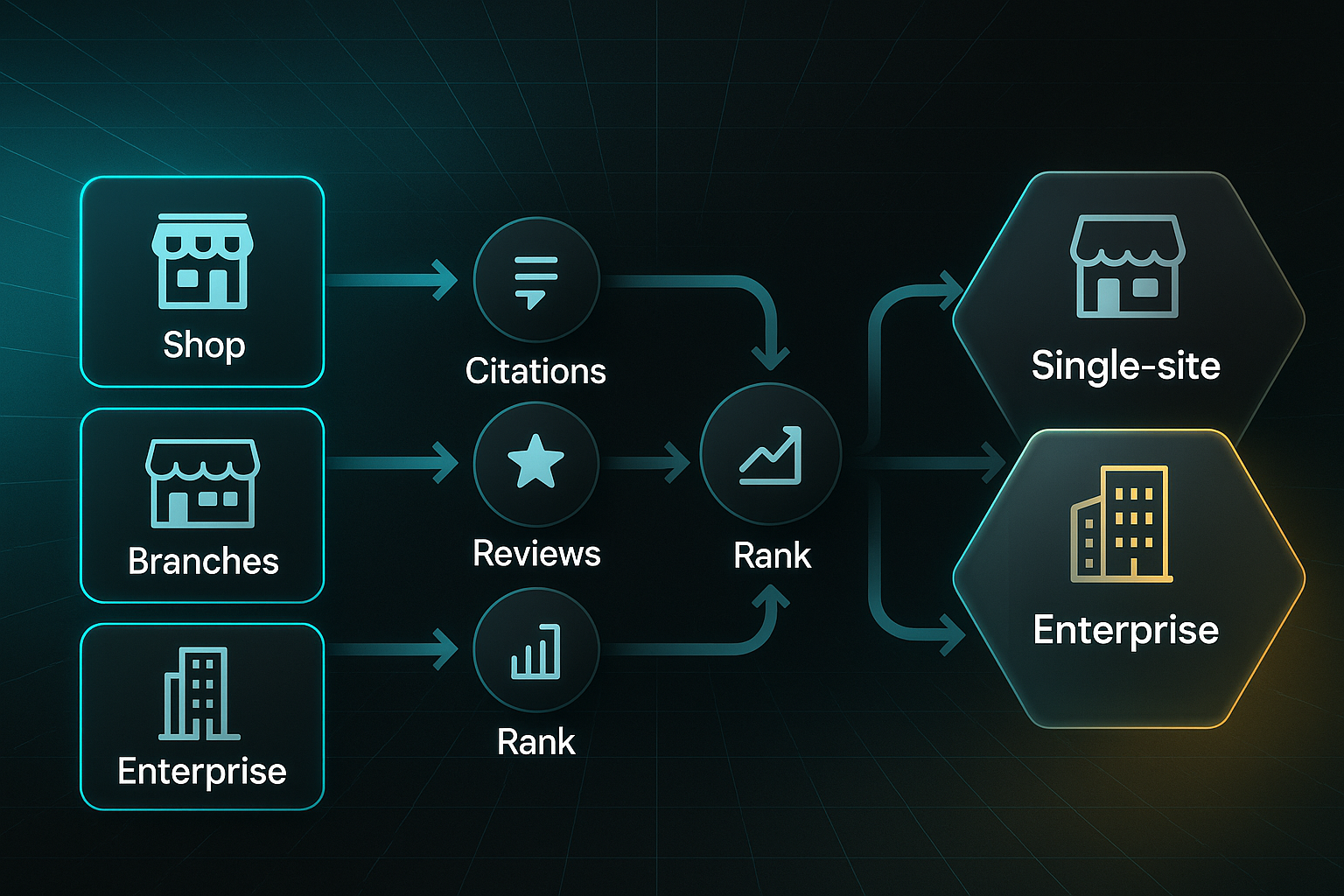
Zero in on solutions that suit your business’s scale.
- BrightLocal/Moz Local
Ideal for single sites or small teams; focus on citations and reviews. - Semrush Local/Yext
Suited for franchises or multi-location groups. - Geo-targeted rank tracking
Check location keyword visibility. - Citation audits
Find and fix NAP mismatches. - Aggregated review feeds
View every review in one place. - Schema markup support
(schema markup: code for search engines to “read” your business details).
Always try out dashboards using your real info—if reporting feels slow now, imagine managing ten locations.
2. Smooth Onboarding and Multi-Location Setup
Bulk onboarding is a lifesaver from five sites upwards.
Prioritise CSV import and instant GBP integration.
Double-check every branch location appears in your chosen dashboard.
Export pre-launch KPIs—these benchmarks are how you’ll spot real improvements, not guesswork.
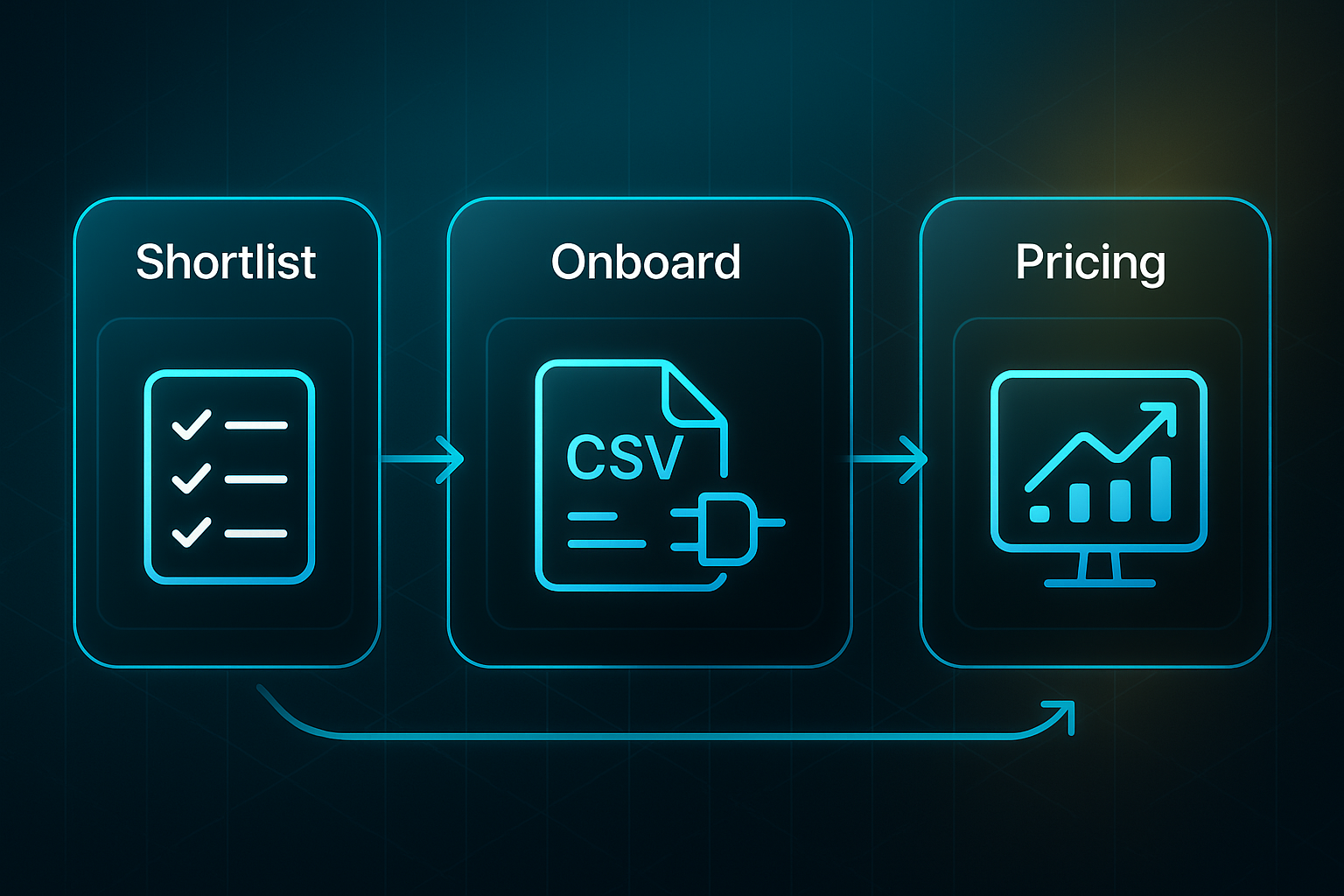
3. Compare Pricing and Scalability
Surprise fees sink budgets fast.
Forecast true costs before you sign up:
- £10–£35/location/month
Standard rates for smaller operators. - £25–£100/location/month
For enterprise/multi-site platforms. - Bulk discounts
Usually start with 10 or 25+ sites. - Add-ons
Log reporting or upgrade extras.
If a feature sits behind a costly upgrade, flag it now—it might stifle growth later.
4. Monitor Outcomes and Make Adjustments
How do you know if your tool pays off?
Look for concrete results:
- Traffic boost
+18–32% in 3–6 months is typical. - Citation accuracy
At least 95%. - Review response rate
80%+ within 48 hours. - Platform alerts
Catch ranking drops and new errors quickly. - Manual spot-checks
Double-check, since no tool is perfect.
Here’s a practical example of how the process works:
Practical Example
What’s it look like in action? Smith’s Hardware paired Moz Local (citations) with Whitespark (niche listings).
They set up five branches in just six hours.
Citation accuracy jumped from 82% to 97% within two weeks; review replies hit 86% in under 48 hours.
After three months, map visibility surged 28%, driving a 22% lift in footfall.
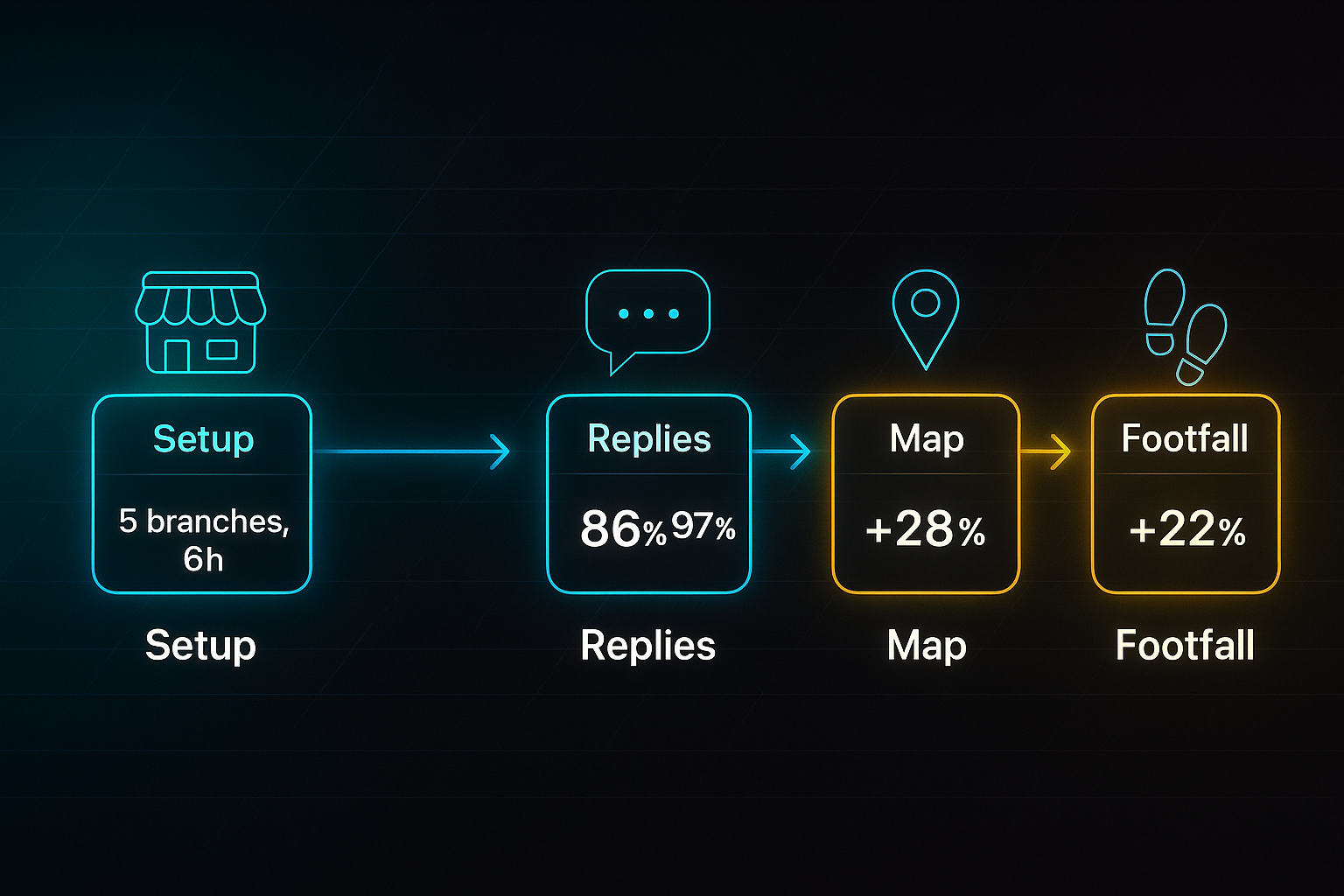
That’s the effect of the right platform: measurable, local growth—not just promises.
Ready for more? Next, you’ll see how SEOSwarm combines AI automation and expert support to take your results further.

AI-Powered
SEO Content Strategy
See the AI platform that's replacing entire content teams
(with better results).

SEOSwarm: Hybrid Agency-AI Local SEO Solution
Who Should Use SEOSwarm – Setup Requirements and Practical Context
Feeling bogged down by technical errors or weary of manual review management for your local SEO? SEOSwarm is purpose-built for SMBs and multi-location brands craving hands-off growth plus dependable technical oversight.
All you need to start: admin access for your website CMS—such as WordPress or Shopify—alongside credentials for Google Analytics and Search Console.
Keep admin rights ready for your social and directory pages, like Facebook or Yelp.
Before setup, round up current stats—keyword rankings, organic traffic, and conversion rates.
Initial setup takes just 2–4 hours for meetings, integrations, and the first bit of content approval.
After launch, routine tasks drop to 1–2 hours weekly for dashboard checks and reviewing new material.
The typical cost: £250–£1,000/month for 5–20 articles, with batch deals for bigger campaigns.
Regulated sector? Make legal signoff part of your publishing routine.
Once you have setup completed, SEOSwarm offers a practical, step-by-step implementation structure to support your local SEO growth.
Stepwise Implementation: SEOSwarm Local SEO Actions and Validation
Here’s how SEOSwarm’s game plan breaks down, with validation for every step.
- Kickoff and Baseline Alignment
Complete onboarding, connect analytics, upload review feeds, and set up keywords and conversions. Validate in dashboard and Google Analytics. The goal: a 18–32% organic traffic increase. - AI Content Creation and Instant Publishing
Once the baseline is set, AI creates blog topics targeting local intent; human review covers branding and technical SEO (EEAT, schema markup). Publish through a two-line embed, with Cloudflare hosting. Confirm schema with Google’s Rich Results Test; aim for page load under 3 seconds, mobile score 90+. - Technical SEO Audit and Error Remediation
Building on the published content, trigger the crawler to catch errors like 404s, broken links, and metadata gaps. Prioritise fixes monthly (small sites) or weekly (larger ones). Validate in Search Console: LCP under 2.5s, FID below 100ms, CLS below 0.1. - API Integration for Real-Time KPI Tracking
After correcting technical issues, link up Google Analytics and Search Console. Confirm imports, and set up alerts for traffic and ranking changes. Issues are flagged for manual action or agency support if syncing hiccups. - Ongoing Maintenance and Blog Refresh
With tracking in place, proceed to weekly KPI checks, quarterly AI refreshes for top blogs, and monthly strategist reviews to stay ahead. Results: 12–22% conversion improvement inside 90 days, plus early warnings for dips. - Agency+AI Differentiation and Key Outcome
This cumulative approach combines automated content, human QA, and technical audits for simple, rapid improvement. Setup is fast, scaling is straightforward, and compliance coverage bridges gaps. Most users see marked traffic growth and error drops in under a month.
Comparing SEOSwarm Agency+AI to Typical SaaS Local SEO Tools
Let’s stack SEOSwarm beside mainstream SaaS platforms for local SEO.
| Aspect | SEOSwarm Agency+AI | Typical SaaS Local SEO Tools |
|---|---|---|
| Content Creation | AI + human QA for every post | Automated or manual |
| Workflow | Project-managed, live dashboard | Standalone app |
| Technical SEO | Automated audit + direct fixes | General reports, fewer actionable steps |
| Compliance/Custom | Sector workflows, legal gates | Basic compliance |
| Scalability | Multi-location and agency coverage | Single site or small teams |
| Validation/Reporting | Real-time KPIs, alerts | Standard reporting |
Compared to standard SaaS platforms, what stands out is the way SEOSwarm brings technical auditing, hands-off content creation, and compliance support together.
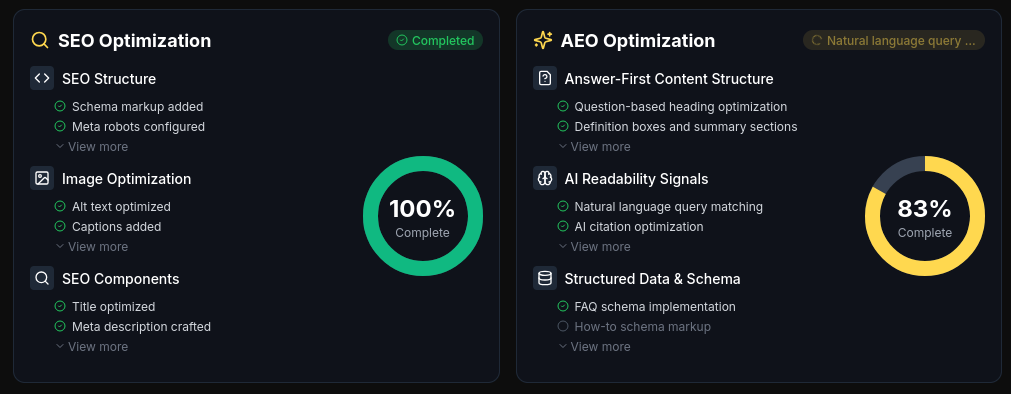
Businesses relying on conventional SaaS platforms tend to spend more time fixing issues and wrestling with regulations.
With SEOSwarm, measurable impact is the norm—organic traffic jumps 18–32%, and technical errors drop by up to 40% in just one month. Scaling is simple, whether you’re managing a high street shop or a batch of regulated branches.
Of course, content is just part of the local SEO equation. Next up, you’ll see how platforms like BrightLocal streamline citation management, review tracking, and multi-location rankings.
BrightLocal: Efficient Local SEO for Multi-Location Management
Core Onboarding and Data Preparation
BrightLocal is purpose-built for agencies or businesses juggling 10+ locations that want automated listings, citation, and review systems. To start, gather admin access for Google Business Profile (GBP), Facebook, Yelp, and Apple Maps, then pull together a master NAP (Name, Address, Phone) spreadsheet for every site.
Expect the initial onboarding for 10+ locations to take anywhere from 2½ to 4 hours.
Having these details lined up saves headaches later.
Bulk Import and Automated Citation Management
Once you’ve gathered the data, import every location into the dashboard using CSV.
Confirm that each branch is listed before you sync directories.
BrightLocal’s Active Sync takes over—automating NAP updates on Google, Facebook, Apple Maps, and Bing.
This not only chops manual errors but boosts citation accuracy from 60–80% to 90%+ after that first audit.
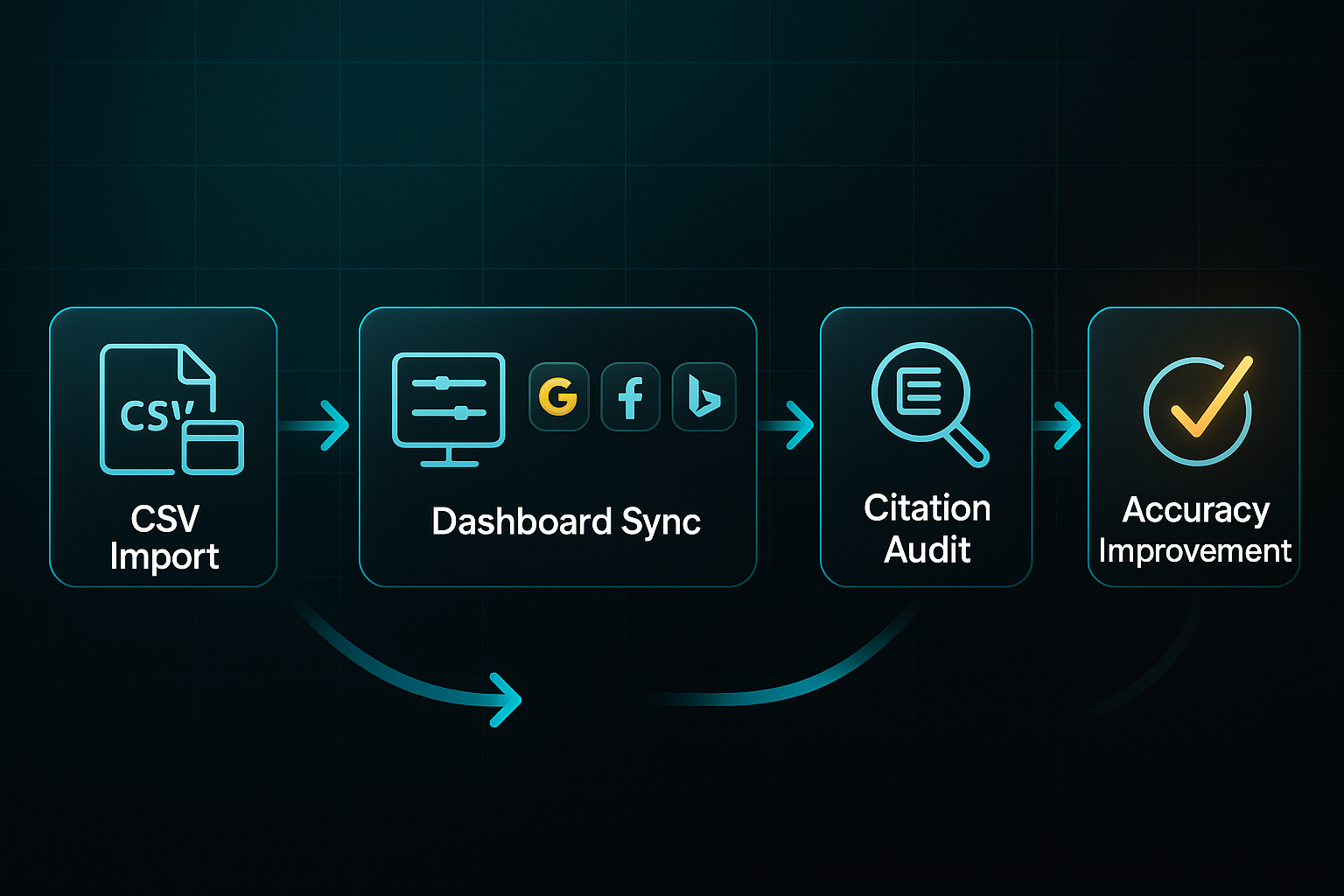
And don’t forget—run follow-up audits in thirty days so you’re pushing for 95% accuracy or higher.
Automating local citation building can enhance a company’s online reputation and boost local search rankings.
Rank Tracking and Local Search Grid
Set up the Local Search Grid with priority keywords tailored to each branch.
Weekly scans for those high-traffic spots give you a live look at progress.
Most businesses spot a 5+ position lift in map rankings within a month after a good cleanup.
You can export automated reports as PDF or CSV for updates—handy for sharing with the team or stakeholders.
Beyond tracking rankings, BrightLocal simplifies how you handle customer reviews.
Centralised Review Management and Response Workflows
Sync GBP and Facebook for instant review alerts.
The smart move? Assign staff so you keep fewer than five pending reviews at all times and hit 85% response or better within two days.
Jump into the Review Inbox to handle feedback from every site in one spot.
Reporting, API Integration, and Automation
Set up scheduled, branded exports for your stakeholders and link BrightLocal’s API to custom dashboards or wider marketing workflows.
A monthly check keeps an eye on data synchronisation and reporting.
Troubleshooting, Edge Cases, and Platform Limitations
If imports or syncs fail, try sending batches of five locations at a time—anything unresolved can go straight to support.
BrightLocal runs best with 10+ locations, and businesses under five sites might actually prefer Moz Local.
Some legacy directories might drag their feet with syncing, so don’t ditch the manual check just yet.
Benchmarks and ROI
After going live, target at least 90% citation accuracy and quick review responses.
Within two months, you should see stronger local rankings and noticeable upticks in branch-level traffic.
BrightLocal clears up the weekly SEO admin, so your team can focus on cost-efficient growth.
Blog-in-one-minute
Add a fully SEO-optimised blog to your website with just 2 lines of code.
Learn more
And with these results, it’s easier to see what works when you’re managing locations at scale.
SEMrush Local: Achieving High-Impact Map Pack Visibility and Automated Review Success
Aiming for top three map pack rankings and streamlined automated review management? SEMrush Local is designed to make multi-location SEO easier, whether you handle just one site or oversee up to 50 locations.
For setup, you’ll need Google Business Profile (GBP) admin access, Facebook or Yelp logins, and a NAP (Name, Address, Phone) spreadsheet with over 99% accuracy. If you don’t have this spreadsheet, just export your data from GBP or another dashboard. Whoever’s leading the charge should be comfortable with dashboards and CSV imports. Expect 2–4 hours per location for setup and 15–30 minutes a week for ongoing checks.
Here’s the pricing: every step up boosts your credits and speeds up review checks.
- Base
£35/location/month — 375 credits, best for single or rural sites. - Essentials
£50/location/month — 625 credits with 6-hour review refreshes. - Pro
£60/location/month — 1,225 credits, hourly review checks, plus API access for fast-paced, multi-location operations.
Urban sites or those with more competition nearly always need a higher tier to keep up.
Stepwise Implementation and Validation
Each action is designed for visibility—so there’s no guesswork at any stage.
Directory Sync & NAP Validation
Upload your NAP spreadsheet and sync with 70+ directories. Dashboard flags turn green for pass, yellow for warnings, and red for critical fixes. If the same problems keep cropping up, sort your five key listings manually and escalate as needed. 95%+ NAP consistency is the benchmark—one dashboard export tells you if you’re there.
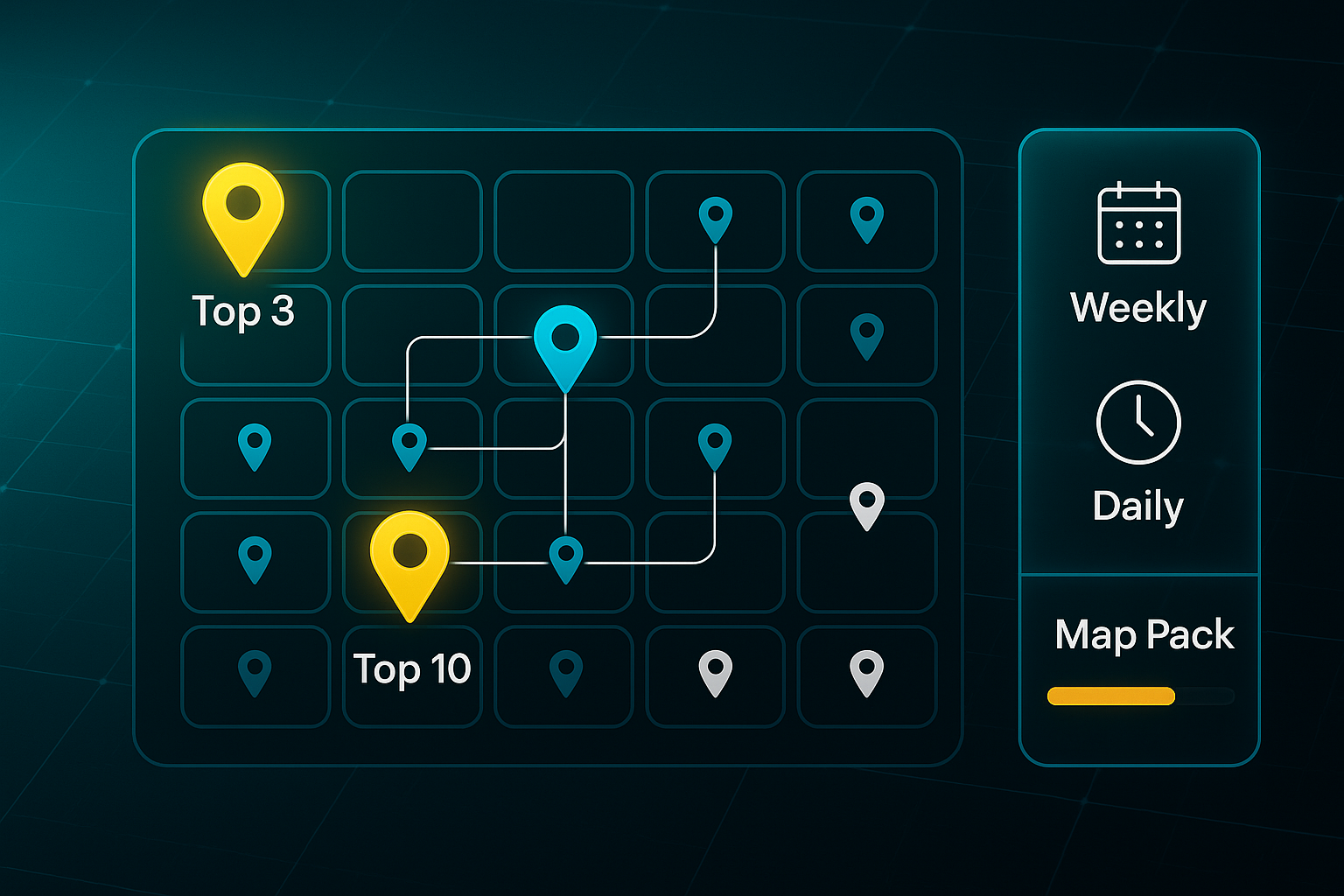
Map Grid Tracking
Build your GEO Grid (from 5×5 to 13×13) and add 3–10 keywords per site. A baseline scan takes just 10–30 minutes. Set scans weekly or daily. After 90 days, check for 70%+ of tracked keywords in the map pack. Not achieving this? Try tightening up your keywords or expanding your grid. And you know those times it feels like the map results never budge? This step makes any movement clear week to week.
Review Management & Sentiment Response
Turn on review monitoring: Essentials delivers daily checks and Pro goes hourly. AI handles positive/neutral replies and flags negatives for your team. KPIs are 90% replies in 48 hours and 80%+ positivity. API or sync error? Just reauthorise or update logins—usually fixes things fast. Ever get caught chasing overlooked reviews? SEMrush helps stop the scramble before it starts.
Competitor Benchmarking & Reporting
Input 10 rivals, then export monthly CSV or PDF reports on rankings and sentiment. When competitors pull ahead, adjust your keywords or scan frequency. Sometimes a small tweak is all it takes to turn things around.
Resource Scope, Pitfalls, and Limitations
Setup is lean: 2–4 hours per site and 15–30 minutes a week for maintenance. Set your budget for £35–£60/month/location. The lead user should know dashboards and CSV basics, plus light API troubleshooting.
Let’s face it—dealing with stubborn directory errors can feel never-ending. Here’s how to keep things running smoothly:
- Scan quota overage
Lower scan frequency or consider upgrading. - Sync failures
Manually update key listings and escalate persistent issues. - Missed reviews
Increase scan/update frequency if needed.
City sites use more credits. A few directories refuse automation—so, yes, manual monthly checks still matter. Reviews need API-enabled profiles to sync smoothly.
Start with a single-site test, back up your NAPs, and check logs monthly. The real win? When your dashboards glow green, ranking ticks up, and reviews roll in, you’re finally freed up for big-picture growth. Isn’t that what every local marketer is after?
Whitespark: Manual Precision and Device-Based Local SEO Tracking
Who Should Use Whitespark—Resource Needs and Cost Signals
If you’re managing an agency, regulated business, or a franchise, Whitespark is purpose-built for detailed audit history, manual citation control, and device-level rank tracking. Unlike automation-first platforms such as BrightLocal or SEMrush, Whitespark offers pay-per-citation flexibility, granular mapping, and Google Business Profile (GBP) reinstatement support.
Setup is straightforward. Have GBP admin rights, an up-to-date Name, Address, Phone (NAP) spreadsheet, and budget for citations ($4–$5 each or $20–$999 packages).
Monthly fees include Citation Finder ($33–$149), Reputation Builder ($79/location), Local Rank Tracker ($14+), GeoGrid ($10–$50), and Local Platform ($1/location).
Allocate 1–2 hours per site for onboarding. Follow up with 1–2 hours monthly for checks and quarterly or biannual audits.
Stepwise Citation Audit & Correction
Citation management with Whitespark follows four steps:
- Launch Citation Audit
Start in Local Citation Finder, uploading your NAP sheet. Most see 60–75% accuracy initially, with top errors flagged. - Order Corrections (Pay-per-Citation)
Address flagged listings individually or in bulk. Most corrections are complete in 7–21 days, with dashboard confirmation. - Manual Validation and QA
Check updates aiming for under 5% error rate and over 85% visibility. Export scheduled reports. - Quarterly or Biannual Re-Audit
Use 45–60 minutes to recheck listings and maintain over 90% citation accuracy.
Automated Review Management with Reputation Builder
Reviews campaigns run simply:
- Sync Contacts and Set Campaigns
Import contacts and create email/SMS requests—done in under an hour. - Routine Automation and Monitoring
Automate reminders and monitor weekly, taking 15–30 minutes. - Validate Campaign KPIs
Aim for 10% or more new reviews per quarter, 95% or greater delivery, and an 18% or higher response rate.
Granular Rank Tracking with GeoGrid and Local Rank Tracker
Rank tracking is precise:
- Configure Mapping and Tracking
Setup takes 45 minutes per location for device or area. - Baseline and Progress Scans
Scan top keywords and map packs, aiming for top 5 rankings. Run biweekly or monthly scans.
GBP Suspension and Reinstatement Support
Solving GBP suspensions is easier:
- Flag and Document Issue
Identify suspensions, collect documents such as licence, bill, and store photo. - Submit via Platform
Upload via checklist. Most are resolved in 5–14 business days.
Core QA and Multi-Metric Validation
Plan monthly checks for everything. Target over 90% citation accuracy, under 5% error rate, 10% or more new reviews quarterly, and top 5 keyword rankings.
Whitespark’s manual audit trails, device-level tracking, and GBP support truly stand out for businesses needing precision and control. These features go far beyond what automated platforms typically provide.
While Whitespark excels in precision and manual controls, some businesses may prefer a solution focused on speed and bulk onboarding. That’s where Moz Local comes in, offering bulk onboarding and quick campaign validation to ease your local SEO workflow.
Moz Local: Streamlined Bulk Onboarding and Integrated Local SEO
Bulk Onboarding and Data Validation
Getting started with Moz Local is refreshingly efficient, especially if you’re juggling between 5 and 200+ locations. Your first move is preparing Name, Address, and Phone (NAP) details using Moz’s CSV template. The Moz Template Validator then highlights lingering errors—such as format slips, duplicate entries, or missing fields—before you upload your data. That means headaches are avoided later on, and most users see less than a 2% upload error rate.
With validation complete, most SMBs or agencies notice a rapid transformation. Listings go live on over 90 directories in just 48 hours, and progress updates are simple to monitor—the dashboard will show a 'success' prompt for more than 98% of locations. Most entries turn 'active' within two working days, making the process nearly seamless. Pricing falls between $16 and $33 per location/month, while networks with 100+ sites gain API access for broader management.
Review Monitoring and Social Campaigns
Connecting your Google Business Profile and Facebook reviews to Moz Local’s dashboard couldn’t be easier—sync typically completes in under half an hour. You can enable sentiment alerts and automate responses, targeting at least 80% replies within 48 hours at every site. For social posts, Moz’s batch scheduler makes it possible to update 10 to 100+ locations at once via Google and Facebook. Preferred or Elite plans, at $30–$33 per location/month, add advanced features so each post reaches 200+ views and at least 2% engagement within a day.
Mobile Access, Bulk Edits, and Plan Selection
All features are accessible whether you’re working on a phone or a laptop—no separate app required. Edits using API or CSV batch uploads typically reach key directories in 2–3 days, so you can aim for more than 95% listing completeness after updates. Small teams with fewer than 25 sites will find Lite or Preferred plans sufficient, while those needing broader review and social tools should opt for the upper tiers. If you’re scaling past 100 sites, Enterprise packages are offered via custom quote.
Comparative Insights and Typical Outcomes
Moz Local’s automation and fast onboarding make it a top pick for businesses seeking a unified dashboard covering listings, reviews, and social media. Bulk management here is much faster than with BrightLocal or Whitespark, though you lose some granular control over individual citations.
There are a couple of pitfalls to watch for: forgetting to reconnect Google or Facebook profiles can cause sync delays, and incomplete profiles may restrict your reach. Those seeking deeper citation control or more advanced review analytics should look toward BrightLocal or Whitespark for additional capabilities.
For most businesses, the payoff is clear—improved local visibility, precise data across directories, and serious time savings. Next, we’ll dig into how Local Falcon approaches rank tracking with a different angle, using geo-grid scans for pinpoint insights.
Yext: Enterprise-Grade Local SEO for Multi-Location Management
Core Enterprise Features and Implementation
Yext is built for large enterprises and agencies that handle 50 to 10,000+ locations. Its core strengths include centralised listing management, automated compliance workflows, and permission-based controls that keep your business details consistent and accurate across over 100 directories. If scale matters, these features make errors less likely and visibility far more reliable.
Instant review management means your team can reply to customer feedback straight away, while AI-powered insights help refine local content and bring in qualified leads. To kick things off, you’ll need a clean Name, Address, Phone (NAP) spreadsheet, directory logins, and both a data operations lead and an IT admin for smooth setup.
Onboarding generally takes about 1–2 hours per 100 locations, with an extra 20–30 minutes for configuring each directory’s access. Bulk imports and API sync follow, usually sorting branches and mapping fields in 30–60 minutes per 100 sites. The deduplication tool drops duplicate listings below 2% inside a week and spot-audits (around ten live listings) help confirm that everything’s lined up correctly.
After import and sync, assigning team roles and permissions is quick—about 10–15 minutes per region. For regulated sectors, compliance testing flags issues before they reach the public, while automated alerts ensure sync errors don’t go unnoticed. Exporting data to BI dashboards keeps leadership up-to-date from the start and monthly spot audits (10–15 minutes each) make sure data stays fresh.
When troubleshooting is required, most issues like sync failures or permission hiccups can be fixed in under 48 hours. This rapid turnaround—combined with regular checks—means big operations keep running smoothly with minimal disruption.
Outcomes, Validation, and Limitations
After syncing, Yext averages over 98% listing accuracy, with active status appearing in 48 hours. As a result, enterprises typically see a 10–20% improvement in map pack rankings and a 15–35% jump in review volume within the first half-year. Rapid workflow and reporting mean errors are sorted quickly; support tickets usually resolve within 24–48 hours.
Yext stands apart with bulk sync automation, team-based workflows, and enterprise health reporting—features which manual-first platforms like BrightLocal or Whitespark do not offer. However, its complexity and cost make it a better fit for larger organisations, and single-location businesses or those needing custom citation tweaks may find simpler solutions more valuable.
For those who truly need speed, compliance, and reliable accuracy at scale, Yext remains a clear choice. Agencies after hyper-local detail or grid-level insights will want to look at tools like Localrank.so—which is coming up next.
Localrank.so: Unlimited Grid Tracking and White-Label Reporting for Agencies
Rapid Setup, Granular Mapping, and Bulk Management
If you’re running an agency and managing complex service areas, Localrank.so brings a real edge to keyword tracking. You can track rankings across unlimited custom grids, covering as many locations as needed—ideal for franchises or larger campaigns.
Set-up is quick, with most agencies completing onboarding and dashboard configuration inside an hour. Just have your formatted Name, Address, Phone (NAP) and keyword spreadsheet on hand. Sometimes blank fields or duplicate entries cause upload hiccups, but a simple reformat sorts that out fast.
Unlike platforms that cap your tracking, Localrank.so lets you monitor over 95% of target keywords per site. That’s a significant advantage when granular ranking coverage matters.
Automated Alerts, Benchmarking, and White-Label Reporting
Want to know exactly when a keyword drops out of the top spots? The platform’s daily or weekly ranking alerts can be set for each area and keyword, helping agencies spot and act on position changes in less than a day.
And when it comes to reporting, things get even smoother. You can produce unlimited white-label PDFs or CSVs, fully branded for your agency, and generate over ten reports monthly at no extra cost. The entire process typically takes 20–40 minutes per batch.
With robust campaigns, most teams see a 20–30% grid ranking boost inside two months. Some research-backed cases even show visibility exceeding 150% in half a year.
Competitor Analysis, Ongoing Operations, and Decision Workflow
Localrank.so lets you map keyword grids against several competitors at each site, making quarterly progress easy to track and export.
A healthy campaign sees top-three rankings for more than 90% of terms you’re targeting. Onboarding ten to fifty locations doesn’t take long—just one or two days—and ongoing troubleshooting or performance checks are usually finished in two or three hours a month.
Bulk import problems? They’re almost always solved by reformatting or reaching out to support—who typically come back in under 48 hours.
If deep analytics and unlimited tracking matter most, Localrank.so is hard to beat. But when citation management or directory work is your main priority, you might steer toward BrightLocal, Whitespark, or Yext instead.
While Localrank.so leads in grid analytics, brands focused on mobile updates and real-time review management may find Uberall a compelling next step. Next up, let’s see how Uberall handles rapid mobile onboarding and live social or review updates—giving big brands the tools to move even faster.
Uberall: Rapid Mobile Onboarding, Social Automation, and Enterprise-Grade Directory Sync
Let’s talk about how Uberall makes life easier for big brands focused on mobile-first local SEO and quick review responses. Designed for enterprise teams managing 40 to 10,000+ sites, Uberall ensures every step is built for scale.
Setup kicks off by preparing your NAP (Name, Address, Phone) spreadsheet and directory logins. Bulk onboarding lets you import up to 1,000 locations at a time—expect about 90 minutes per 100 sites. If there are duplicate listings, Uberall’s deduplication tool drops them below 2% in just one week.
Next, directory sync connects you to over 100 platforms. The native mobile app manages instant location updates, review monitoring, and lets your team reply on the go.
AI-powered social tools automate Facebook or Google posts—target at least 80% review replies within 48 hours and a 30% lift in engagement.
Ongoing health checks run via live dashboards, flagging errors, permissions, and compliance issues. Troubleshooting? Most sync or app errors resolve in under 24 hours, but anything critical can be exported for support escalation.
Here’s a checklist to track success post-rollout:
- Citation accuracy
Maintain over 98% - Review response rate
80%+ in two days - Social engagement
Increase by 30% within three months - Error rate
Keep it under 2% - Duplicate listings
Below 2% after deduplication
For compliance-heavy sectors, set up automated permissioning and regular regulatory audits. If you run into permission or sync issues, document and escalate within 48 hours.
With these practices in place, Uberall users are well-positioned for deeper strategic insight—something GeoRanker offers through granular geo-pin tracking, flexible API reporting, and robust cross-platform analytics for advanced local strategies.
GeoRanker: Pin-Drop Rank Tracking and Scalable API Reporting for Agencies
Let’s dive into what makes GeoRanker so appealing for agencies and big brands wanting granular rank data and broad, scalable reporting. Here, you’re looking at a platform built for teams that manage anywhere from 50 to 50,000+ locations—that’s serious reach.
Prep work begins with an SEO or ops specialist assembling a CSV packed with every site and 8–12 keywords each. For most, onboarding 50 pins takes just half an hour, but when you’re handling thousands, you’ll need IT to help split big batches—2,000 pins max per push keeps things running smoothly.
It’s all about careful steps. First, upload pins and keywords, then check the dashboard to confirm every detail landed right. Your initial scan shows where you rank, and if any results are missing, no panic—just re-upload those pins. Once validated, connect GeoRanker’s API so you can automate exports. Always run a quick check: does the export match your upload? Any mismatch means you fix it, pronto.
Routine upkeep is straightforward. Weekly audits and exports cover your bases—100 pins means 30 minutes’ work, 1,000+ pins takes longer. Archive every key batch, holding at least two backups for a safety net if anything goes awry. If campaign data gets corrupted, restore a backup and rerun those validation scans.
GeoRanker only lets you track the volume of new Google reviews—not the sentiment. When tracking rankings, focus on pins hitting the top three spots in the Google Map Pack; a good target is 22%+ improvement by the three-month mark.
Watch out for API quota and upload limits. Segment big campaigns and bring IT into the mix to keep large workflows smooth. This tool is brilliant for those needing grid-level analytics and detailed, branded exports—but if you want AI-powered review replies or auto social posting, platforms like SEMrush Local or Uberall are a better fit.
Here’s a quick summary of GeoRanker’s features and considerations, so you know what to expect:
- Bulk Pin Tracking
Multi-engine rank maps with a 2,000-pin batch max; validate every pin and keyword displays. - API/Export
White-label reports at scale, credit/quota-based; check exports match source data. - GBP Review Alerts
Only monitors review volumes, no sentiment; run test alerts for accuracy. - Backup Protocols
Manual archiving for error recovery—keep two recent backups at all times.
Synup: Branded Local SEO and Review Automation at Scale
Essential Use Cases and Onboarding
If you’re running an agency or managing a growing chain—anywhere from ten to five hundred sites—Synup is built with you in mind. Its unified dashboard lets you handle bulk onboarding for every location, streamlining your setup.
Just upload your Name, Address, Phone (NAP) data via CSV, then connect the dots with Google Business Profile, Facebook, and Yelp. For ten locations, expect to have everything live in under three hours.
Directory Sync, Review Response, and Key Metrics
After onboarding, you’ll want to kick off the platform’s health diagnostic. The goal? Achieve over 95% listing accuracy (most see a jump from 70–80% to that target within weeks).
Monthly audits keep duplicate listings below 2%, so search results stay clean and confusion is minimised. Here’s where Synup really shines: it monitors and automates review responses across 20+ platforms, giving your team the edge when speed and trust matter.
Rather than juggling replies by hand, you get automated review alerts and reply tools to keep on top of feedback. Agencies often hit 85%+ response rates within two days—something manual setups rarely match.
Automated social posting is a huge bonus, driving local engagement and saving your team plenty of time.
When tracking outcomes, focus on these Synup metrics:
- Listing accuracy
More than 95% within 30 days - Review response rate
Over 85% in 48 hours (across 20+ review sources) - Duplicate listings
Less than 2% monthly average - Onboarding
Ten locations live in under three hours
Synup comes into its own the moment you need branded dashboards, unified reporting, and scalable review management at agency level. It’s ideal for larger SMEs or agencies needing automation and accuracy that goes beyond manual-first options like BrightLocal or Moz Local.
If you’re handling massive, ultra-custom campaigns, you might favour solutions like Yext or Whitespark instead. Baseline all KPIs before rollout and check monthly so improvements are never just guesswork.
Of course, keeping those metrics high requires hands-on effort—next up, we’ll explore GBP onboarding, review monitoring, and how to push your visibility further in the local pack.
Google Business Profile (GBP): Stepwise Setup, Key Differentiators, Maintenance, and Upgrade Logic
Let’s break down how Google Business Profile (GBP) forms the universal, free foundation of local SEO. With GBP, any shop, restaurant or service gets stronger visibility in Maps and Search, displays reviews, adds menus and photos, and uses AI summaries for extra impact.
For one location, GBP delivers everything fundamental. Paid tools matter only with more sites, automation, in-depth reports, or compliance needs.
Starting out is direct. Here’s a stepwise guide:
- Single or Bulk Verification
Use phone, email, video, postcard, or CSV/Chain for 10+ locations. - Mandatory Fields Completion
Fill every detail—aim for 100% dashboard completeness and get 2.7x engagement (the 2025 benchmark). - Monthly Accuracy Audits
Review info and bulk upload logs monthly for clean data.
Next, upgrade your profile power:
- AI Summaries Activation
Ten or more reviews unlock auto-generated summaries. - Photos/Menu Uploads
Add optimised menus, 20–100+ images; use dashboard insights to troubleshoot. - Realtime Edits & Messaging
Update instantly, post for engagement, activate WhatsApp chat.
Monitor results with GBP Insights. Typical uplift? 20–70% after optimising GBP; paid platforms like BrightLocal or SEMrush add +18–45%. They provide multi-site updates, compliance, benchmarking and deeper reporting.
Ongoing care means running audits and backups before edits. Follow this checklist:
- Audit Scheduling
Monthly, or twice yearly for larger setups. - Backups Before Edits
Always keep one ready. - Admin Checklist
Check NAP completeness, clear duplicates, manage reviews, fix CSV errors, recover any lost data.
Once you’ve mastered the essentials, it’s time to consider when to expand your toolkit. Here are your upgrade options:
- GBP Only
Suits single locations and basic needs. - Upgrade to Paid Tools
Switch for multi-site, automation, benchmarking, compliance.
With these basics in place, claim and optimise GBP for secure, visible results—scaling to paid tools when your scope demands it.
My Final Thoughts on the Best Local SEO Tools
Visibility isn’t just about showing up—it’s about being found by the right people, at the right time, in the right place. I’ve seen too many businesses stall because they rely on guesswork or outdated tactics. The best local SEO tools don’t just automate tasks; they turn complex challenges into measurable wins.
Here’s my advice: Start by auditing your Google Business Profile and NAP data, then shortlist tools that match your business size and goals. Test dashboards with your real info, set benchmarks, and monitor outcomes—traffic, citation accuracy, and review response rates. Don’t settle for a tool that looks good on paper but fails in practice.
Local SEO is a living system. The businesses that thrive are those that continuously refine their approach, automate what matters, and keep a close eye on results. The real advantage isn’t in having the most features—it’s in making every click count for your business.
- Wil